Node.jsREST APIDatabase DesignDeveloper Careers
Backend Developer Roadmap 2026: A Step-by-Step Guide for Beginners
A step-by-step backend developer roadmap for 2026: which language to choose, how the web works, SQL and databases, REST APIs, login and security, testing and deployment, with working code, 5 portfolio projects and a realistic study timeline for students.

MetaSkillGroup
15 min read5
When you log in to an app, book a train ticket or pay for something online, you only see buttons and forms. The real work happens somewhere you never see: a server checks your password, finds your data, saves your order and sends back an answer in less than a second. Building that hidden part is the job of a backend developer.
Backend development is a great choice if you enjoy logic, data and solving problems more than choosing colours and layouts. This roadmap shows you what to learn, in what order, and what to build at each step, so you always know what comes next.
💡 Quick answer: To become a backend developer in 2026, learn in this order: how the web works, one language (JavaScript with Node.js or Python), Git, SQL and databases, REST APIs, login and security, testing, and deployment. Build a project at every step. If you study 1–2 hours a day, you can reach internship level in about 6 to 9 months.
💡 Who is this guide for? Students and beginners from any branch (BCA, B.Tech, BSc or self-taught) who know a little programming, or are ready to start, and want a clear path into backend development.
In this guide:
- What Does a Backend Developer Do?
- Which Language Should You Learn First?
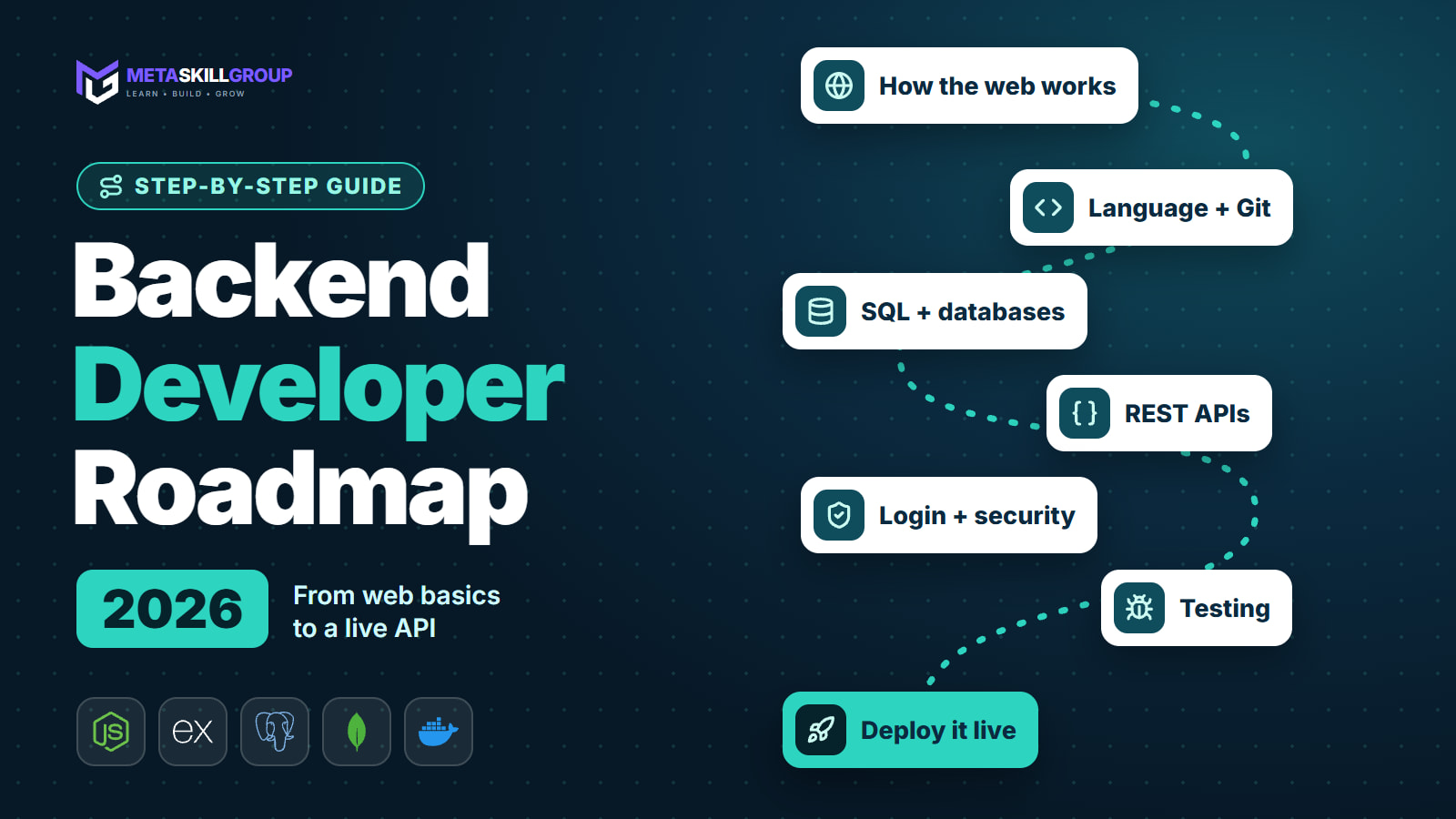
- The Backend Roadmap at a Glance
- Step 1: Learn How the Web Works
- Step 2: Learn Your Language and Git
- Step 3: Learn SQL and Databases
- Step 4: Build REST APIs
- Step 5: Add Login and Security
- Step 6: Test Your Code and Handle Errors
- Step 7: Deploy Your API
- Step 8: Learn What Comes Next
- 5 Backend Projects for Your Portfolio
- A Realistic Study Timeline
- Common Beginner Mistakes
What Does a Backend Developer Do?
A backend developer builds the part of an application that runs on a server. When someone taps "Place order", the backend checks who they are, confirms the item is in stock, saves the order and tells the app whether it worked.
A normal day can include:
- Building API endpoints that the website or mobile app calls
- Designing database tables and writing queries
- Adding login, permissions and payments
- Finding out why something is slow, and fixing it
- Reading logs to track down bugs
- Reviewing code with teammates on GitHub
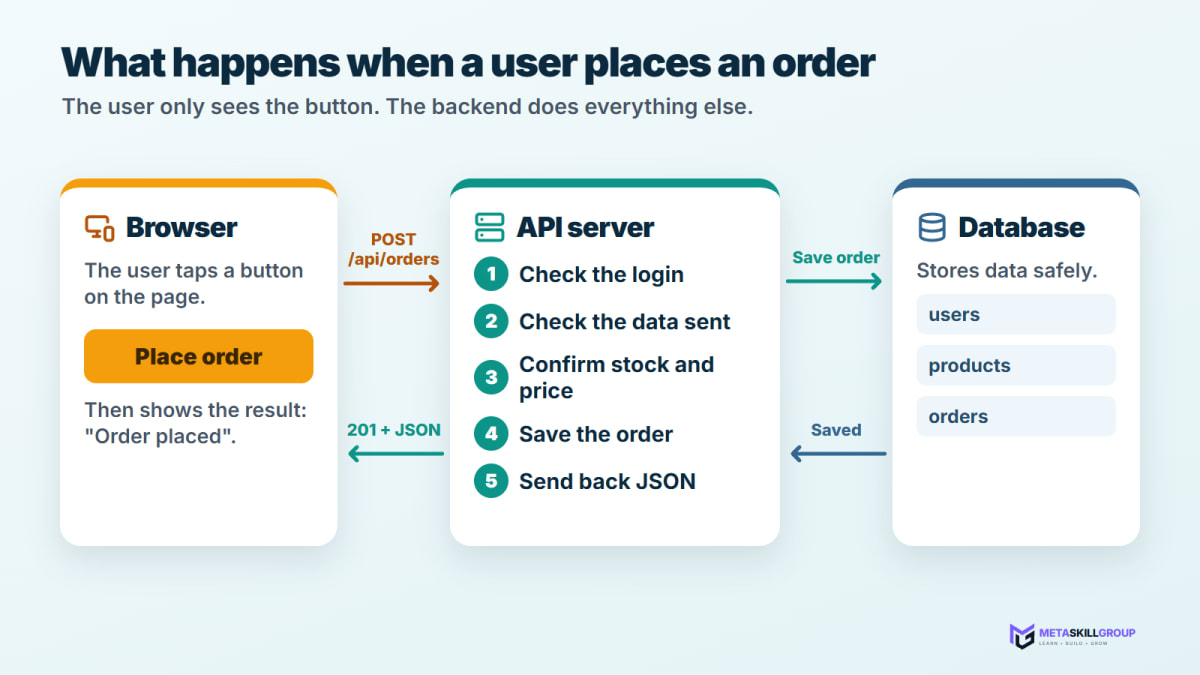
Figure 1: What happens on the backend when a user places an order.
Not sure if backend is the right fit? Our guide to the frontend developer roadmap shows the other side, so you can compare the two.
Which Language Should You Learn First?
The honest answer: pick one and go deep. The concepts you learn, such as APIs, databases and authentication, carry over to every language.
| Language | Best if you... | Popular tools | Note |
|---|---|---|---|
| JavaScript (Node.js) | Already know some JavaScript, or want to do frontend too | Express, NestJS | One language for the whole app |
| Python | Are new to coding, or are interested in data and AI | FastAPI, Django | Very readable for beginners |
| Java | Want to work in large companies and banks | Spring Boot | More to learn at the start, widely used in big companies |
| Go | Already know one language and like fast, simple services | Standard library, Gin | A strong second language |
In the 2026 Stack Overflow Developer Survey, JavaScript (62.0%), SQL (58.4%) and Python (58.0%) were all among the four most used languages, and Node.js was the most used web technology (46.4%). So you can't go wrong with either of the first two options.
💡 Pro Tip: If you have no strong preference, choose Node.js or Python and stop comparing. The examples in this guide use Node.js, and our Python developer roadmap covers the Python path step by step.
The Backend Roadmap at a Glance
| Step | What you learn | Time (1–2 hours a day) | Finish it by building |
|---|---|---|---|
| 1 | How the web works | 1 week | Explain what happens when you open a URL |
| 2 | Your language and Git | 6–8 weeks | A command-line tool, pushed to GitHub |
| 3 | SQL and databases | 3–4 weeks | A small database with joined tables |
| 4 | REST APIs | 4 weeks | A notes API |
| 5 | Login and security | 2–3 weeks | Add login to your notes API |
| 6 | Testing and errors | 2 weeks | Tests for your main endpoints |
| 7 | Deployment | 1–2 weeks | Your API live on a public URL |
| 8 | What comes next | Ongoing | Caching or real-time features |
These are rough estimates. Some people move faster and some slower, and that is completely fine. What matters is that you finish each small project before moving on.

Figure 2: The eight steps of the backend roadmap, from web basics to advanced topics.
Step 1: Learn How the Web Works
You only need the basics here, but they explain almost everything that comes later.
- HTTP: MDN describes it as the foundation of data exchange on the web and a client-server protocol. In simple words, the browser asks and the server answers. The MDN overview of HTTP is a good place to start.
- Methods: GET reads data, POST creates it, PATCH or PUT updates it, and DELETE removes it.
- Status codes: 200 means OK, 201 means created, 400 means a bad request, 401 means not logged in, 404 means not found and 500 means the server failed.
- DNS and hosting: how a domain name finds the right server.
- JSON: the plain text format most APIs use to send data.
This is what one request and response look like:
text1POST /api/tasks HTTP/1.1 2Content-Type: application/json 3 4{ "title": "Build a project" } 5 6HTTP/1.1 201 Created 7Content-Type: application/json 8 9{ "id": 2, "title": "Build a project", "done": false }
Step 2: Learn Your Language and Git
Learn the core of your language first, without any framework:
- Variables, functions, loops and conditions
- Arrays and objects (or lists and dictionaries)
- Reading and writing files
- Handling errors properly
- Async code, if you choose Node.js (
asyncandawait) - Installing packages (
npmfor Node.js,pipfor Python)
Start using Git from your very first project. Every backend team depends on it, and your GitHub profile becomes your portfolio. Our Git and GitHub guide for beginners covers everything you need.
If you use Node.js, install a current LTS version. Our guide on how to update Node.js explains how to install and switch versions on any system.
Step 3: Learn SQL and Databases
Almost every backend stores data, so this step is worth your time. Start with SQL, because the ideas apply everywhere. In the same 2026 survey, PostgreSQL was the most used database at 57.9%, which makes it a safe first choice.
Learn these in order:
- Tables, columns, rows and primary keys
SELECT,INSERT,UPDATEandDELETEWHERE,ORDER BYandGROUP BY- Foreign keys and
JOIN - Indexes, and why they make reads faster
- Transactions, which keep related changes all-or-nothing
Here is a small example with two tables and one useful query:
sql1CREATE TABLE users ( 2 id INTEGER PRIMARY KEY, 3 name TEXT NOT NULL, 4 email TEXT UNIQUE NOT NULL 5); 6 7CREATE TABLE orders ( 8 id INTEGER PRIMARY KEY, 9 user_id INTEGER NOT NULL REFERENCES users(id), 10 total INTEGER NOT NULL 11); 12 13-- How many orders has each user placed, and how much have they spent? 14SELECT users.name, COUNT(orders.id) AS order_count, SUM(orders.total) AS total_spent 15FROM users 16JOIN orders ON orders.user_id = users.id 17GROUP BY users.id, users.name 18ORDER BY total_spent DESC;
Once SQL feels comfortable, try MongoDB, a popular document database that stores data as JSON-like documents. It is widely used with Node.js and is part of the MERN stack. Our MERN stack roadmap shows how it fits into a full application.
Step 4: Build REST APIs
This is where it all comes together. A REST API is a set of URLs that other programs can call to read and change your data. A typical API for tasks looks like this:
| Action | Method and URL | Success code |
|---|---|---|
| List all tasks | GET /api/tasks | 200 |
| Get one task | GET /api/tasks/5 | 200 |
| Create a task | POST /api/tasks | 201 |
| Update a task | PATCH /api/tasks/5 | 200 |
| Delete a task | DELETE /api/tasks/5 | 204 |
Here is a small but working API with Node.js and Express. In an empty folder, run:
bash1npm init -y 2npm pkg set type=module 3npm install express
Then create server.js:
js1import express from "express"; 2 3const app = express(); 4app.use(express.json()); 5 6const tasks = [{ id: 1, title: "Learn REST APIs", done: false }]; 7 8// Read all tasks 9app.get("/api/tasks", (req, res) => { 10 res.json(tasks); 11}); 12 13// Create a task 14app.post("/api/tasks", (req, res) => { 15 const { title } = req.body; 16 if (!title) { 17 return res.status(400).json({ message: "Title is required" }); 18 } 19 const task = { id: tasks.length + 1, title, done: false }; 20 tasks.push(task); 21 res.status(201).json(task); 22}); 23 24app.listen(3000, () => console.log("API running on port 3000"));
Run it with node server.js, then open http://localhost:3000/api/tasks in your browser. Use a tool like Postman or the curl command to test the POST route.
Your next challenge is to add the update and delete routes yourself, and then replace the array with a real database.
💡 Pro Tip: Always check the data a client sends before you use it. Never assume it is correct, even if your own frontend sends it, because anyone can call your API directly.
Step 5: Add Login and Security
Security is not an extra step for later. Learn the basics while you build.
- Authentication answers "Who are you?" and authorization answers "What are you allowed to do?". Learn the difference early.
- Never store plain passwords. Store a secure hash instead. The OWASP password storage guide recommends Argon2id first. You will also see bcrypt in many existing projects.
- Sessions or JWTs: learn how one of them keeps a user logged in between requests, and how to make the token or session expire.
- Prevent SQL injection by using parameterized queries, or an ORM that uses them, instead of joining user input into a query string.
- Keep secrets out of your code. Put API keys and database passwords in environment variables, and add
.envto.gitignore. - Limit requests on login routes, so nobody can try thousands of passwords.
Once you have built your first login, read through the OWASP Top 10, the best-known list of web application security risks.
Step 6: Test Your Code and Handle Errors
Professional code doesn't just work once; it keeps working after the next change.
- Write API tests for your main routes. Vitest or Jest with Supertest are common choices in Node.js, and pytest is the usual choice in Python.
- Test the unhappy paths too, such as a wrong password, a missing field or a request for an item that doesn't exist.
- Return clear errors with the right status code and a helpful message. Don't send raw error details to users.
- Add logging, so you can see what went wrong after it happens on a live server.
Step 7: Deploy Your API
An API on your laptop can't be shown to anyone. Putting it online is a skill in itself, and it looks great on a resume. Learn how to:
- Use environment variables for your settings and secrets
- Connect your app to a hosted database
- Read the logs when something fails after deployment
- Use a custom start command and a health check route
You can begin for free. Here is what two popular free options offer:
| Service | What is free | Good to know |
|---|---|---|
| Render | Web services and a Postgres database | Free web services spin down after 15 minutes without traffic and take about a minute to wake up. Free Postgres databases expire after 30 days. |
| MongoDB Atlas | The M0 cluster with 512 MB of storage | Enough for learning and small portfolio projects |
Free plans change often, so check each provider's page before you rely on them. When you are ready, learn the basics of Docker, which packages your app so that it runs the same way everywhere.
Step 8: Learn What Comes Next
You don't need these for your first internship, but they are good to explore next, in roughly this order:
- Caching with Redis, so that common data loads faster
- Background jobs, for slow work such as sending emails
- Real-time features with WebSockets, such as chat and live notifications
- CI/CD with GitHub Actions, to test and deploy your code automatically
- System design basics: load balancers, queues and how large apps scale
- Calling AI APIs, because many new products now include AI features
5 Backend Projects for Your Portfolio
| Project | What it proves | Add this to stand out |
|---|---|---|
| Notes API | CRUD and clean routes | Search and pagination |
| URL shortener | Database design and redirects | A click counter for each link |
| Blog API with roles | Authentication and permissions | Admin, author and reader roles |
| Store backend | Relations and transactions | Payments with Razorpay test mode |
| Real-time chat server | WebSockets | Rooms and online status with Socket.IO |
For each one, write a README that explains what it does, how to run it and which routes it offers. Then deploy it and add the live link. You can also browse real projects in our project marketplace to see how a complete application is organised.
A Realistic Study Timeline
| Months | Focus | By the end, you can... |
|---|---|---|
| 1–2 | Web basics, language, Git | Write small programs and push them to GitHub |
| 3 | SQL and databases | Design tables and write joins |
| 4–5 | REST APIs, login, security | Build an API with login |
| 6 | Testing and deployment | Put a tested API online |
| 7–9 | Bigger projects, applying | Build 2–3 strong projects and apply for internships |
Consistency matters more than speed. An hour every day will take you further than one long session on a Sunday.
Common Beginner Mistakes
| Mistake | What to do instead |
|---|---|
| Learning three languages at once | Stick with one until you have built a complete API |
| Skipping SQL because an ORM exists | Learn SQL first, so you understand what your ORM does |
| Watching tutorials without building | Build a small project after every topic |
| Storing passwords or keys in code | Hash passwords and use environment variables |
| Only testing the happy path | Try bad inputs on purpose and fix what breaks |
| Never deploying anything | Put your first API online early, even a small one |
| Copying AI code you can't explain | Use AI to learn, then rewrite the code in your own words |
Final Thoughts
Backend development can feel invisible at first, because there is no pretty page to show for your work. But the first time your own API saves real data, checks a real password and responds from a live URL, it clicks. Take it one step at a time: learn the web basics, pick one language, master SQL, build APIs, secure them, test them and deploy them.
The best way to grow from here is to work on a real product with real code reviews. You can do a free internship at MetaSkillGroup, where you build features for our own products and our team reviews your work. Our backend development internship is part of an online developer internship that is open all year in six tracks. It takes about 2 minutes to apply, and your first exam attempt is free.
- #backend
- #backend developer roadmap
- #backend roadmap 2026
- #node.js
- #express
- #rest api
- #sql
- #database
- #web development roadmap
- #beginner guide
Related posts
 Node2Shell and the Node.js October 2026 Security Release: What to UpdateThe Node.js security release of 21 October 2026 explained: what Node2Shell (CVE-2026-111497, a Brotli decoder bug) is, how it reaches apps through fetch(), zlib and Express 5, a plain-English table of all 10 CVEs, the fixed versions 26.12.1, 24.22.1 and 22.23.4, and how to update laptops, Docker images and hosting platforms.
 How to Update Node.js to the Latest Version (Windows, Mac and Linux)A step-by-step guide to updating Node.js: check your version, choose between LTS and Current, update on Windows (installer, winget, nvm-windows), macOS (nvm, Homebrew) and Linux (nvm, NodeSource), rebuild Docker images, set the version on Render and Vercel, and fix the most common update problems.
 What Is a CVE? CVE, CVSS Scores and Zero-Days Explained for DevelopersCVE and CVSS explained in plain words for students and developers: how to read a CVE ID, who assigns them, what CVSS 4.0 scores mean, terms like RCE, zero-day and KEV, the life of a CVE, real examples from PHP2Shell and Node2Shell, and how to check your projects with npm audit, composer audit, pip-audit and Dependabot.
❓ FAQs
A backend developer builds the part of an application that runs on a server. This includes APIs, business logic, databases, login systems and payments. When you place an order in an app, the backend checks who you are, saves the order and sends back the result.
If you study for 1–2 hours a day and build projects along the way, you can reach internship level in about 6 to 9 months. This is a rough estimate. Your speed depends on your starting point and how consistently you practise.
JavaScript with Node.js and Python are both great first choices. Choose Node.js if you already know some JavaScript or want to do frontend too. Choose Python if you are new to coding or interested in data and AI. The concepts carry over to other languages.
No. You can start directly with backend. Knowing basic HTML and JavaScript helps, because you will understand who is calling your API and why, but you don't need to master frontend first.
Learn SQL first. Tables, joins and transactions teach you how to think about data, and those ideas help with every database. After that, MongoDB is easy to pick up, and it is commonly used in Node.js and MERN projects.
A REST API is a set of URLs that other programs can call to read and change data. It uses HTTP methods: GET to read, POST to create, PATCH or PUT to update and DELETE to remove. The response usually comes back as JSON with a status code such as 200 or 404.
It is not harder, just different. Backend work involves more logic, data and security, while frontend involves more visual detail and browser behaviour. The one you enjoy will usually feel easier.
Build a notes API, a URL shortener, a blog API with user roles, a store backend with test payments and a real-time chat server. Two or three of these, deployed with a clear README, are enough for most internship applications.
Not at the start. They are useful next steps, but most internships care more about whether you can build a working API with a database and login. Learn the basics of Docker after you have deployed your first few projects.
Yes. MetaSkillGroup offers a free online backend development internship as one of its six tracks. You build features for real products and the team reviews your work. It takes about 2 minutes to apply at metaskillgroup.com/careers, and your first exam attempt is free.
Comments
Join the conversation
Login to post comments and replies
No comments yet. Be the first!