TypeScriptReact & Next.jsJavaScriptWeb DevelopmentCSS & Tailwind
Frontend Developer Roadmap 2026: A Step-by-Step Guide for Beginners
A simple, step-by-step frontend developer roadmap for 2026. Learn HTML, CSS, JavaScript, Git, React, TypeScript and Next.js in the right order, with a 6-month study plan, beginner projects, free resources and a checklist for your first frontend internship.

MetaSkillGroup
14 min read2

Every website you use, from your college portal to your favourite shopping app, has a frontend. It is the part you see and click: the buttons, the menus, the forms and the pages that open when you tap a link. A frontend developer is the person who builds that part.
The good news is that frontend development is one of the friendliest ways to start a career in tech. You only need a laptop and a browser, you see your results instantly, and you can build a portfolio while you are still in college. The hard part is knowing what to learn and in which order. This roadmap solves exactly that.
💡 Quick answer: To become a frontend developer in 2026, learn in this order: how the web works, HTML, CSS with responsive design, JavaScript, Git and GitHub, React, and then TypeScript and Next.js. Build a small project after every stage. With 2–3 hours of study a day, most beginners are ready for a frontend internship in about 6 months.
💡 Who is this guide for? Complete beginners, college students from any branch (BCA, B.Tech, BSc, B.Com) and self-taught learners who want a clear, step-by-step path.
In this guide:
- What Does a Frontend Developer Do?
- The Frontend Roadmap at a Glance
- Stage 1: How the Web Works
- Stage 2: HTML
- Stage 3: CSS and Responsive Design
- Stage 4: JavaScript
- Stage 5: Git and GitHub
- Stage 6: React
- Stage 7: TypeScript and Next.js
- Stage 8: Deploy, Performance and Accessibility
- A 6-Month Study Plan
- 6 Projects to Build
- Free Resources to Learn From
- Common Mistakes to Avoid
- Your Frontend Readiness Checklist
What Does a Frontend Developer Do?
A frontend developer turns a design into a working page that runs in the browser. They make sure it looks right on every screen size, loads fast and works for everyone, including people who use only a keyboard or a screen reader.
A normal day for a frontend developer can include:
- Building pages and reusable pieces, such as a navbar, a product card or a login form
- Making layouts work well on phones, tablets and laptops
- Connecting the page to a backend API so it shows real data
- Fixing bugs and making slow pages load faster
- Working with designers and backend developers through GitHub
Here is how frontend and backend work differ:
| Frontend | Backend | |
|---|---|---|
| What it is | What the user sees and clicks | What runs on the server |
| Main tools | HTML, CSS, JavaScript, React | Node.js, Python, databases |
| Where it runs | In the browser | On a server |
| Example | The login form | Checking the password |
If you later want to do both, you become a full-stack developer, and our MERN stack roadmap shows that path. Frontend is a great place to start, because every line of code you write turns into something you can see on the screen.
The Frontend Roadmap at a Glance
Here is the full path in one table. The times assume you study for 2–3 hours a day.
| Stage | What you learn | Time | Build this to finish the stage |
|---|---|---|---|
| 1 | How the web works | 3–4 days | Explain what happens when you open a URL |
| 2 | HTML | 1–2 weeks | A personal profile page |
| 3 | CSS and responsive design | 3–4 weeks | A responsive landing page |
| 4 | JavaScript | 6–8 weeks | A to-do app and a weather app |
| 5 | Git and GitHub | 1 week, then always | Every project on GitHub |
| 6 | React | 5–6 weeks | A movie search app |
| 7 | TypeScript and Next.js | 4–5 weeks | A multi-page blog or portfolio |
| 8 | Deploy, performance, accessibility | 2 weeks | Your portfolio on a live URL |

Figure 1: The frontend roadmap in 8 stages, from web basics to your first live portfolio.
💡 Pro Tip: Do not jump to React in your first week. Almost every problem beginners face in React is really a JavaScript problem. Strong basics make every later stage faster.
Stage 1: How the Web Works
Before you write code, spend a few days understanding what happens when you type a website address and press Enter. You do not need deep theory here, just the big picture.
- Browser, server and URL: your browser asks a server for a page using its URL.
- HTTP and HTTPS: the rules for that request and its response. HTTPS is the secure version.
- Domain and DNS: DNS turns a name like
example.cominto the address of a server. - What the browser does with the files: it reads the HTML, applies the CSS and runs the JavaScript.

Figure 2: HTML gives a page its structure, CSS gives it style and JavaScript makes it interactive.
A simple way to remember it: HTML is the walls and rooms of a house, CSS is the paint and furniture, and JavaScript is the electricity that makes the lights and fans work.
Stage 2: HTML
HTML (HyperText Markup Language) gives a page its structure. It tells the browser "this is a heading", "this is a paragraph" and "this is a button".
Focus on these topics:
- Headings, paragraphs, lists, links and images
- Forms:
input,label,select,textareaandbutton - Semantic tags:
header,nav,main,section,articleandfooter - Tables, and basic accessibility such as alt text for images and labels for inputs
html1<main> 2 <h1>Hi, I'm Priya</h1> 3 <p>I am learning frontend development.</p> 4 <a href="https://github.com/">See my projects</a> 5</main>
Semantic HTML also helps search engines understand your page. Our advanced SEO guide explains why that matters.
Project: a personal profile page with your photo, a short bio, your skills and a simple contact form.
Stage 3: CSS and Responsive Design
CSS (Cascading Style Sheets) controls how a page looks: colours, fonts, spacing and layout. This is the stage where your pages start to look professional.
Learn CSS in this order:
- Selectors, colours, fonts and units such as
px,remand% - The box model: margin, border, padding and content
- Flexbox for rows and columns
- CSS Grid for full page layouts
- Responsive design with media queries, so the page works on phones
- Simple transitions and hover effects
Most people in India browse the internet on their phones, so design for small screens first and then add styles for bigger ones. This is called "mobile-first" design.
Once you are comfortable with plain CSS, learn Tailwind CSS. It is very popular in 2026 and lets you style pages quickly with ready-made classes. Learn plain CSS first, though, because Tailwind is simply CSS written in a shorter way.
Project: a responsive landing page for a café, a college fest or a product, that looks good on both a phone and a laptop.
Stage 4: JavaScript
JavaScript makes a page interactive. It is the most important stage of this roadmap, so give it the most time.
| Topic | What to learn |
|---|---|
| Basics | Variables (let, const), data types, operators, conditions and loops |
| Functions | Normal and arrow functions, parameters, return values and scope |
| Arrays and objects | map, filter, reduce, find, destructuring and the spread operator |
| The DOM | Selecting elements, changing text and styles, handling clicks and forms |
| Async JavaScript | Promises, async/await, and fetch to call an API |
| Modern JavaScript | Modules (import/export), template literals and optional chaining |
| Browser storage | localStorage to save simple data |
Here is a small example that gets data from a free test API and shows it on the page:
javascript1async function showUser() { 2 const res = await fetch("https://jsonplaceholder.typicode.com/users/1"); 3 const user = await res.json(); 4 document.querySelector("#name").textContent = user.name; 5} 6 7showUser();
Projects: a to-do list that saves tasks in localStorage, a quiz app with a timer, and a weather app that uses a free weather API.
💡 Pro Tip: When you get stuck, open the browser console (press F12) and read the error message. Most beginner bugs are explained right there.
Stage 5: Git and GitHub
Git saves the history of your code, and GitHub stores it online so that others can see your work. Every software company uses them, and recruiters often look at your GitHub profile before your resume.
Start using Git from your very first project. Learn these basics:
git init,git add,git commitandgit push- Branches, and how to merge them
- Pull requests, which is how teams review each other's code
- Writing a short README for every project, with a live link
The official Git book is free to read online and explains everything step by step.
Stage 6: React
React is a JavaScript library for building user interfaces from small, reusable pieces called components. It is one of the most asked-for skills in frontend job and internship posts.
Learn these topics:
- Components and JSX
- Props and state with
useState - Handling events and forms
- Showing lists with keys
useEffectfor loading data- React Router for apps with many pages
- Lifting state up, and Context for data that many components need
jsx1import { useState } from "react"; 2 3export default function Counter() { 4 const [count, setCount] = useState(0); 5 return ( 6 <button onClick={() => setCount(count + 1)}> 7 Clicked {count} times 8 </button> 9 ); 10}
The official tutorial at react.dev is free and very beginner friendly. Once your app works, our guide to React optimization techniques shows you how to make it fast.
Project: a movie search app that calls a public movie API, with a search box, a grid of results and a details page.
Stage 7: TypeScript and Next.js
TypeScript is JavaScript with types. It catches many mistakes before you even run your code, which is why most new React projects use it. Learn basic types, interfaces, union types and how to add types to props and state.
typescript1type Course = { 2 title: string; 3 price: number; 4 isFree?: boolean; 5}; 6 7const course: Course = { title: "Frontend Basics", price: 0, isFree: true };
Next.js is a framework built on top of React. It adds page routing, server rendering and search-friendly pages out of the box, and many companies use it for their websites and apps. Learn the App Router, layouts, server and client components, and how to load data. The Next.js docs have a free step-by-step course.
Project: a multi-page blog or portfolio in Next.js with TypeScript, reading posts from a JSON file or a free API.
Stage 8: Deploy, Performance and Accessibility
A project that only runs on your laptop is hard to show anyone. Put everything online and make it fast and easy to use.
- Deploy: use Vercel or Netlify. Both have free plans and connect directly to your GitHub.
- Performance: compress images, lazy-load what is lower down the page, and check your score with Lighthouse in Chrome DevTools.
- Accessibility: use proper labels, enough colour contrast, and make sure everything works with the keyboard.
- Basic SEO: a clear page title, a meta description and one main heading on each page.
Project: your own portfolio website with your projects, live links and GitHub, on a real URL.
A 6-Month Study Plan
If you study for 2–3 hours a day, this plan gets you ready for an internship in about six months.
| Month | Focus | Goal by the end of the month |
|---|---|---|
| Month 1 | Web basics, HTML and CSS | A responsive landing page |
| Month 2 | JavaScript basics and the DOM | A to-do app and a quiz app |
| Month 3 | Advanced JavaScript, APIs and Git | A weather app on GitHub |
| Month 4 | React | A movie search app |
| Month 5 | TypeScript and Next.js | A blog or portfolio in Next.js |
| Month 6 | Deploying, polishing and applying | A live portfolio and your first applications |
Going slower is completely fine. If you can give only one hour a day, simply double the time for each month. What matters is that you keep going and keep building.
6 Projects to Build
Projects are your proof of skill. Build them yourself, put them on GitHub and deploy them.
| # | Project | Skills it shows | Level |
|---|---|---|---|
| 1 | Personal profile page | HTML and semantic tags | Beginner |
| 2 | Responsive landing page | CSS, Flexbox, Grid and media queries | Beginner |
| 3 | To-do app with saved tasks | JavaScript, the DOM and localStorage | Beginner |
| 4 | Weather app | fetch, async/await and APIs | Intermediate |
| 5 | Movie search app | React, hooks and routing | Intermediate |
| 6 | Portfolio website | Next.js, TypeScript and deployment | Intermediate |
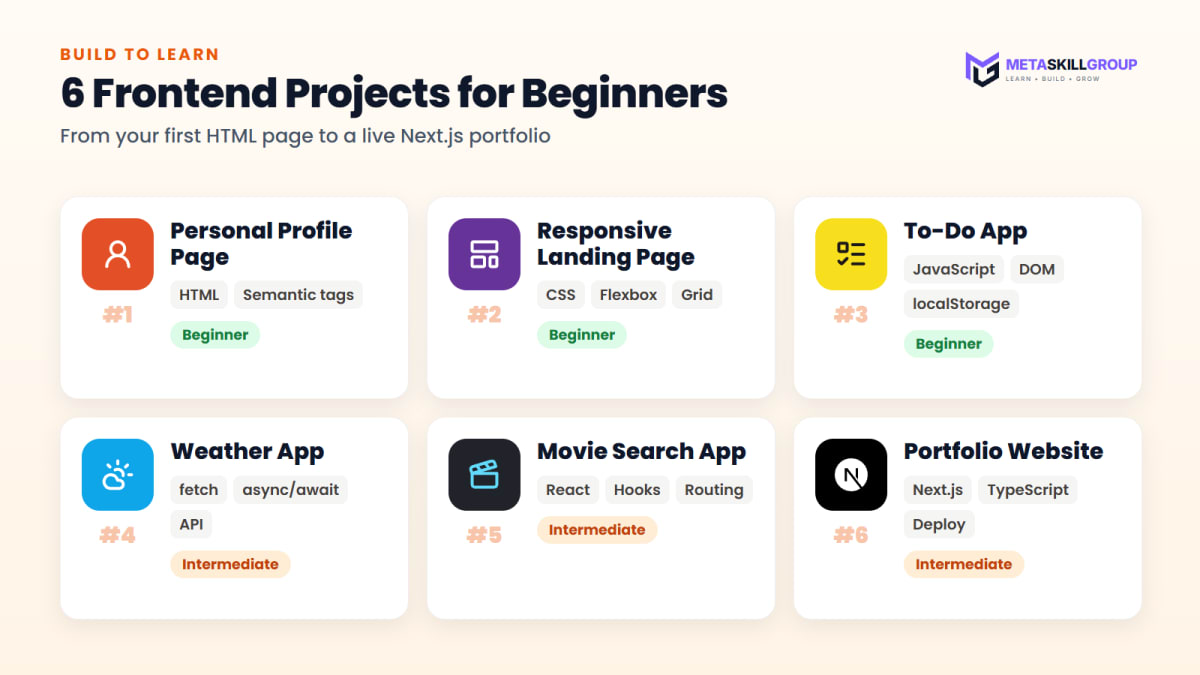
Figure 3: Six projects that take you from your first HTML page to a live Next.js portfolio.
You can also learn a lot by reading real code. Browse our UI components and website templates to see how finished components and pages are put together.
Free Resources to Learn From
| Resource | Best for |
|---|---|
| MDN Web Docs | HTML, CSS and JavaScript, explained properly |
| react.dev | Learning React the official way |
| Next.js docs | Next.js and the App Router |
| TypeScript Handbook | TypeScript basics |
| freeCodeCamp | Free practice exercises |
| Frontend Mentor | Real designs to practise building |
Common Mistakes to Avoid
- Watching tutorials without building. After every tutorial, build something small on your own.
- Skipping JavaScript basics. Moving to React too early makes everything feel harder than it is.
- Learning too many things at once. Stick to HTML, CSS, JavaScript and React until you are comfortable.
- Forgetting about phones. Always check your pages on a real phone screen.
- Not using Git. Your GitHub profile is your proof of work.
- Copying code you don't understand. AI tools and forums are useful, but read every line and make sure you can explain it.
- Waiting to feel "ready". Start applying once you have 3–4 good projects. You learn the most on real work.
Your Frontend Readiness Checklist
- I can build a responsive page with HTML and CSS, using Flexbox and Grid
- I understand JavaScript arrays, objects, functions and
async/await - I can get data from an API and show it on the page
- I can build a small React app with components, props, state and hooks
- I know the basics of TypeScript and Next.js
- All my projects are on GitHub, each with a README
- At least 3 projects are live on Vercel or Netlify
- I have a simple portfolio site with my projects and contact details
If you can tick most of these boxes, you are ready to apply. Our guide on getting a web development internship with no experience covers the next step.
Final Thoughts
Frontend development rewards consistency more than talent. Learn one stage at a time, build something after each stage and keep your work on GitHub. In about six months you can go from writing your first HTML tag to sharing a live portfolio.
The fastest way to grow after that is real work with real feedback. If you want that, you can do a free internship at MetaSkillGroup. Our frontend development internship is online, open all year and free to apply. It takes about 2 minutes to apply, and your first exam attempt is free.
- #frontend
- #frontend developer roadmap
- #web development roadmap
- #html
- #css
- #javascript
- #react
- #next.js
- #typescript
- #beginner guide
Related posts
 Building a Video Downloader Tool for Ads — ResultsI tried to build a free video downloader site to earn money from ads. It worked, then it got shut down. Here's exactly what I built, what happened, and what I learned about platform terms of service and copyright law.
 How to Get a Web Development Internship With No Experience (2026 Guide)No experience? No problem. A step-by-step 2026 guide to your first web development internship: pick one track, learn the basics in 30 days, build three small projects, set up GitHub and LinkedIn, and prepare for the entrance test.
 Free Online Internship for Students in 2026: How to Find a Real One (With Certificate)A simple 2026 guide to free online internships for students and freshers in India: what a good internship gives you, where to find one, how to get selected without experience, and how a work-from-home internship with a verifiable certificate works.
❓ FAQs
Learn in this order: how the web works, HTML, CSS with responsive design, JavaScript, Git and GitHub, React, and then TypeScript and Next.js. Finish with deployment, performance and accessibility. Build a small project after each stage so you learn by doing.
With 2–3 hours of study a day, most beginners are ready for a frontend internship in about 6 months. Becoming job-ready usually takes a few more months of real projects or internship work. If you study less each day, it simply takes longer, and that is completely fine.
Yes. Companies hiring frontend developers mostly look at your skills and projects. Students from BCA, BSc, B.Com and many other courses become frontend developers by learning the basics well and showing good projects on GitHub.
JavaScript first. React is built on JavaScript, so arrays, objects, functions and async code should feel comfortable before you start React. Most React problems beginners face are really JavaScript problems.
Not on day one. Learn JavaScript well first, then add TypeScript after React. Many companies now use TypeScript, so learning its basics before you apply for internships is a good idea.
React is a library for building user interfaces from components. Next.js is a framework built on React that adds page routing, server rendering and search-friendly pages. Learn React first, then Next.js.
Plain CSS first. Tailwind is a faster way to write CSS, so it makes sense once you understand the box model, Flexbox, Grid and responsive design. After that, Tailwind is quick to pick up.
Start with a personal profile page and a responsive landing page, then a to-do app, a weather app that uses an API, a React movie search app and a Next.js portfolio. Put each project on GitHub and deploy it with a live link.
Yes. AI tools help developers write code faster, but companies still need people who understand HTML, CSS, JavaScript and React, can fix problems and can build pages that work well for real users. Strong basics are what let you use AI tools well.
Build 3–4 good projects, put them on GitHub with READMEs and live links, make a simple one-page resume and start applying. The MetaSkillGroup frontend development internship is online, free to apply and open all year, and your first exam attempt is free.
Comments
Join the conversation
Login to post comments and replies
No comments yet. Be the first!