REST APIDjango & FlaskPythonWeb DevelopmentDatabase Design
Python Developer Roadmap 2026: From Basics to Django and FastAPI
A clear Python developer roadmap for 2026: learn Python basics, OOP, Git, SQL and web APIs, then build real apps with Django or FastAPI. Includes a 6-month study plan, 5 projects to build, common mistakes and a checklist for your first Python internship.

MetaSkillGroup
13 min read10

Python is often the first programming language students learn, and for good reason. It reads almost like plain English, it is used everywhere from websites to AI, and you can write something useful in your very first week.
But after the basics, many learners get stuck. Should you learn Django or FastAPI? When do databases come in? What do companies actually expect from a Python developer? This roadmap answers those questions and gives you a clear, step-by-step path from your first print("Hello") to building and deploying real web applications.
💡 Quick answer: To become a Python developer in 2026, learn Python basics first, then intermediate topics such as OOP and error handling, then Git and SQL, then how web APIs work. After that, pick one framework, Django or FastAPI, build 3–5 projects with a database, and deploy them. With 2–3 hours of study a day, this takes about 6 months.
💡 Who is this guide for? Beginners, college students and anyone who wants to build websites and APIs with Python. No earlier coding experience is needed.
In this guide:
- Why Learn Python in 2026?
- The Python Roadmap at a Glance
- Stage 1: Python Basics
- Stage 2: Intermediate Python
- Stage 3: Your Setup, Git and the Command Line
- Stage 4: Databases and SQL
- Stage 5: How the Web and APIs Work
- Stage 6: Django or FastAPI
- Stage 7: Testing and Deployment
- 5 Python Projects to Build
- A 6-Month Study Plan
- Common Mistakes to Avoid
- Your Python Readiness Checklist
Why Learn Python in 2026?
Python is simple to read, quick to write and useful in many fields. Once you know it well, you can move between web development, data and AI without learning a new language.
| Area | What you build | Popular Python tools |
|---|---|---|
| Web development | Websites, APIs and admin panels | Django, FastAPI, Flask |
| Data analysis | Reports, charts and dashboards | pandas, NumPy, Matplotlib |
| AI and machine learning | Models that predict or classify | scikit-learn, PyTorch |
| Automation | Scripts that save hours of manual work | Standard library, Selenium |
This roadmap focuses on web development with Python, because it gives you something you can show to anyone: a working app with a live link. It is also a strong base if you move to data or AI later.
The Python Roadmap at a Glance
Here is the whole path in one table. The times assume 2–3 hours of study a day.
| Stage | What you learn | Time | Build this to finish the stage |
|---|---|---|---|
| 1 | Python basics | 3–4 weeks | A number guessing game and a simple calculator |
| 2 | Intermediate Python | 3–4 weeks | A student marks manager that saves to a file |
| 3 | Your setup, Git and the command line | 1 week, then always | Every project on GitHub |
| 4 | Databases and SQL | 2–3 weeks | A library database with joins |
| 5 | How the web and APIs work | 1 week | Call a public API from a Python script |
| 6 | Django or FastAPI | 6–8 weeks | A blog (Django) or a to-do API (FastAPI) |
| 7 | Testing and deployment | 2 weeks | Your project live on a real URL |
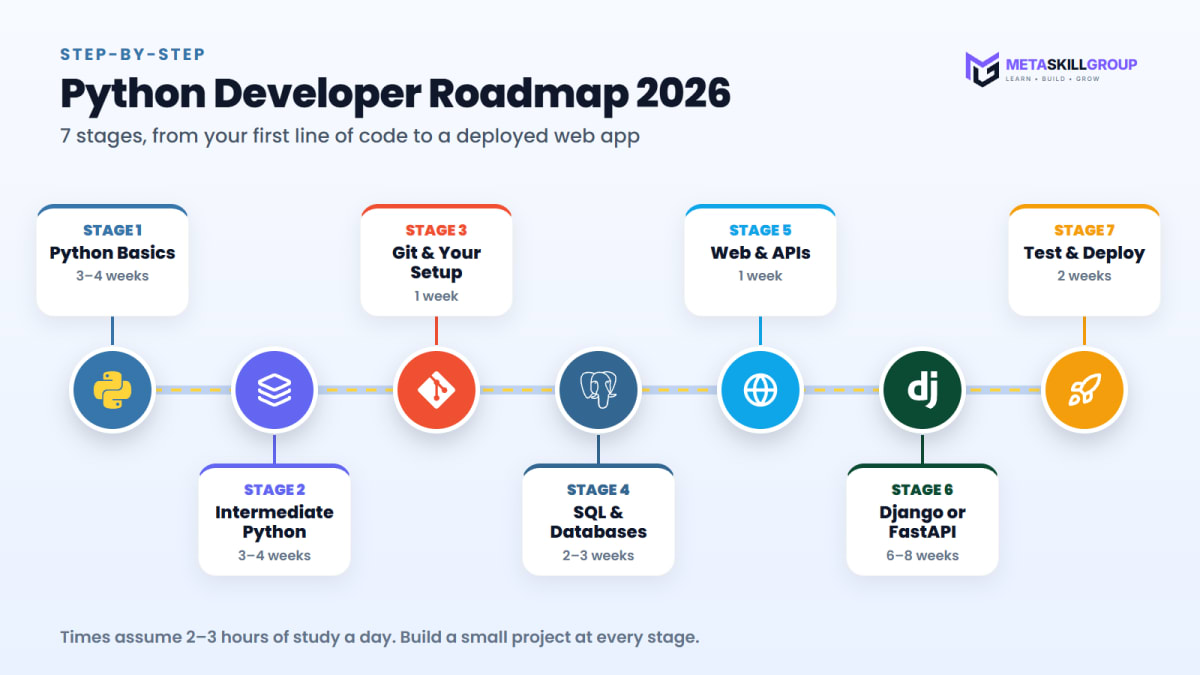
Figure 1: The Python developer roadmap in 7 stages, from your first line of code to a deployed web app.
Stage 1: Python Basics
Start with the core of the language. Write small programs every day instead of only reading or watching videos.
- Variables and data types:
int,float,strandbool - Input and output with
input()andprint() - Conditions with
if,elifandelse - Loops with
forandwhile - Functions, parameters and return values
- Strings and their methods, such as
split,stripandupper - Lists, tuples, dictionaries and sets
python1def grade(marks): 2 if marks >= 75: 3 return "Distinction" 4 elif marks >= 50: 5 return "Pass" 6 return "Try again" 7 8students = {"Aman": 82, "Riya": 67, "Kabir": 45} 9for name, marks in students.items(): 10 print(name, grade(marks))
The official Python tutorial is free and covers all of these topics in a clear order.
Projects: a number guessing game, a simple calculator and a unit converter.
Stage 2: Intermediate Python
This stage turns you from someone who knows Python into someone who can write clean, organised programs.
| Topic | Why it matters |
|---|---|
| Object-oriented programming (classes, objects, inheritance) | Django and most large projects are built with classes |
| Modules and packages | Splitting code into files keeps big projects tidy |
Error handling with try and except | Real apps must not crash on bad input |
| File handling (text, CSV and JSON) | Saving and reading data |
| List and dictionary comprehensions | Shorter, cleaner loops |
Virtual environments and pip | Each project gets its own set of packages |
python1class Student: 2 def __init__(self, name, marks): 3 self.name = name 4 self.marks = marks 5 6 def has_passed(self): 7 return self.marks >= 50 8 9riya = Student("Riya", 67) 10print(riya.has_passed()) # True
Project: a student marks manager that adds, edits and deletes records and saves them to a JSON file.
💡 Pro Tip: Create a new virtual environment for every project with
python -m venv venv. It keeps each project's packages separate and saves you from confusing version problems later.
Stage 3: Your Setup, Git and the Command Line
Professional developers spend a lot of time in a code editor and a terminal. Get comfortable with both early.
- Code editor: VS Code or PyCharm, with the Python extension
- Command line basics: moving between folders, creating files and running scripts
- Git and GitHub:
git init,add,commit,push, branches and pull requests - A README for every project: what it does, how to run it and a screenshot
Start using Git from your first project. Your GitHub profile slowly becomes your portfolio, and companies do look at it.
Stage 4: Databases and SQL
Almost every real application stores data, and most companies use SQL databases. Learn SQL properly; it is useful for your whole career.
- Tables, rows, columns and primary keys
SELECT,INSERT,UPDATEandDELETE- Filtering with
WHERE, sorting withORDER BYand grouping withGROUP BY JOINto combine tables- Relationships: one-to-many and many-to-many
sql1SELECT students.name, courses.title 2FROM enrollments 3JOIN students ON students.id = enrollments.student_id 4JOIN courses ON courses.id = enrollments.course_id 5WHERE courses.title = 'Python Basics';
Start with SQLite, which comes with Python, and then move to PostgreSQL, which is the most common choice for Django and FastAPI apps. Later, you will use an ORM (Object Relational Mapper), which lets you work with the database using Python code instead of raw SQL.
Stage 5: How the Web and APIs Work
Before you pick a framework, understand what a web backend actually does. A backend receives a request, does some work (often with a database) and sends back a response.
| Concept | What to understand |
|---|---|
| HTTP methods | GET reads data, POST creates, PUT/PATCH updates, DELETE removes |
| Status codes | 200 OK, 201 created, 400 bad request, 401 not logged in, 404 not found, 500 server error |
| JSON | The common format for sending data between frontend and backend |
| REST APIs | A clean way to design URLs, such as /api/students/5 |
| Authentication | How users log in, using sessions or tokens such as JWT |
Practise by calling a public API from Python with the requests package and printing the result.
Stage 6: Django or FastAPI
This is the stage where you start building real web applications. Both Django and FastAPI are excellent; the right choice depends on what you want to build.
| Django | FastAPI | |
|---|---|---|
| Best for | Full websites with an admin panel, user login and pages | Fast, modern APIs for web and mobile apps |
| Comes with | ORM, admin panel, authentication, forms, templates | Automatic API docs, data validation, async support |
| Learning curve | More to learn, but very complete | Smaller and quicker to start |
| Good first project | A blog with login and an admin panel | A to-do or notes API with a database |

Figure 2: Django and FastAPI compared. Pick one and go deep before you try the other.
Our suggestion: start with Django if you want to build complete websites, or FastAPI if you are more interested in APIs. Learn one well before you try the other. Flask is also a good, small framework, but Django and FastAPI cover most of what companies ask for.
Learning Django
Follow the official Django tutorial. Learn models, views, URLs, templates, the admin panel, forms and user authentication. Then add the Django REST Framework to build APIs.
Learning FastAPI
The FastAPI tutorial is one of the friendliest docs you will find. Learn path and query parameters, request bodies with Pydantic, connecting to a database and adding authentication.
python1from fastapi import FastAPI 2 3app = FastAPI() 4 5@app.get("/students/{student_id}") 6def get_student(student_id: int): 7 return {"id": student_id, "name": "Riya"}
Run it, open /docs in your browser, and FastAPI shows interactive documentation for your API automatically.
Stage 7: Testing and Deployment
A project that runs only on your laptop is hard to show anyone. Test it, then put it online.
- Testing: write simple tests with
pytestfor your important functions and API routes - Environment variables: keep passwords and secret keys out of your code with a
.envfile - Docker basics: package your app so it runs the same everywhere
- Deploy: use a platform such as Render or Railway, which have simple setups for Python apps
- Logs: learn to read your app's logs when something goes wrong in production
Project: deploy your Django or FastAPI project with a PostgreSQL database and share the live link in your README.
5 Python Projects to Build
| # | Project | What it shows | Level |
|---|---|---|---|
| 1 | Expense tracker (command line) | Basics, functions, file handling | Beginner |
| 2 | Student marks manager | OOP, JSON files, error handling | Beginner |
| 3 | Blog with login and admin panel | Django, models, authentication | Intermediate |
| 4 | Notes or to-do REST API | FastAPI, PostgreSQL, validation | Intermediate |
| 5 | URL shortener with click counts | A full app with a database, deployed | Intermediate |
Projects 3, 4 and 5 are the ones to show in internship applications. Make sure each has a README, a live link and clean code.
A 6-Month Study Plan
| Month | Focus | Goal by the end of the month |
|---|---|---|
| Month 1 | Python basics | 3 small programs, such as a game and a calculator |
| Month 2 | Intermediate Python and Git | The marks manager on GitHub |
| Month 3 | SQL and how APIs work | A practice database and an API script |
| Month 4 | Django or FastAPI basics | Your first web app running on your laptop |
| Month 5 | A bigger project with a database | A blog or a REST API with login |
| Month 6 | Testing, deployment and applying | A live project and your first internship applications |
If you can study only one hour a day, simply take twice as long for each step. Steady progress beats fast progress that stops.
If you also want to learn how websites look and feel on the user's side, our frontend developer roadmap is a good companion to this one. And if you prefer one language for everything, the MERN stack roadmap uses JavaScript on both sides.
Common Mistakes to Avoid
- Jumping into AI and machine learning first. Strong Python basics make every later topic easier.
- Learning Django and FastAPI together. Pick one and finish a real project with it first.
- Skipping SQL. Almost every backend job needs it, even if you use an ORM.
- Installing every package globally. Use a virtual environment for each project.
- Pushing passwords to GitHub. Keep secrets in a
.envfile and add it to.gitignore. - Never deploying. A live link is much more convincing than "it works on my laptop".
Your Python Readiness Checklist
- I am comfortable with Python data types, loops, functions and dictionaries
- I can write classes and handle errors with
tryandexcept - I use virtual environments and
pipfor every project - I can write SQL queries with
WHERE,ORDER BYandJOIN - I understand HTTP methods, status codes and JSON
- I have built a project with Django or FastAPI and a database
- My projects are on GitHub with clear READMEs
- At least one project is deployed with a live link
If you can tick most of these, you are ready to apply for a Python internship.
Final Thoughts
Python is a wonderful first language and a strong career skill. Learn the basics well, add Git and SQL, then go deep into one framework and build real projects with a database. In about six months you can have a deployed Django or FastAPI app that you are proud to show.
When you are ready for real work and real code reviews, you can do a free internship at MetaSkillGroup. Our Python development internship is online, open all year and free to apply. It takes about 2 minutes to apply, and your first exam attempt is free.
- #python
- #python developer roadmap
- #python roadmap 2026
- #django
- #fastapi
- #backend development
- #web development roadmap
- #beginner guide
Related posts
 Internship Report Format for BCA and B.Tech Students (With Sample)A complete internship report format for BCA and B.Tech students: the 15 sections in order, the formatting rules most colleges follow, sample text for the declaration, acknowledgement and abstract, a sample weekly work log, a chapter plan and a final checklist before you submit.
 How to Prepare for an Internship Entrance Test in 2026 (With Sample MCQs)A simple 2026 guide to preparing for an internship entrance test: what the aptitude, DSA and track-skill sections look like, a 2-week study plan, 10 sample MCQs with answers, speed tips for timed questions and an exam-day checklist for online tests.
 How to Get a Web Development Internship With No Experience (2026 Guide)No experience? No problem. A step-by-step 2026 guide to your first web development internship: pick one track, learn the basics in 30 days, build three small projects, set up GitHub and LinkedIn, and prepare for the entrance test.
❓ FAQs
Learn Python basics, then intermediate topics such as OOP and error handling, then Git, SQL and how web APIs work. After that, pick Django or FastAPI, build 3–5 projects with a database, add tests and deploy them.
With 2–3 hours a day, most beginners can build and deploy a Django or FastAPI app in about 6 months. The basics take about a month; the rest is databases, a framework and real projects.
Start with Django if you want to build complete websites with login and an admin panel. Start with FastAPI if you mainly want to build APIs for web or mobile apps. Learn one well before you try the other.
Yes. Django and FastAPI are used by many companies to build websites and APIs. Python's simple syntax also makes it easier to learn than many other backend languages.
Yes. Most web apps store data in SQL databases such as PostgreSQL. Even when you use Django's ORM or SQLAlchemy, understanding SQL helps you write better queries and fix problems faster.
Flask is a small, simple framework and still a fine way to learn how web apps work. For internships and jobs, Django and FastAPI cover most of what companies ask for, so they are a better focus for beginners.
Yes. Companies mainly look at what you can build. A GitHub profile with 2–3 deployed Python projects and clear READMEs can matter more than your degree when you apply for an internship.
Start with a command-line expense tracker and a student marks manager, then a Django blog with login, a FastAPI notes API with PostgreSQL, and a deployed URL shortener.
You can do both over time, but web development is a great place to start because you build things you can show with a live link. Strong Python basics from web projects also make data and AI easier to learn later.
Yes. The MetaSkillGroup Python development internship is online, free to apply and open all year. It uses Python, Django, FastAPI, PostgreSQL and REST APIs, and your first exam attempt is free.
Comments
Join the conversation
Login to post comments and replies
No comments yet. Be the first!