Web DevelopmentPerformance & SEO
How to Implement Advanced SEO on Your Website in 2026 (Step-by-Step Guide).
A complete step-by-step guide to implementing advanced SEO in 2026 — covering technical SEO, semantic HTML, server-side rendering, sitemaps, Google Analytics, Core Web Vitals, and monetization with ads. Works for any website: blog, news, Next.js, WordPress, and more.

MetaSkillGroup
24 min read146
How to Implement Advanced SEO on Your Website in 2026 (Step-by-Step Guide)
SEO in 2026 is not just about stuffing keywords into your page. Google's AI-powered search, SGE (Search Generative Experience), and stricter ranking signals mean you need to be technically sharp, content-smart, and user-focused — all at the same time.
Whether you run a Next.js blog, a WordPress site, a news portal, or an Angular app — this guide covers everything you need to rank higher, get more traffic, and eventually make money from your website.
Let's go step by step.
💡 Quick answer: To do advanced SEO in 2026, fix the technical base first (HTTPS, good Core Web Vitals, mobile-friendly pages and server-side rendering), add a dynamic sitemap and schema markup, then publish helpful long-form content in topic clusters with 3–5 internal links per post. Track results in Google Search Console and GA4, and add ads only after about 3 months and 1,000+ monthly visitors.
1. Why SEO in 2026 Is Different (And More Important Than Ever)
Google now uses AI Overviews (formerly SGE) to answer queries directly in search results. This means:
- If your content is not deeply useful, Google won't feature it
- Generic content gets buried — E-E-A-T (Experience, Expertise, Authoritativeness, Trust) matters more than ever
- Voice search, AI chatbots, and conversational queries are growing fast
- Page speed and Core Web Vitals are hard ranking signals — not suggestions
Simple truth: Bad SEO in 2026 = invisible website. Good SEO = consistent free traffic for years.
Whether your site earns from ads, products, or services — traffic is everything. And SEO is the only free, long-term traffic source that compounds over time.
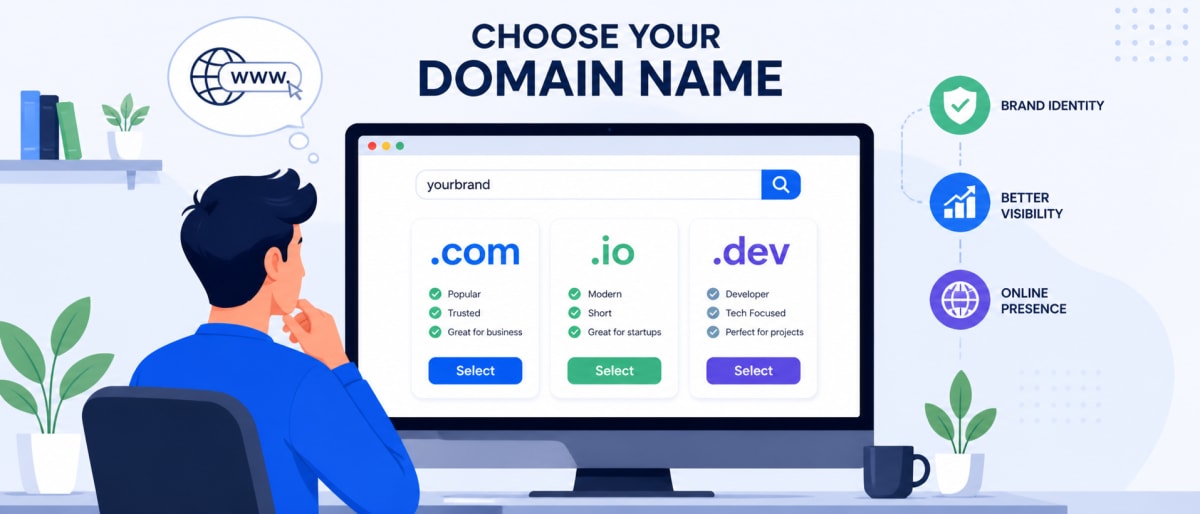
2. Choose the Right Domain Name (Foundation of SEO)
Before you write a single line of code or content, your domain name matters more than most people think.
What Makes a Good Domain?
| Factor | Good Example | Bad Example |
|---|---|---|
| Short & memorable | techblog.com | besttechblogsiteonline.com |
| Has keyword (optional) | seoguide.io | randomname123.net |
| Easy to spell | codecraft.dev | k0decr4ft.com |
| Right TLD | .com, .io, .dev | .xyz, .click |
Tips:
- Prefer
.comfor global audience,.infor India-focused sites - Avoid hyphens (
my-blog.comlooks spammy) - Buy from trusted registrars: Namecheap, GoDaddy, Google Domains (Squarespace)
- Once you pick it — don't change it. Domain age and authority build over time
A good domain builds trust with both users and search engines before you even publish content.
3. Semantic HTML — The Hidden SEO Superpower
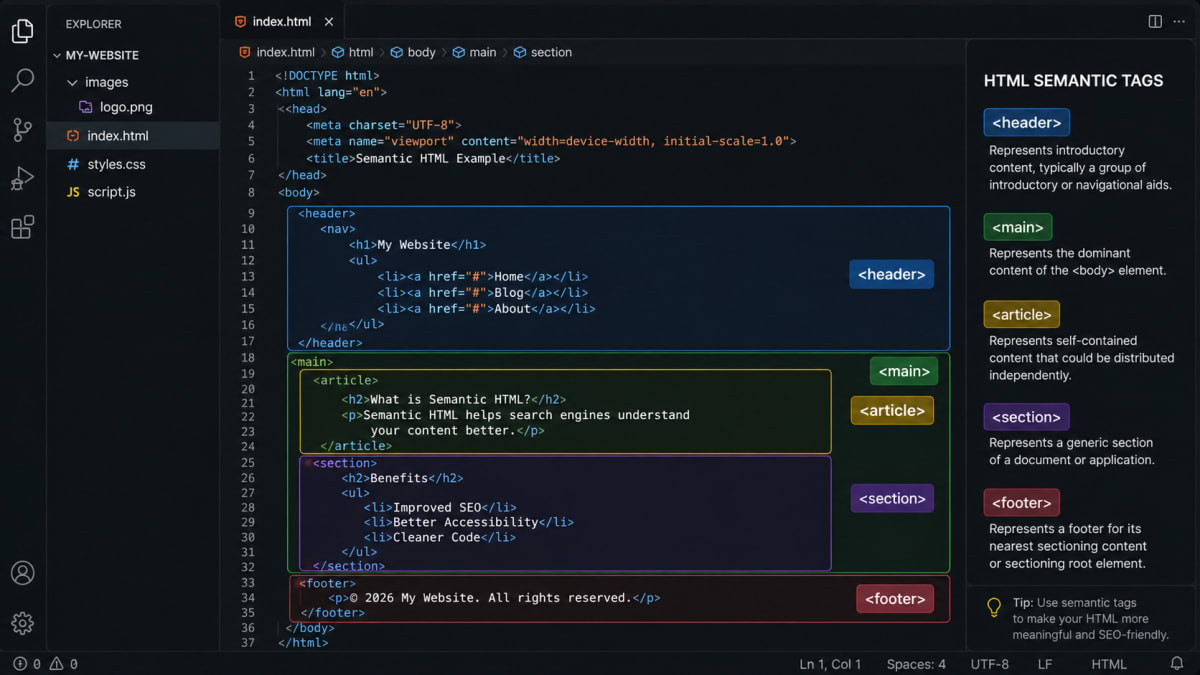
Most developers use <div> for everything. That's a mistake. Google reads your HTML to understand what each part of your page is about.
Semantic HTML tells Google: "this is the header," "this is an article," "this is navigation."
The Right Way to Structure a Blog Page
html1<!DOCTYPE html> 2<html lang="en"> 3 <head> 4 <meta charset="UTF-8" /> 5 <meta name="viewport" content="width=device-width, initial-scale=1.0" /> 6 <title>How to Implement Advanced SEO in 2026</title> 7 <meta name="description" content="Complete step-by-step SEO guide for 2026..." /> 8 </head> 9 10 <body> 11 12 <!-- Site-wide header with logo and navigation --> 13 <header> 14 <nav aria-label="Main Navigation"> 15 <a href="/">Home</a> 16 <a href="/blog">Blog</a> 17 <a href="/about">About</a> 18 </nav> 19 </header> 20 21 <!-- Main content area — Google focuses here --> 22 <main> 23 24 <!-- Each blog post is an article --> 25 <article> 26 27 <!-- Article header with title and meta --> 28 <header> 29 <h1>How to Implement Advanced SEO on Your Website in 2026</h1> 30 <p>By <span itemprop="author">John Doe</span> · 31 <time datetime="2026-05-01">May 1, 2026</time> · 32 12 min read 33 </p> 34 </header> 35 36 <!-- Actual blog content goes here --> 37 <section aria-label="Blog Content"> 38 <p>SEO in 2026 requires...</p> 39 </section> 40 41 <!-- Author info at the bottom --> 42 <footer> 43 <p>Written by John Doe — Senior SEO Specialist</p> 44 </footer> 45 46 </article> 47 48 <!-- Related posts sidebar --> 49 <aside aria-label="Related Articles"> 50 <h2>Related Posts</h2> 51 <!-- related post cards here --> 52 </aside> 53 54 </main> 55 56 <!-- Site-wide footer --> 57 <footer> 58 <p>© 2026 YourSite.com</p> 59 </footer> 60 61 </body> 62</html>
Key Semantic Tags Cheatsheet
| Tag | Use For | SEO Benefit |
|---|---|---|
<header> | Site or section header | Marks branding/nav area |
<nav> | Navigation links | Helps Google map site structure |
<main> | Primary page content | Tells Google where to focus |
<article> | Blog post, news item | Marks standalone content |
<section> | Content sections | Organizes content logically |
<aside> | Sidebar, related posts | Secondary content signal |
<footer> | Page/site footer | Legal, links, author info |
<h1>–<h6> | Headings hierarchy | Keyword signal — use carefully |
<time> | Published/modified date | Freshness signal for Google |
<figure> + <figcaption> | Images with captions | Better image SEO |
Rule: One
<h1>per page only. It should contain your main keyword. Use<h2>for sections,<h3>for sub-sections.
4. Technical SEO — The Engine Room
Technical SEO is everything Google can't see but deeply cares about. Fix these and you'll rank faster.
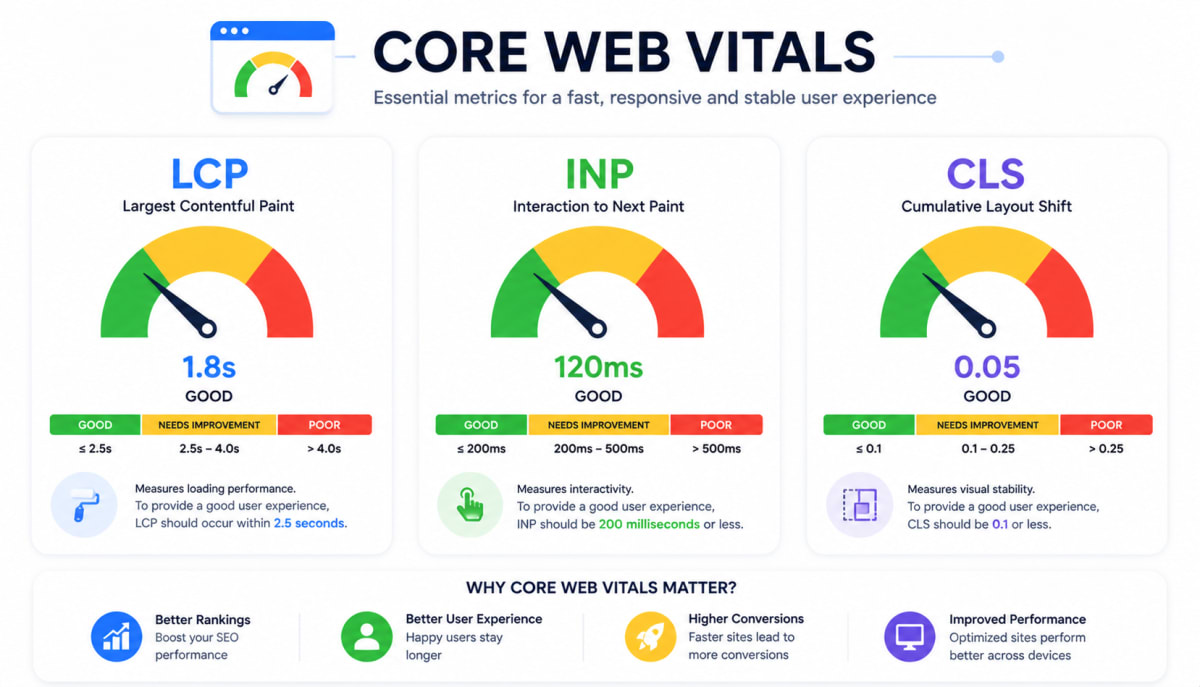
4.1 Core Web Vitals (Google's Speed Test)
Google measures three things:
| Metric | What It Measures | Target Score |
|---|---|---|
| LCP (Largest Contentful Paint) | How fast main content loads | Under 2.5 seconds |
| INP (Interaction to Next Paint) | How fast page responds to clicks | Under 200ms |
| CLS (Cumulative Layout Shift) | How much page jumps around | Under 0.1 |
How to improve them:
- Use
next/imagein Next.js (auto-compresses + lazy loads) - Add
widthandheightto all images (prevents layout shift) - Use
font-display: swapfor web fonts - Minimize JavaScript — code split aggressively
- Use CDN for static assets (Cloudflare, Vercel Edge)
If your site is built with React, our guide to the top 7 React optimization techniques shows how code splitting, lazy loading and caching improve these scores.
4.2 Mobile-First Indexing
Google indexes your mobile version first. If your site looks bad on mobile, your desktop rankings also suffer.
html1<!-- Always include this in <head> --> 2<meta name="viewport" content="width=device-width, initial-scale=1.0" />
Test your site: Google Mobile-Friendly Test
4.3 HTTPS is Non-Negotiable
No HTTPS = Google marks your site as "Not Secure" = users leave = rankings drop.
- Use Cloudflare (free SSL)
- Vercel and Netlify give free HTTPS automatically
- WordPress: Use Really Simple SSL plugin
4.4 Canonical URLs — Avoid Duplicate Content Penalty
If the same content is accessible at multiple URLs, Google gets confused.
html1<!-- Add this in <head> of every page --> 2<link rel="canonical" href="https://yoursite.com/blog/your-post-slug" />
In Next.js (App Router):
tsx1// app/blog/[slug]/page.tsx 2import type { Metadata } from "next"; 3 4export async function generateMetadata({ params }): Promise<Metadata> { 5 return { 6 alternates: { 7 canonical: `https://yoursite.com/blog/${params.slug}`, 8 }, 9 }; 10}
5. Server-Side Rendering (SSR) & SEO — Why It Matters
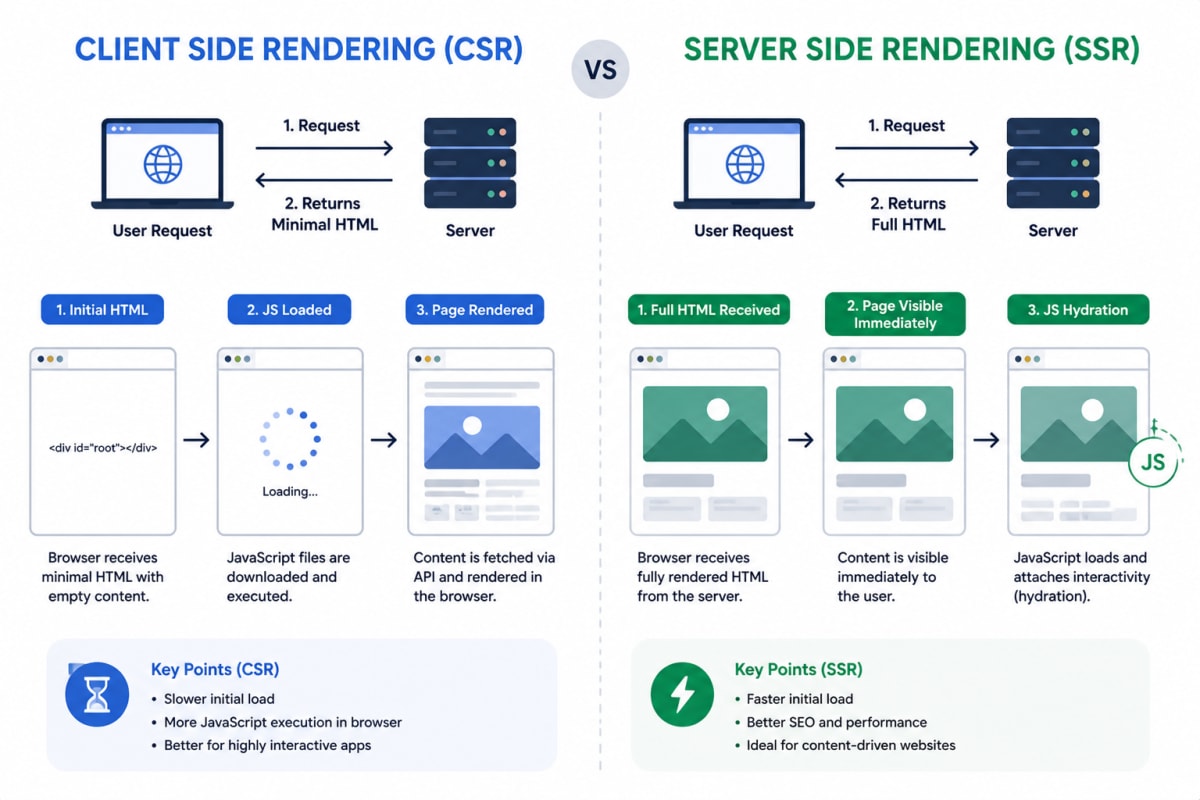
This is where most modern developers make a big mistake. If your blog is built with React/Next.js and renders on the client side only, Google may not index your content properly.
The Problem With Client-Side Rendering (CSR)
text1User requests page → Browser gets empty HTML → JavaScript loads → 2Content appears → Google might miss it
The Solution: Server-Side Rendering or Static Generation
text1User requests page → Server sends FULL HTML with content → 2Google reads it instantly ✅
Next.js Blog List Page — Server Component Example
tsx1// app/blog/page.tsx — This is a SERVER component (no "use client") 2// Server components fetch data on the server before sending HTML to browser 3// Google gets fully rendered HTML = perfect for SEO 4 5import { Metadata } from "next"; 6import BlogCard from "@/components/BlogCard"; 7import { getAllBlogs } from "@/lib/api"; 8 9// Static metadata for the blog listing page 10export const metadata: Metadata = { 11 title: "Blog — Latest Articles on Web Development & SEO", 12 description: "Read our latest articles on Next.js, SEO, performance, and modern web development.", 13 openGraph: { 14 title: "Blog — YourSite", 15 description: "Latest articles on web dev and SEO", 16 type: "website", 17 }, 18}; 19 20// This function runs ON THE SERVER — not in the browser 21export default async function BlogListPage() { 22 // Data fetched server-side = HTML is ready when Google crawls 23 const blogs = await getAllBlogs({ status: "published", limit: 20 }); 24 25 return ( 26 <main> 27 <header> 28 <h1>All Blog Posts</h1> 29 <p>Deep dives into SEO, Next.js, and modern web development</p> 30 </header> 31 32 <section aria-label="Blog Posts Grid"> 33 {blogs.map((blog) => ( 34 <article key={blog.slug}> 35 <BlogCard blog={blog} /> 36 </article> 37 ))} 38 </section> 39 </main> 40 ); 41}
Individual Blog Post Page — Dynamic SSR
tsx1// app/blog/[slug]/page.tsx — Server Component with dynamic metadata 2 3import { Metadata } from "next"; 4import { getBlogBySlug, getAllBlogSlugs } from "@/lib/api"; 5import { notFound } from "next/navigation"; 6import BlogContent from "@/components/BlogContent"; 7 8// Generate static paths for all published blogs (ISR) 9export async function generateStaticParams() { 10 const slugs = await getAllBlogSlugs(); 11 return slugs.map((slug) => ({ slug })); 12} 13 14// Dynamic SEO metadata per blog post 15export async function generateMetadata({ params }): Promise<Metadata> { 16 const blog = await getBlogBySlug(params.slug); 17 if (!blog) return { title: "Not Found" }; 18 19 return { 20 title: blog.seo?.metaTitle || blog.title, 21 description: blog.seo?.metaDescription || blog.description, 22 keywords: blog.seo?.metaKeywords?.join(", "), 23 openGraph: { 24 title: blog.seo?.ogTitle || blog.title, 25 description: blog.seo?.ogDescription || blog.description, 26 images: [blog.seo?.ogImage || blog.thumbnail?.url], 27 type: "article", 28 publishedTime: blog.publishedAt?.toString(), 29 }, 30 twitter: { 31 card: blog.seo?.twitterCard || "summary_large_image", 32 title: blog.seo?.ogTitle || blog.title, 33 description: blog.seo?.ogDescription || blog.description, 34 }, 35 alternates: { 36 canonical: blog.seo?.canonicalUrl || 37 `https://yoursite.com/blog/${params.slug}`, 38 }, 39 }; 40} 41 42export default async function BlogPostPage({ params }) { 43 const blog = await getBlogBySlug(params.slug); 44 if (!blog) notFound(); 45 46 return ( 47 <main> 48 <article> 49 <BlogContent blog={blog} /> 50 </article> 51 </main> 52 ); 53}
WordPress users: WordPress uses PHP which is server-rendered by default — you're already good here. Just make sure you're using Yoast SEO or Rank Math plugin for meta tags.
6. XML Sitemap — Tell Google Every Page You Have
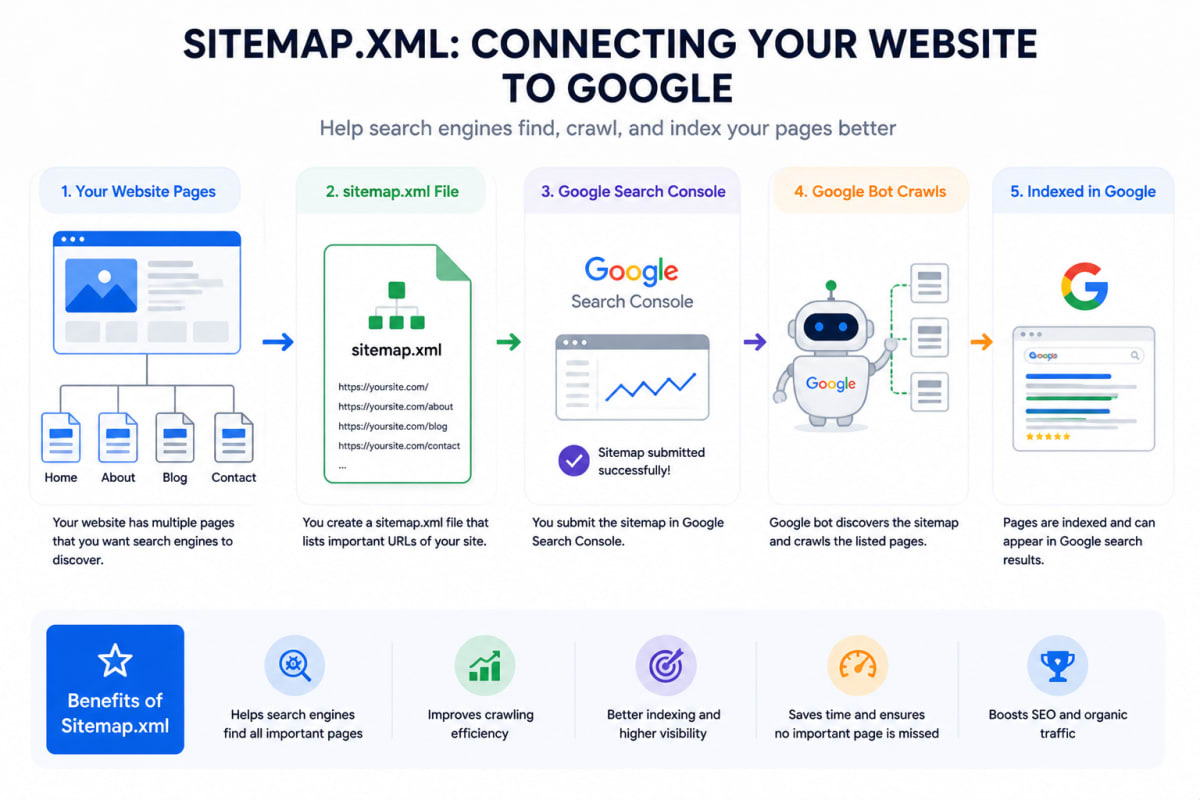
A sitemap is a file that tells Google: "Hey, these are all the pages on my site, please index them."
Without a sitemap, Google finds your pages slowly (or sometimes never).
Static Sitemap (Simple XML File)
xml1<?xml version="1.0" encoding="UTF-8"?> 2<urlset xmlns="http://www.sitemaps.org/schemas/sitemap/0.9"> 3 4 <!-- Homepage --> 5 <url> 6 <loc>https://yoursite.com/</loc> 7 <lastmod>2026-05-01</lastmod> 8 <changefreq>daily</changefreq> 9 <priority>1.0</priority> 10 </url> 11 12 <!-- Blog listing page --> 13 <url> 14 <loc>https://yoursite.com/blog</loc> 15 <lastmod>2026-05-01</lastmod> 16 <changefreq>daily</changefreq> 17 <priority>0.9</priority> 18 </url> 19 20 <!-- Individual blog post --> 21 <url> 22 <loc>https://yoursite.com/blog/how-to-implement-advanced-seo-2026</loc> 23 <lastmod>2026-05-01</lastmod> 24 <changefreq>weekly</changefreq> 25 <priority>0.8</priority> 26 </url> 27 28</urlset>
Save this as public/sitemap.xml — Google will find it at https://yoursite.com/sitemap.xml
Dynamic Sitemap in Next.js (Auto-Generated — Best Practice)
Static XML is fine for small sites. But if you have a blog with 100+ posts, you need a dynamic sitemap that auto-updates when you publish new content.
ts1// app/sitemap.ts — Next.js generates this automatically at build time 2// Accessible at: https://yoursite.com/sitemap.xml 3 4import { MetadataRoute } from "next"; 5import { getAllPublishedBlogs } from "@/lib/api"; 6 7export default async function sitemap(): Promise<MetadataRoute.Sitemap> { 8 // Fetch all published blog posts from your database 9 const blogs = await getAllPublishedBlogs(); 10 11 // Static pages — always include these 12 const staticPages: MetadataRoute.Sitemap = [ 13 { 14 url: "https://yoursite.com", 15 lastModified: new Date(), 16 changeFrequency: "daily", 17 priority: 1.0, 18 }, 19 { 20 url: "https://yoursite.com/blog", 21 lastModified: new Date(), 22 changeFrequency: "daily", 23 priority: 0.9, 24 }, 25 { 26 url: "https://yoursite.com/about", 27 lastModified: new Date(), 28 changeFrequency: "monthly", 29 priority: 0.5, 30 }, 31 ]; 32 33 // Dynamic blog pages — auto-generated from database 34 const blogPages: MetadataRoute.Sitemap = blogs.map((blog) => ({ 35 url: `https://yoursite.com/blog/${blog.slug}`, 36 lastModified: blog.updatedAt || blog.publishedAt || new Date(), 37 changeFrequency: "weekly" as const, 38 priority: blog.isFeatured ? 0.9 : 0.8, 39 })); 40 41 // Return combined sitemap 42 return [...staticPages, ...blogPages]; 43}
Sitemap Index (For Large Sites 500+ Pages)
ts1// app/sitemap-index.ts — For very large websites 2// Splits into multiple sitemaps for better crawling 3 4export default function sitemapIndex() { 5 return [ 6 { 7 url: "https://yoursite.com/sitemap-blogs.xml", 8 lastModified: new Date(), 9 }, 10 { 11 url: "https://yoursite.com/sitemap-categories.xml", 12 lastModified: new Date(), 13 }, 14 { 15 url: "https://yoursite.com/sitemap-pages.xml", 16 lastModified: new Date(), 17 }, 18 ]; 19}
Submit Your Sitemap to Google
- Go to Google Search Console →
search.google.com/search-console - Add your website property
- Go to Sitemaps section
- Enter
sitemap.xmland click Submit - Google will now crawl all your pages
WordPress users: Install Yoast SEO — it generates dynamic sitemaps automatically. Done.
7. Schema Markup (Structured Data) — Stand Out in Search Results
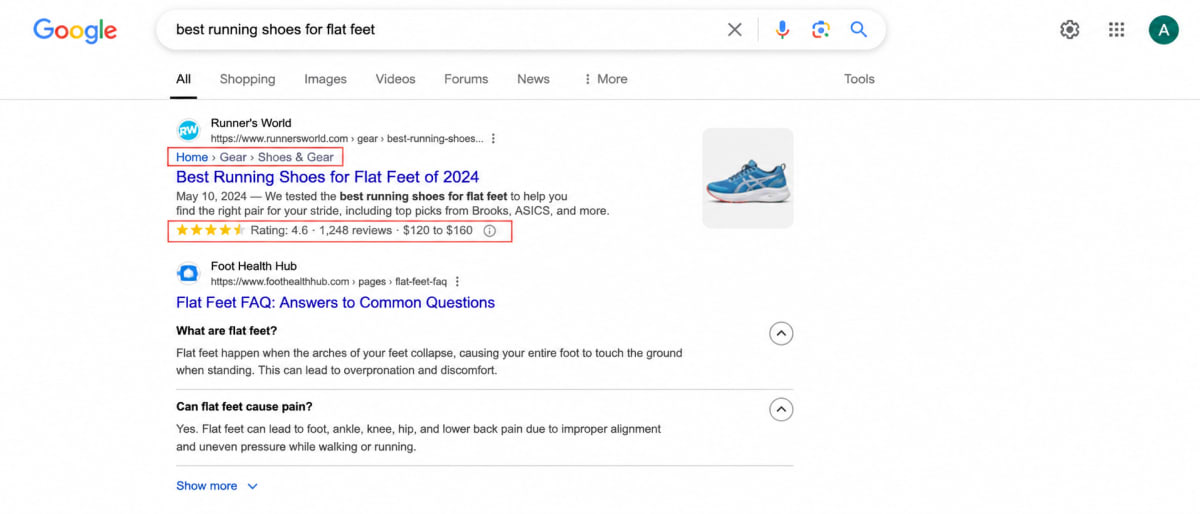
Schema markup is JSON code you add to your page that helps Google show rich results — like star ratings, article dates, FAQs, and breadcrumbs directly in search.
Article Schema for Blog Posts
tsx1// components/BlogStructuredData.tsx 2// Add this inside your blog post page <head> 3 4interface BlogSchemaProps { 5 title: string; 6 description: string; 7 publishedAt: string; 8 updatedAt: string; 9 authorName: string; 10 imageUrl: string; 11 slug: string; 12} 13 14export default function BlogStructuredData({ 15 title, description, publishedAt, 16 updatedAt, authorName, imageUrl, slug 17}: BlogSchemaProps) { 18 19 const schema = { 20 "@context": "https://schema.org", 21 "@type": "BlogPosting", 22 "headline": title, 23 "description": description, 24 "image": imageUrl, 25 "datePublished": publishedAt, 26 "dateModified": updatedAt, 27 "author": { 28 "@type": "Person", 29 "name": authorName, 30 }, 31 "publisher": { 32 "@type": "Organization", 33 "name": "YourSite", 34 "logo": { 35 "@type": "ImageObject", 36 "url": "https://yoursite.com/logo.png", 37 }, 38 }, 39 "mainEntityOfPage": { 40 "@type": "WebPage", 41 "@id": `https://yoursite.com/blog/${slug}`, 42 }, 43 }; 44 45 return ( 46 <script 47 type="application/ld+json" 48 dangerouslySetInnerHTML={{ __html: JSON.stringify(schema) }} 49 /> 50 ); 51}
FAQ Schema (Gets Shown Directly in Google Results!)
tsx1const faqSchema = { 2 "@context": "https://schema.org", 3 "@type": "FAQPage", 4 "mainEntity": [ 5 { 6 "@type": "Question", 7 "name": "What is the most important SEO factor in 2026?", 8 "acceptedAnswer": { 9 "@type": "Answer", 10 "text": "E-E-A-T (Experience, Expertise, Authoritativeness, Trust) combined with Core Web Vitals are the most critical ranking factors in 2026." 11 } 12 }, 13 { 14 "@type": "Question", 15 "name": "How long does SEO take to show results?", 16 "acceptedAnswer": { 17 "@type": "Answer", 18 "text": "Typically 3-6 months for new sites. Competitive keywords can take 12+ months. Consistency is key." 19 } 20 } 21 ] 22};
Breadcrumb Schema (Helps Google Understand Site Structure)
tsx1const breadcrumbSchema = { 2 "@context": "https://schema.org", 3 "@type": "BreadcrumbList", 4 "itemListElement": [ 5 { "@type": "ListItem", "position": 1, "name": "Home", "item": "https://yoursite.com" }, 6 { "@type": "ListItem", "position": 2, "name": "Blog", "item": "https://yoursite.com/blog" }, 7 { "@type": "ListItem", "position": 3, "name": "Advanced SEO 2026", "item": "https://yoursite.com/blog/advanced-seo-2026" }, 8 ] 9};
8. On-Page SEO — What You Write and How You Write It
8.1 Title Tags & Meta Descriptions
html1<!-- Perfect title tag: 50-60 characters, keyword near start --> 2<title>Advanced SEO Guide 2026 — Step-by-Step for Any Website</title> 3 4<!-- Perfect meta description: 120-160 characters, has keyword + CTA --> 5<meta name="description" 6 content="Learn advanced SEO techniques for 2026 — technical setup, sitemaps, schema markup, Core Web Vitals, and monetization. Works for any website." />
8.2 Heading Hierarchy (Critical!)
html1<!-- ONE h1 per page — your main keyword --> 2<h1>How to Implement Advanced SEO on Your Website in 2026</h1> 3 4 <!-- h2 for main sections --> 5 <h2>Technical SEO Fundamentals</h2> 6 7 <!-- h3 for sub-topics --> 8 <h3>Core Web Vitals Explained</h3> 9 <h3>Mobile-First Indexing</h3> 10 11 <h2>Content Strategy for SEO</h2> 12 13 <h3>E-E-A-T Signals</h3> 14 <h3>Keyword Clustering</h3>
8.3 Image SEO
html1<!-- Always add alt text — Google reads this --> 2<img 3 src="/blog/seo-diagram.webp" 4 alt="Diagram showing how Google crawls and indexes website pages for SEO" 5 width="800" 6 height="450" 7 loading="lazy" 8/> 9 10<!-- For Next.js — even better --> 11<Image 12 src="/blog/seo-diagram.webp" 13 alt="Diagram showing how Google crawls and indexes website pages" 14 width={800} 15 height={450} 16 priority={false} // use priority={true} only for above-the-fold images 17/>
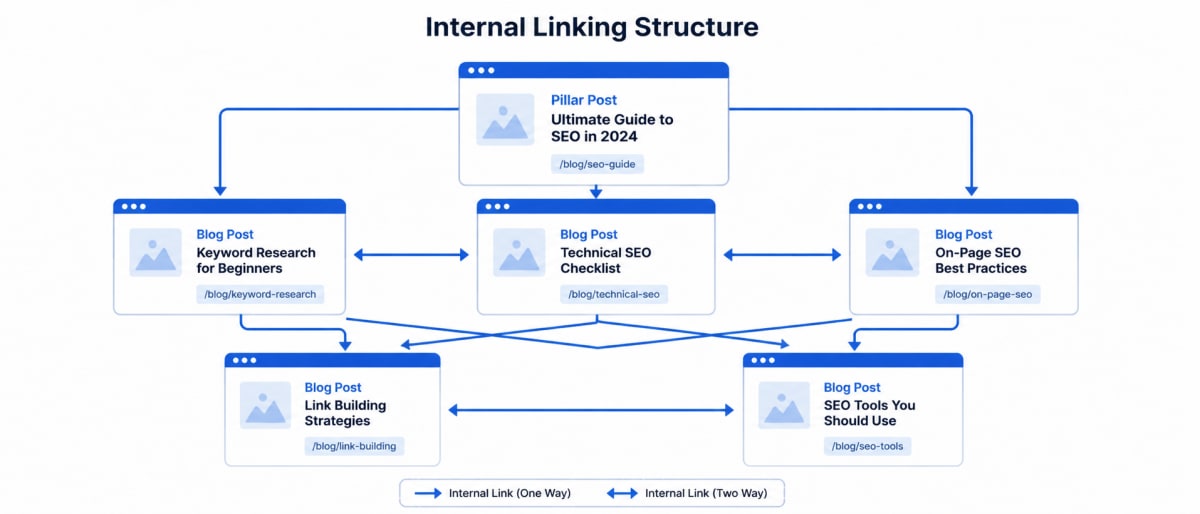
8.4 Internal Linking Strategy
Internal links pass "link juice" between your pages and help Google discover all your content.
html1<!-- Good internal link — descriptive anchor text --> 2<a href="/blog/core-web-vitals-guide"> 3 Learn how to fix Core Web Vitals issues 4</a> 5 6<!-- Bad internal link — generic anchor text --> 7<a href="/blog/core-web-vitals-guide">Click here</a>
Rules:
- Link to 3-5 related posts in every blog article
- Use descriptive anchor text with keywords
- Link from high-traffic pages to newer pages to boost them
9. Google Analytics 4 (GA4) — Know Your Traffic
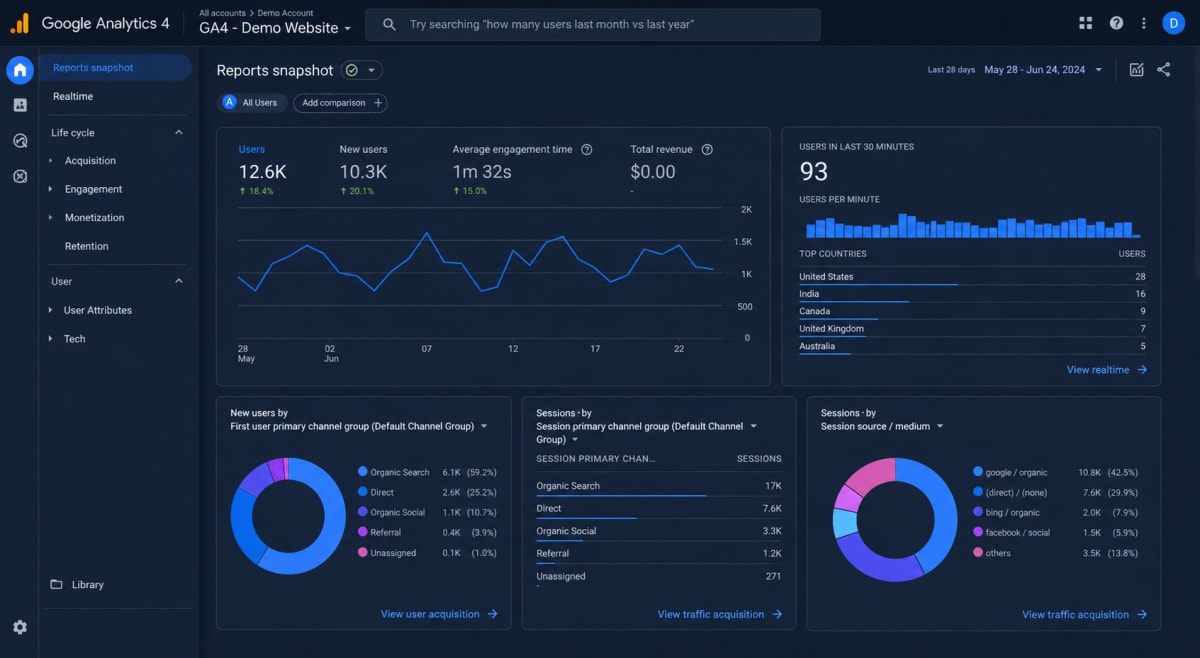
Without analytics, you're driving blind. GA4 shows you where your visitors come from, what they read, and how long they stay.
Step 1: Create GA4 Property
- Go to analytics.google.com
- Click Admin → Create Property
- Choose Web platform
- Copy your Measurement ID (looks like
G-XXXXXXXXXX)
Step 2: Add GA4 to Next.js
tsx1// app/layout.tsx — Add Google Analytics to every page 2 3import Script from "next/script"; 4 5const GA_MEASUREMENT_ID = "G-XXXXXXXXXX"; // Replace with your actual ID 6 7export default function RootLayout({ children }) { 8 return ( 9 <html lang="en"> 10 <head> 11 {/* Google Analytics — loads after page is interactive */} 12 <Script 13 src={`https://www.googletagmanager.com/gtag/js?id=${GA_MEASUREMENT_ID}`} 14 strategy="afterInteractive" 15 /> 16 <Script id="google-analytics" strategy="afterInteractive"> 17 {` 18 window.dataLayer = window.dataLayer || []; 19 function gtag(){dataLayer.push(arguments);} 20 gtag('js', new Date()); 21 gtag('config', '${GA_MEASUREMENT_ID}', { 22 page_path: window.location.pathname, 23 }); 24 `} 25 </Script> 26 </head> 27 <body>{children}</body> 28 </html> 29 ); 30}
Step 3: Add GA4 to WordPress
- Install Site Kit by Google plugin (official Google plugin)
- Connect your Google account
- Done — GA4 is live
What to Track in GA4
| Metric | What It Tells You |
|---|---|
| Users | How many unique people visited |
| Sessions | Total number of visits |
| Bounce Rate | % of people who left immediately |
| Avg. Engagement Time | How long people actually read |
| Top Pages | Which content gets most traffic |
| Traffic Sources | Organic search vs social vs direct |
| New vs Returning | Are people coming back? |
Google Search Console (Pair With GA4)
GA4 tells you what happens on your site. Search Console tells you what happens in Google.
text1search.google.com/search-console
- Shows which keywords bring you traffic
- Shows your average position in Google
- Alerts you to crawl errors and penalties
- Where to submit your sitemap
Connect GA4 and Search Console together for complete picture of your SEO performance.
10. Keyword Research in 2026 — Intent Over Volume
In 2026, chasing high-volume keywords alone doesn't work. You need to match search intent.
The 4 Types of Search Intent
| Intent | Example Query | What User Wants |
|---|---|---|
| Informational | "how does SEO work" | Learn something |
| Navigational | "Google Search Console login" | Go somewhere |
| Commercial | "best SEO tools 2026" | Compare before buying |
| Transactional | "buy Ahrefs subscription" | Make a purchase |
Best Free Keyword Research Tools
| Tool | Best For | Cost |
|---|---|---|
| Google Search Console | See what you already rank for | Free |
| Google Keyword Planner | Volume data | Free |
| Ubersuggest | Beginner keyword research | Free/Paid |
| AnswerThePublic | Question-based keywords | Free/Paid |
| Ahrefs / SEMrush | Professional deep research | Paid |
Keyword Clustering — The 2026 Way
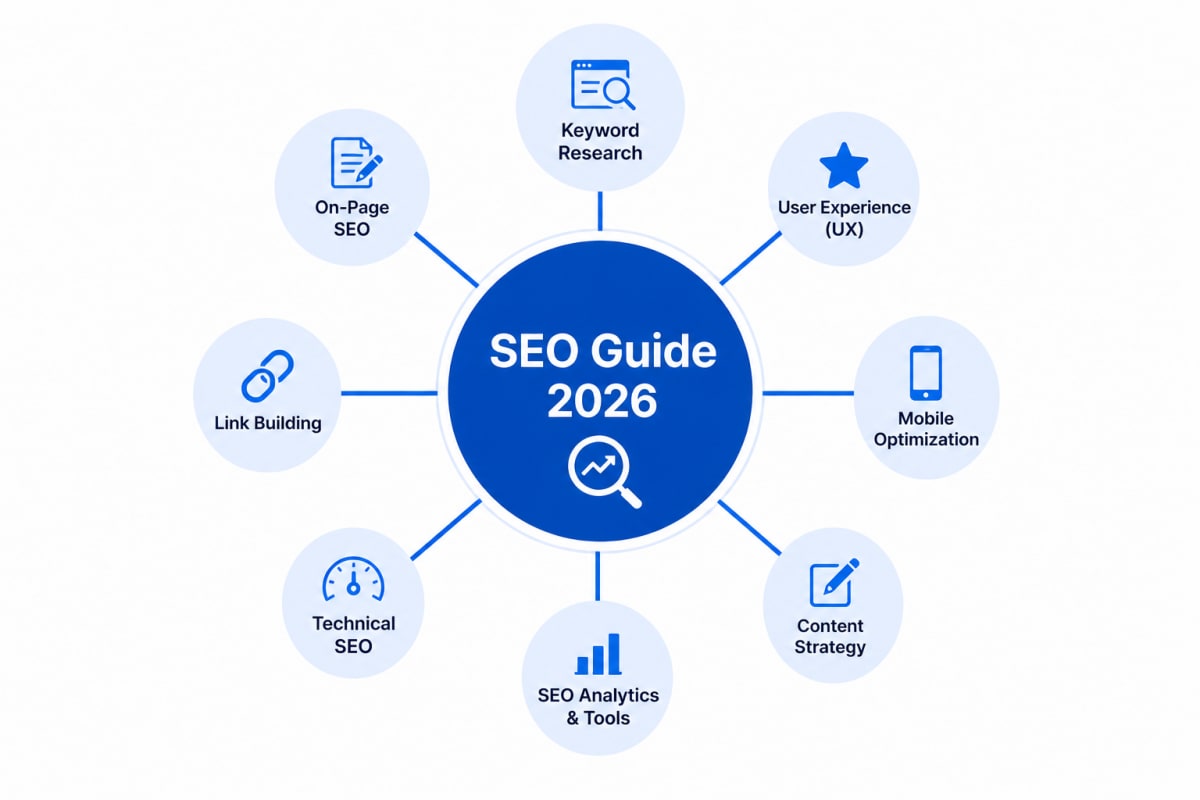
Instead of writing one post per keyword, write content clusters:
text1Main Topic (Pillar Page): "Complete SEO Guide 2026" 2├── Cluster: "Technical SEO checklist" 3├── Cluster: "How to fix Core Web Vitals" 4├── Cluster: "Schema markup tutorial" 5├── Cluster: "Google Analytics setup" 6└── Cluster: "How to build backlinks"
All cluster posts link back to the pillar page → Google sees topical authority → Better rankings for all posts.
You can see this on our own blog: this guide is part of our developer roadmap, whose main article is the MERN stack roadmap for beginners.
11. Content Strategy — Write for Humans, Optimize for Google
E-E-A-T: What Google Looks For in 2026
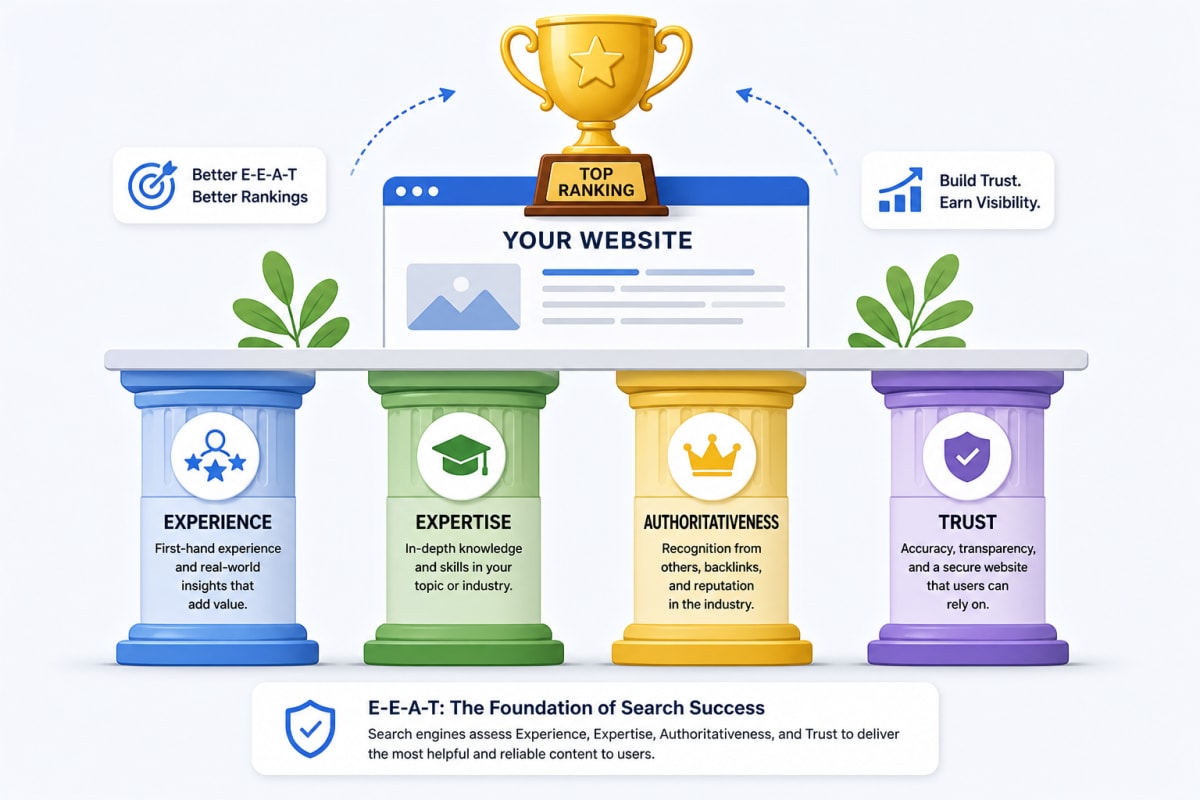
Google evaluates every piece of content against E-E-A-T:
- Experience — Did you actually use/do the thing you're writing about?
- Expertise — Do you know this topic deeply?
- Authoritativeness — Do other sites link to and mention you?
- Trust — Is your site secure, transparent, and accurate?
How to demonstrate E-E-A-T:
- Add author bio with credentials to every post
- Include real screenshots, data, and personal examples
- Cite authoritative sources (Google, MDN, research papers)
- Keep content updated — add "Last updated: Month Year"
- Get backlinks from trusted sites in your niche
Optimizing for AI Overviews (SGE)
Google's AI Overviews pick content that:
- Directly answers questions in the first paragraph
- Uses clear, structured formatting (headings, lists, tables)
- Covers the topic comprehensively (long-form wins)
- Has strong E-E-A-T signals
markdown1<!-- Bad opening paragraph --> 2In this article, we will discuss SEO and all its various aspects that 3have been changing over the years... 4 5<!-- Good opening paragraph — answers immediately --> 6Advanced SEO in 2026 requires four things: technical optimization, 7semantic HTML, quality content with E-E-A-T signals, and consistent 8tracking with Google Analytics. Here's exactly how to implement each one.
12. Backlinks — The Votes That Still Matter
Backlinks are other websites linking to your content. Google treats them as votes of confidence.
How to Build Backlinks in 2026
1. Write linkable assets — In-depth guides, original research, free tools, templates. People naturally link to useful things.
2. Guest posting — Write articles for other blogs in your niche. Get an author link back to your site.
3. HARO (Help A Reporter Out) — Journalists ask for expert quotes. You respond. They link to your site.
4. Broken link building — Find broken links on other sites, suggest your content as replacement.
5. Digital PR — Get mentioned in news articles, podcasts, and industry reports.
What NOT to Do (Google Penalizes These)
- Buying backlinks from link farms
- Participating in link exchange schemes
- Spamming blog comments with your URL
- Building 100s of low-quality directory links overnight
Quality > Quantity. One link from
nytimes.comis worth more than 1000 links from random blogs.
13. Robots.txt — Control What Google Crawls
txt1# robots.txt — place in public/ folder 2# Accessible at: https://yoursite.com/robots.txt 3 4User-agent: * 5Allow: / 6 7# Block admin and API routes from indexing 8Disallow: /admin/ 9Disallow: /api/ 10Disallow: /dashboard/ 11Disallow: /_next/ 12 13# Tell Google where sitemap is 14Sitemap: https://yoursite.com/sitemap.xml
Never block your main content pages. Only block pages you don't want indexed (admin, API, private routes).
14. When and How to Add Ads — Monetize Without Ruining SEO
This is where most new website owners make a fatal mistake: they add ads too early.
The 3-Month Rule (Very Important)
| Phase | Timeline | Focus |
|---|---|---|
| Phase 1 | Month 0–3 | Content only — no ads |
| Phase 2 | Month 3–6 | Light ads when 1000+ monthly visitors |
| Phase 3 | Month 6+ | Optimize ad placement for revenue |
Why wait?
- Google's algorithm evaluates new sites for 3-6 months ("Google Sandbox")
- Ads slow down your page — bad Core Web Vitals early on kills rankings
- Too many ads = high bounce rate = Google thinks your site is bad
- You need traffic first for ads to make any money anyway
Ad Networks Comparison
| Network | Min Traffic | RPM (Revenue per 1000 views) | Best For |
|---|---|---|---|
| Google AdSense | None | $1–$5 | Beginners, any site |
| Ezoic | None (AI-optimized) | $3–$10 | Growing blogs |
| Mediavine | 50,000 sessions/month | $15–$40 | Established blogs |
| AdThrive / Raptive | 100,000 pageviews/month | $20–$60 | High-traffic sites |
| Carbon Ads | Tech audience needed | Varies | Dev/tech blogs |
How Much Can You Earn?
| Monthly Traffic | Network | Estimated Monthly Revenue |
|---|---|---|
| 5,000 visitors | Google AdSense | $5 – $25 |
| 20,000 visitors | Ezoic | $60 – $200 |
| 50,000 visitors | Mediavine | $750 – $2,000 |
| 100,000 visitors | Raptive | $2,000 – $6,000 |
| 500,000 visitors | Raptive | $10,000 – $30,000 |
These are estimates. Actual earnings depend on your niche (finance/tech pays more), audience geography (US/UK pays 5-10x more than India), and ad placement quality.
How to Add Google AdSense (After Getting Approved)
html1<!-- Add in <head> — Auto Ads version (easiest) --> 2<script async 3 src="https://pagead2.googlesyndication.com/pagead/js/adsbygoogle.js?client=ca-pub-XXXXXXXXXXXXXXXX" 4 crossorigin="anonymous"> 5</script>
In Next.js:
tsx1// app/layout.tsx 2import Script from "next/script"; 3 4export default function RootLayout({ children }) { 5 return ( 6 <html> 7 <head> 8 <Script 9 async 10 src="https://pagead2.googlesyndication.com/pagead/js/adsbygoogle.js?client=ca-pub-XXXXXXXXXXXXXXXX" 11 crossOrigin="anonymous" 12 strategy="afterInteractive" 13 /> 14 </head> 15 <body>{children}</body> 16 </html> 17 ); 18}
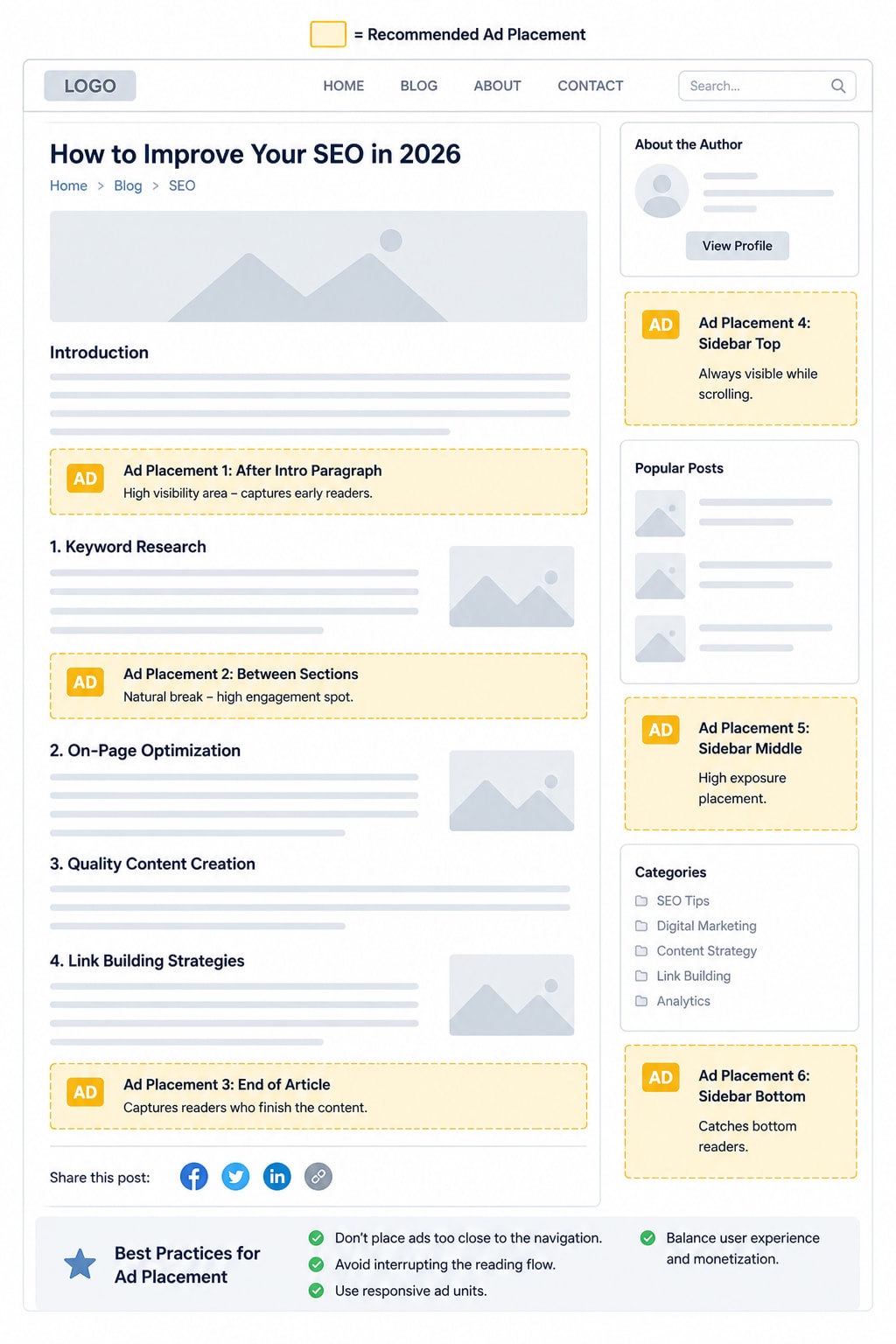
Best Ad Placement for SEO + Revenue Balance
text1✅ Good placements: 2- After first paragraph 3- Between sections (mid-content) 4- End of article 5- Sidebar (desktop only) 6 7❌ Bad placements (hurts SEO + user experience): 8- Before any content (above the fold only ads) 9- Multiple ads back-to-back 10- Pop-ups that block content 11- Auto-playing video ads
15. SEO for Different Platforms — Quick Reference
Next.js / React
- Use App Router with Server Components for SSR
- Use
next/imagefor all images - Add
metadataexport to every page - Use
app/sitemap.tsfor dynamic sitemap - Use
app/robots.tsfor robots.txt - Building with AI tools? Our guide to building a website with AI agents covers the speed and SEO checks to run before you go live
WordPress
- Install Yoast SEO or Rank Math plugin
- Use a fast theme: GeneratePress, Kadence, or Astra
- Install WP Rocket for caching and speed
- Use Cloudflare (free plan) for CDN and SSL
- Use ShortPixel for image optimization
Angular
typescript1// app.component.ts — Set meta tags programmatically 2import { Meta, Title } from "@angular/platform-browser"; 3 4constructor(private meta: Meta, private title: Title) { 5 this.title.setTitle("Advanced SEO Guide 2026"); 6 this.meta.addTag({ 7 name: "description", 8 content: "Complete SEO guide for 2026..." 9 }); 10}
Use Angular Universal for SSR — same benefit as Next.js SSR for SEO.
16. SEO Checklist — Do This for Every Blog Post
Before you hit publish, go through this:
Content
- H1 has your main keyword
- First paragraph answers the topic directly
- At least 3-5 internal links to related posts
- Images have descriptive alt text
- Content is 1500+ words for competitive topics
Technical
- Slug is short and has keyword (
/blog/advanced-seo-2026) - Meta title is 50-60 characters with keyword
- Meta description is 120-160 characters
- Canonical URL is set correctly
- OG image is set (1200x630px recommended)
- Schema markup is added (Article + Breadcrumb)
After Publishing
- Submit URL to Google Search Console for indexing
- Share on social media (Twitter/X, LinkedIn)
- Add link to this post from 2-3 existing high-traffic posts
- Check GA4 after 48 hours for initial traffic
Conclusion
SEO in 2026 is not a one-time task — it's a system. You set up the technical foundation once (sitemap, SSR, schema, analytics), and then consistently produce quality content that matches what your audience is searching for.
Here's the order to follow:
- Get a good domain
- Fix technical SEO (HTTPS, speed, mobile)
- Use semantic HTML properly
- Set up server-side rendering (Next.js SSR or WordPress)
- Generate dynamic sitemap + submit to Search Console
- Add schema markup to every post
- Install GA4 + connect Search Console
- Write long-form, E-E-A-T content consistently
- Build backlinks over time
- Add ads only after 3+ months and 1000+ monthly visitors
Consistent action beats perfect action every time. Start with what you can implement today, and keep improving.
Your website is a long-term asset. Every piece of good content you publish is a seed that can bring you traffic — and income — for years to come.
Want to use these skills on real projects? You can do a free internship at MetaSkillGroup. In our frontend development internship you work online with our team for 3 months on real projects and get a certificate anyone can verify.
- #seo
- #advanced seo
- #technical seo
- #nextjs seo
- #google analytics
- #sitemap
- #seo 2026
Related posts
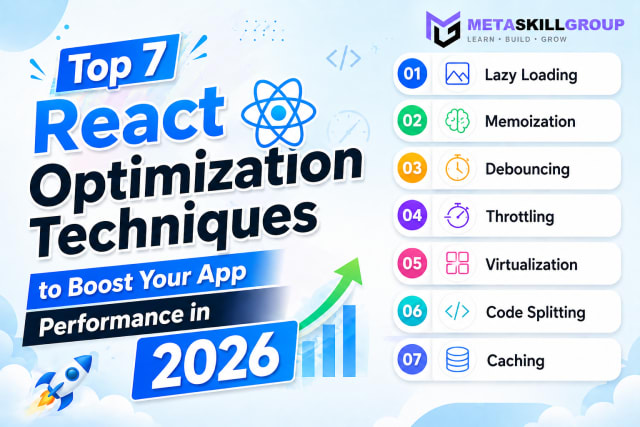 Top 7 React Optimization Techniques to Boost Your App Performance in 2026.Learn the top 7 React optimization techniques including Lazy Loading, Memoization, Debouncing, Throttling, Virtualization, Code Splitting, and Caching to build blazing fast React apps in 2026.
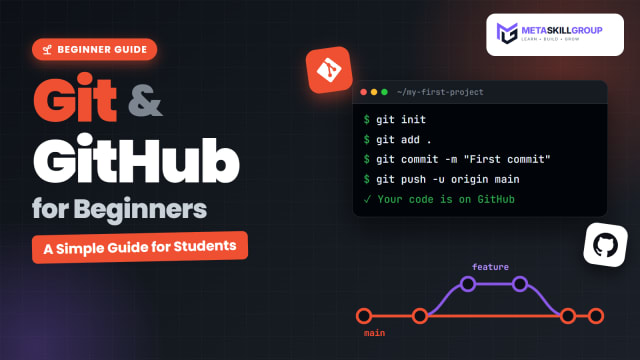 Git and GitHub for Beginners: A Simple Guide for StudentsLearn Git and GitHub from scratch in simple words. Understand the difference between Git and GitHub, set up Git, make your first commits, push to GitHub, use branches and pull requests, and build a GitHub profile that recruiters like, with a full commands cheat sheet.
 Internship Report Format for BCA and B.Tech Students (With Sample)A complete internship report format for BCA and B.Tech students: the 15 sections in order, the formatting rules most colleges follow, sample text for the declaration, acknowledgement and abstract, a sample weekly work log, a chapter plan and a final checklist before you submit.
❓ FAQs
Advanced SEO goes beyond keywords. It covers technical work (speed, HTTPS, mobile-friendly pages, server-side rendering, sitemaps and schema markup), content that matches search intent and shows E-E-A-T, internal linking in topic clusters, backlinks, and tracking results in Google Search Console and GA4.
Core Web Vitals are Google's page experience metrics: LCP (how fast the main content loads) should be under 2.5 seconds, INP (how fast the page responds to a click) under 200 milliseconds, and CLS (how much the layout jumps) under 0.1.
It is strongly recommended for React and Next.js sites. With client-side rendering only, Google first sees an almost empty page and may index it late or badly. Server-side rendering or static generation sends the full content in the HTML, which search engines and AI crawlers can read right away.
Open Google Search Console, add your website as a property, go to the Sitemaps section, enter sitemap.xml and click Submit. In Next.js you can generate the sitemap automatically with app/sitemap.ts; on WordPress, Yoast SEO creates one for you.
Most blogs should add Article (or BlogPosting) schema to every post, BreadcrumbList schema for the site structure, and FAQPage schema when a post has a question-and-answer section. Schema helps Google show rich results such as dates, breadcrumbs and FAQs.
Aim for 3–5 internal links to related posts in every article, using descriptive anchor text. Link cluster posts to their pillar page and back, and link from your popular posts to newer ones so Google finds them faster.
E-E-A-T stands for Experience, Expertise, Authoritativeness and Trust. Google rewards content written from real experience by people who know the topic, on sites others trust. Author bios, real examples and screenshots, cited sources and up-to-date content all help.
Answer the main question directly in the first paragraph, use clear headings, lists and tables, cover the topic in depth, and build strong E-E-A-T signals. Structured, helpful pages are the ones AI Overviews most often pick up.
Wait about three months and until you have around 1,000 monthly visitors. Early ads slow the page and hurt Core Web Vitals while Google is still evaluating your site. Start with Google AdSense and move to higher-paying networks as traffic grows.
Google Search Console shows what you already rank for, and Google Keyword Planner gives search volumes. Ubersuggest and AnswerThePublic have useful free plans for beginner research and question-based keywords. Focus on search intent, not just volume.
Comments
Join the conversation
Login to post comments and replies
No comments yet. Be the first!