How to Build a Website with AI Agents in 2026: A Step-by-Step Guide
Learn how to build a website with AI agents in 2026, step by step. Compare tools like Lovable, v0, Bolt, Replit and Cursor, write prompts that actually work, test AI-generated code, optimize for SEO and publish your site live, even if you only know a little code.
Categories
Tags

MetaSkillGroup
September 24, 2026A few years ago, building a website meant learning HTML, CSS, JavaScript, a framework and how hosting works. In 2026, you can describe the website you want in plain English, and an AI agent will plan it, write the code, fix its own errors and even put it online.
This shift has a name you have probably seen everywhere: vibe coding, which means building software by talking to AI instead of typing every line yourself. It is no longer a side experiment. Lovable, one of the most popular AI app builders, confirmed a $13.3 billion valuation in August 2026 (TechCrunch), and tools like Cursor, v0, Bolt and Claude Code are now part of everyday development.
But here is the part most "build a site in 5 minutes" videos skip: AI agents are fast, not flawless. The people getting great results are not the ones typing the most prompts. They are the ones who know what to ask, what to check and what to fix.
This guide walks you through the full process, step by step, the way it actually works in 2026.
💡 Who is this guide for? Beginners, students, freelancers and small business owners. If you know a little code, you will get even more out of it. If you don't, you can still follow every step.
In this guide:
- What Is an AI Agent?
- Why 2026 Is the Year of Agent-Built Websites
- The 3 Types of AI Website Building Tools
- Step 1: Define What You Want to Build
- Step 2: Choose the Right AI Tool
- Step 3: Write a Clear Brief for Your AI Agent
- Step 4: Generate the First Version
- Step 5: Improve Your Site One Page at a Time
- Step 6: Test Everything the AI Built
- Step 7: Make It Fast and SEO-Friendly
- Step 8: Publish Your Website
- 7 Common Mistakes to Avoid
- AI Agents vs Real Skills: What Still Matters
- Your Pre-Launch Checklist
What Is an AI Agent?
A regular AI chatbot answers. An AI agent acts.
When you ask a chatbot for a website, it gives you a block of code and leaves the rest to you. You copy it, paste it, run it, hit an error and go back to ask again.
An AI agent works more like a junior developer on your team. You give it a goal, and it breaks the goal into tasks, creates the files, runs the code, reads the error messages, fixes them and shows you the result. You stay in charge, but you are no longer doing every small step by hand.
| AI Chatbot | AI Agent | |
|---|---|---|
| What it does | Answers one question at a time | Completes a multi-step goal |
| Works with files | You copy and paste code | Creates and edits files itself |
| Runs the code | No | Yes, and checks the result |
| Fixes errors | Only if you paste the error back | Reads errors and retries on its own |
| Your role | Doer | Director and reviewer |

Figure 1: A chatbot hands you code. An agent does the work and shows you the result.
Why 2026 Is the Year of Agent-Built Websites
AI coding tools have existed for a while, but three changes made 2026 different:
- Agents now fix their own mistakes. Modern builders run the code, catch errors and retry before asking you anything. For example, v0 was rebuilt in February 2026 with git history, a VS Code-style editor and agent loops that repair their own errors (Serverspace).
- Everything lives in one place. Login, database, file storage and hosting now come built into many tools, so a beginner can go from idea to live website without setting up servers.
- It is affordable. Most tools have a free tier, and popular builders like Lovable, Bolt and Replit start at around $25 per month (Automation Atlas).
There is one catch worth remembering from the start. Industry research shows that 92% of US developers use AI coding tools daily, but only 29% trust the code those tools produce (Keyhole Software). That gap between using AI and trusting AI is exactly where your skills matter. We will come back to it in Step 6.
The 3 Types of AI Website Building Tools
Not every AI tool builds websites the same way. Picking the right category first will save you hours.
| Type | Popular Tools | Best For | Coding Needed |
|---|---|---|---|
| AI website builders | Framer AI, Wix, Webflow AI | Portfolios, business sites, landing pages | None |
| Prompt-to-app builders | Lovable, Bolt.new, v0, Replit Agent | Web apps, MVPs, dashboards, sites with login and data | None to basic |
| AI coding agents | Cursor, GitHub Copilot, Claude Code, OpenAI Codex | Custom projects, full control over your code | Basic to good |
AI website builders feel like classic drag-and-drop builders, but the AI creates the layout, colors and first draft of content for you. They are the fastest path to a good-looking business website.
Prompt-to-app builders go further. You chat with them, and they generate a complete working app with pages, a database and user accounts, then host it with one click.
AI coding agents work inside a code editor or terminal on real project files. They give you the most control, and they are the best choice if you want to learn development while you build.
💡 Pro Tip: Many builders combine tools. They create the first version in a prompt-to-app builder, export the code to GitHub, then continue with an AI coding agent like Cursor or Claude Code. You get speed at the start and full control later.
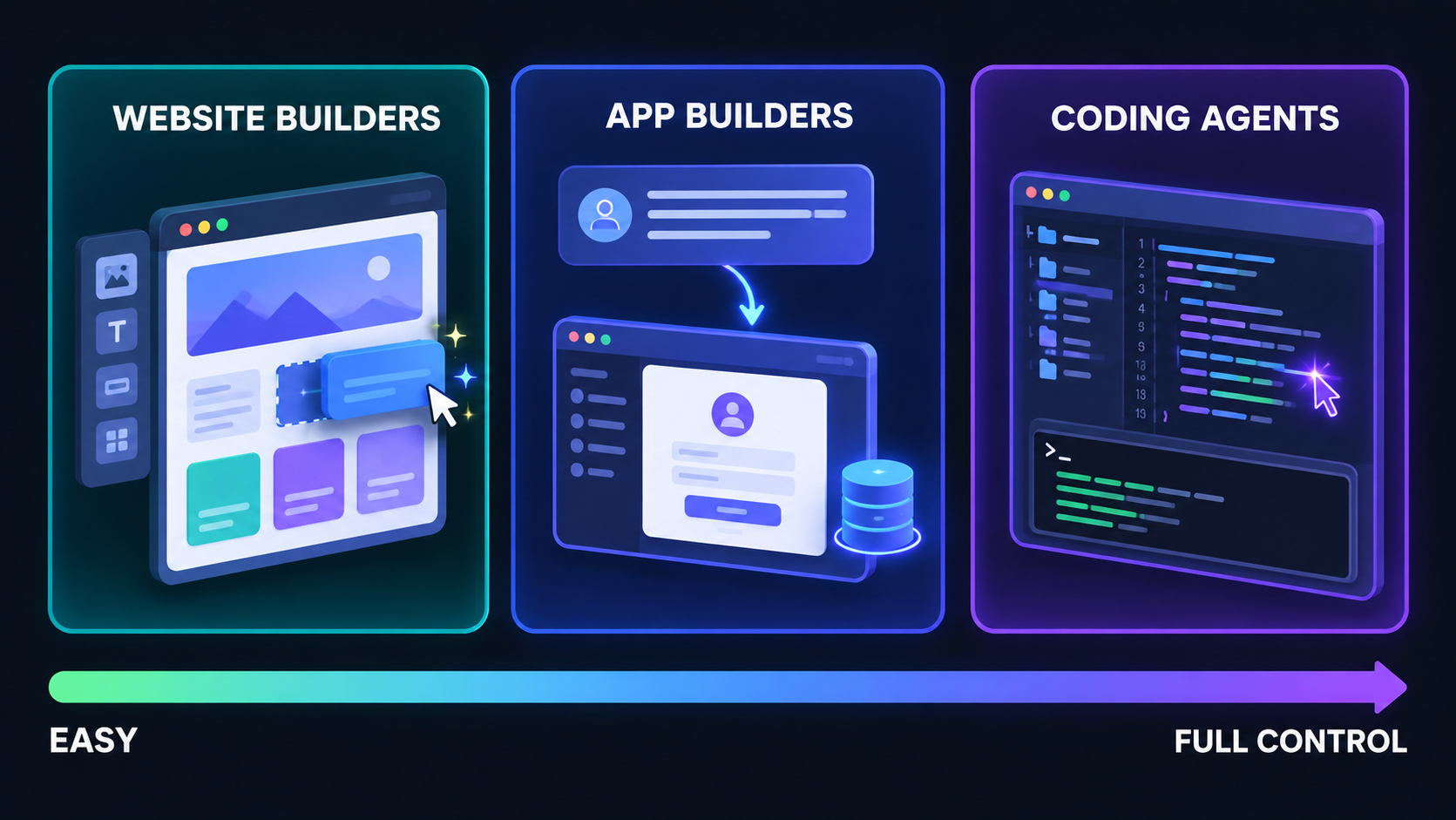
Figure 2: The three types of AI tools, from easiest to most control.
Step 1: Define What You Want to Build
The biggest reason AI-built websites look generic is not the AI. It is a vague request. "Make me a website for my café" gives the agent nothing to work with, so it fills the gaps with the most average choices possible.
Before you open any tool, spend 15 minutes answering five questions:
- Purpose: What should a visitor do on this site? Call you, buy something, sign up, read?
- Audience: Who are they, and are they mostly on mobile or desktop?
- Pages: Which pages do you need?
- Features: Contact form, booking, login, blog, payments?
- Style: Which colors, mood and example websites do you like?
Write the answers in a simple brief like this one. You will reuse it in Step 3.
text1Website name: GreenLeaf Café 2Purpose: Get more people to visit the café and order on WhatsApp 3Target audience: College students and young professionals, mostly on mobile 4Pages: Home, Menu, About, Contact 5Must-have features: Contact form, WhatsApp button, customer reviews, Google Map 6Style: Warm and minimal, earthy green and cream colors, rounded cards 7Sites I like: (paste 2-3 links of websites whose look you like)
Here is the complete roadmap you are going to follow from here:
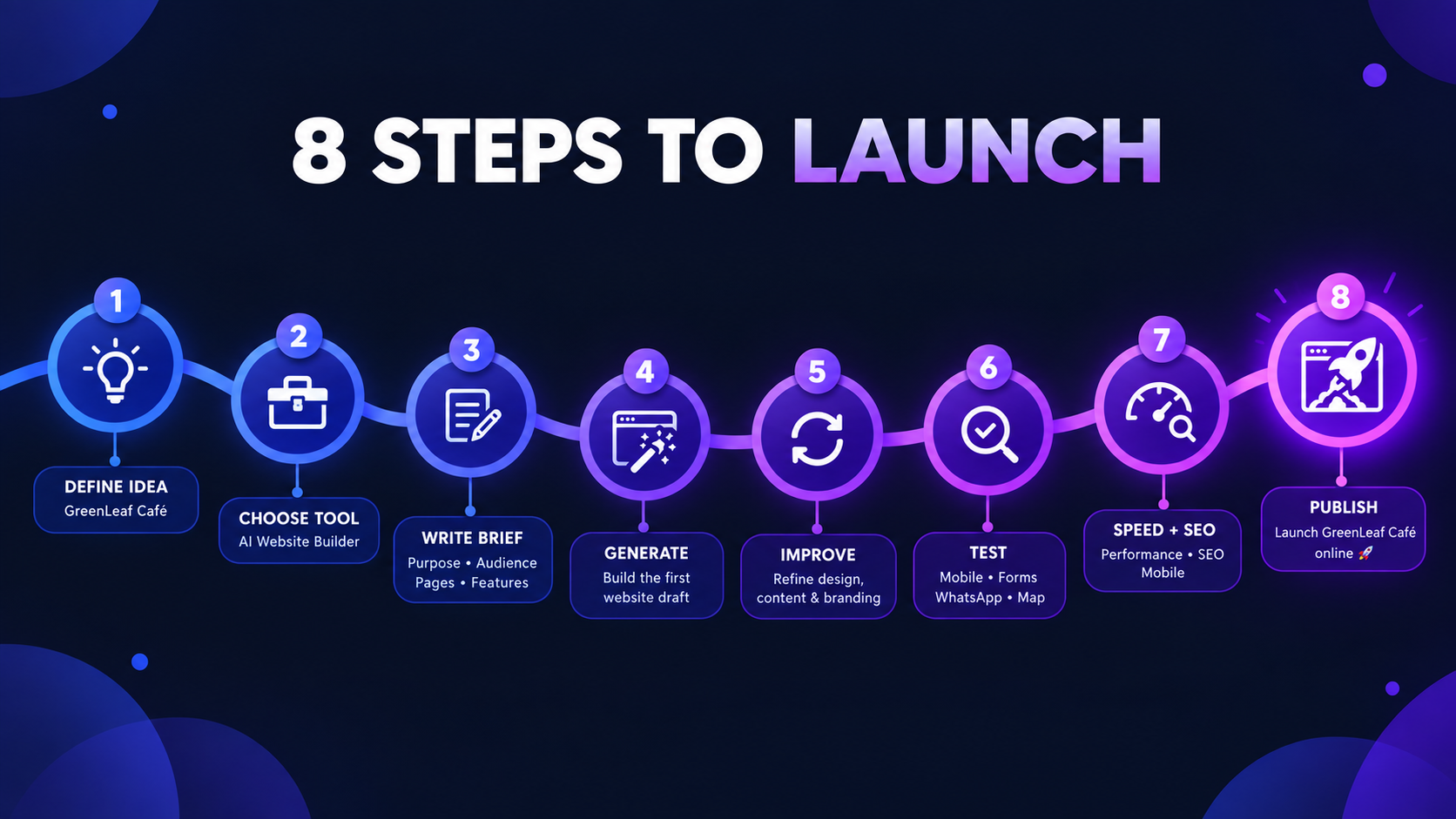
Figure 3: The 8-step roadmap from idea to live website.
Step 2: Choose the Right AI Tool
Now match your brief to a tool. Use this table as a starting point:
| If You Want To Build... | Start With | Why |
|---|---|---|
| A portfolio or small business website | Framer AI or Wix | Fastest path to a polished, design-first site |
| A startup MVP with login and a database | Lovable or Replit Agent | Frontend, backend and hosting in one place |
| A beautiful UI for an existing project | v0 | Strong at clean, modern interface design |
| A quick prototype to test an idea | Bolt.new | Very fast to go from prompt to working demo |
| A custom project where you want to learn | Cursor or Claude Code | Full control, and you see every line of code |
A few honest tips before you choose:
- Start on the free plan. Build a small test page first to see if you like how the tool works.
- Check how usage is counted. Lovable, Bolt and Replit all start at a similar monthly price, but each one measures usage differently (credits, tokens or effort-based checkpoints). A big project can use up a plan faster than you expect.
- Check that you can export your code. If the tool lets you push your project to GitHub, you are never locked in.
⚠️ Note: AI tool pricing and features change almost every month. Always check the official pricing page before you commit to a paid plan.
Step 3: Write a Clear Brief for Your AI Agent
This is the most important step in the whole guide. The quality of what the agent builds follows the quality of what you ask for.
A strong prompt has five parts:
- Role: who the agent should act as
- Context: what the project is and who it is for
- Task: exactly what to build
- Constraints: the rules it must follow
- Format: how you want the answer
Here is a complete example you can copy and adapt, based on the brief from Step 1:
text1You are a senior web designer and front-end developer. 2 3Build a responsive website for "GreenLeaf Café", a small vegan café in Pune. 4 5Audience: College students and young professionals, mostly on mobile. 6 7Pages: 8- Home: hero section, today's specials, customer reviews, location map 9- Menu: categories (Coffee, Smoothies, Bowls) with prices in INR 10- About: our story and team 11- Contact: form (name, email, message) and a WhatsApp button 12 13Style: Warm and minimal. Earthy green and cream colors, rounded cards, friendly font. 14 15Constraints: 16- Mobile-first design 17- Fast loading, no heavy animations 18- Accessible: proper heading order and alt text on every image 19- SEO: a unique title and meta description for every page 20 21Before writing any code, show me a short plan of the pages and components. 22Wait for my approval before you start building.
Notice the last two lines. Asking for a plan first is the single best habit you can build. It lets you catch a wrong idea in 30 seconds, before the agent spends 10 minutes building the wrong thing. Most AI tools now have a chat or plan mode made exactly for this.
Step 4: Generate the First Version
Once the plan looks right, approve it and let the agent build.
Keep your expectations realistic. A good first version usually gets you 70–80% of the way there. The structure, pages and basic design will be in place, while the details will need work.
When the first version is ready, check only the big picture:
- Are all the pages there?
- Does the navigation work?
- Does the layout make sense on a phone?
- Is the overall style close to what you described?
If the foundation is wrong, it is better to fix the brief and regenerate than to patch a broken base with 50 small prompts.
💡 Pro Tip: Save a version as soon as you have a first draft you like. Most AI builders have version history or checkpoints. If a later change breaks something, you can roll back in one click instead of starting over.
Step 5: Improve Your Site One Page at a Time
This is where your website goes from "AI-generated" to "actually good". The secret is simple: make one clear change per prompt.
Big, vague prompts confuse the agent and often break things that were already working. Small, specific prompts get predictable results.
| ❌ Vague Prompt | ✅ Clear Prompt |
|---|---|
| "Make it look better" | "Make the hero heading bigger, add more space between the menu cards, and change the main button color to indigo." |
| "Fix the form" | "The contact form submits but shows nothing. After submit, show a green 'Thanks! We'll reply within 24 hours' message and clear the fields." |
| "Add a blog" | "Add a Blog page that lists posts as cards with an image, title, date and a two-line summary. Clicking a card opens the full post." |
| "Make it mobile friendly" | "On screens smaller than 768px, show the menu cards in a single column and turn the navigation into a hamburger menu." |
Three habits make this step much faster:
- Point to the exact place. Say "the pricing section on the Home page", not "the section".
- Share what you see. Attach a screenshot, and paste the exact error message if something breaks.
- Test after every change. If something breaks, you will know exactly which prompt caused it.
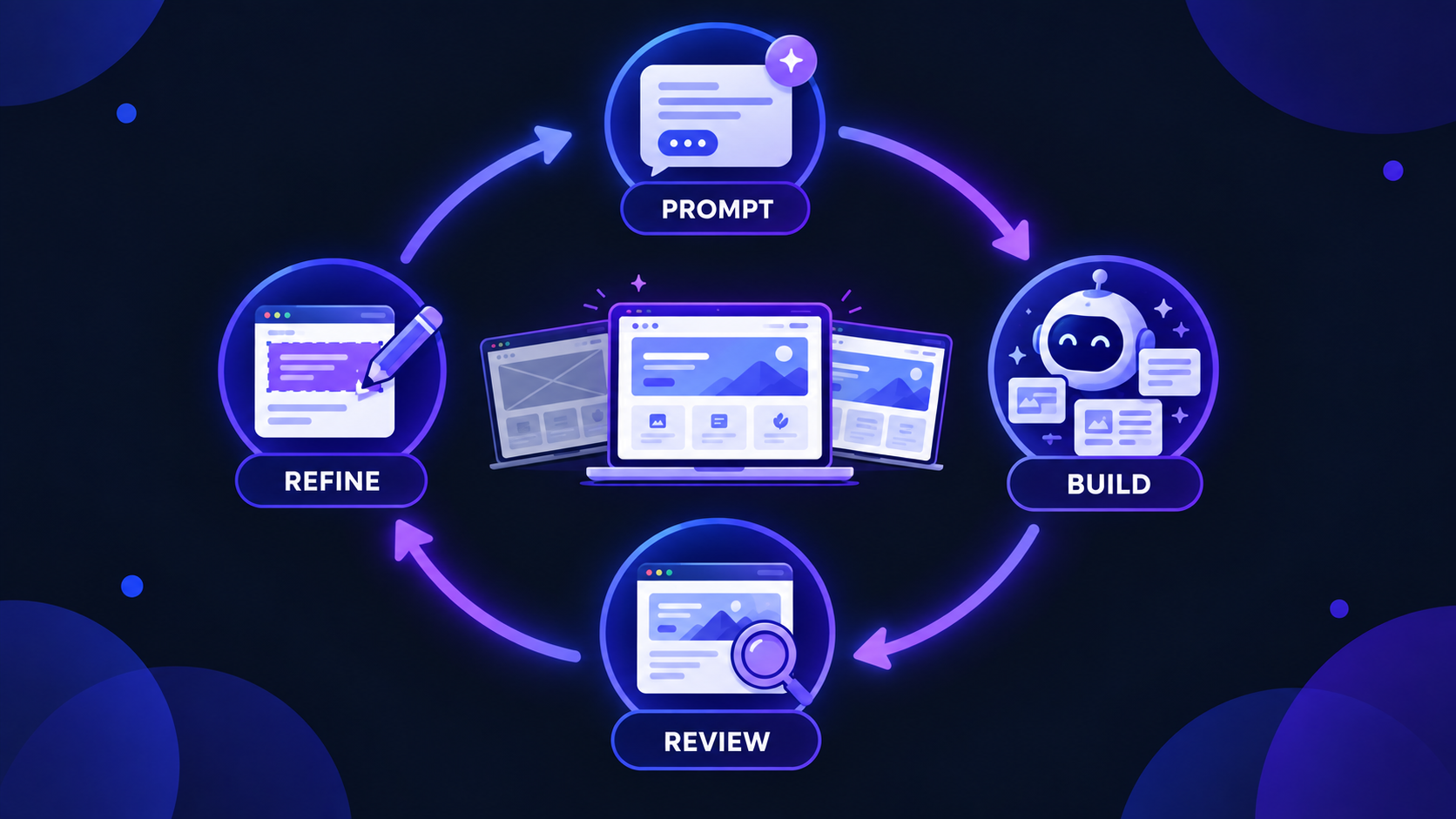
Figure 4: Prompt, build, review, refine. Repeat with one small change at a time.
Step 6: Test Everything the AI Built
Remember the trust gap from earlier? Here is why it exists. One analysis found that 45% of AI-generated code samples introduced a vulnerability from the OWASP Top 10, the list of the most common web security risks (Second Talent).
AI code often looks finished while hiding problems. Your job is to find them before your visitors do. Go through this test list:
- Click everything. Every link, every button, every menu item, on every page.
- Break your forms. Submit them empty, with a wrong email and with very long text. Good forms show clear error messages.
- Test on a real phone. Browser previews are helpful, but a real device shows real problems like tiny buttons or text that overflows the screen.
- Try different browsers. At minimum, Chrome and Safari.
- Check loading speed. If a page feels slow on mobile data, it is slow.
⚠️ Security Warning: Never paste secret API keys (payment, email or database keys) into frontend code. Ask your agent directly: "Is any secret key or password visible in the frontend code? If yes, move it to environment variables on the server." If your tool has a database, also ask it to confirm that users can only read and edit their own data.
If you know some code, open the files the agent changed and read through them. If you don't, ask the agent to explain the code in simple words. You will learn a lot, and you will spot strange decisions early.

Figure 5: Test on real devices. AI-built code often hides problems that only show up in use.
Step 7: Make It Fast and SEO-Friendly
A website nobody can find is a website nobody visits. The good news is that AI agents are excellent at technical SEO, as long as you ask for it clearly.
Copy this prompt into your tool once your pages are ready:
text1Audit this website for SEO and performance, then fix what you find: 2 3- Exactly one H1 per page, with a logical H2 and H3 order 4- A unique title (under 60 characters) and meta description (under 160 characters) for every page 5- Descriptive alt text on every image 6- Compress images and serve them in a modern format like WebP 7- Lazy-load images below the fold 8- Add Open Graph tags so links look good when shared on social media 9- Generate a sitemap.xml and a robots.txt file 10 11Show me the list of changes before you apply them.
After the fixes, test your site with Google PageSpeed Insights. It shows your Core Web Vitals score and explains exactly what is slowing your pages down. You can paste its suggestions straight back into your agent.
One more thing matters more than any technical fix: your content. AI can build the site in minutes, but the real work is still writing text and choosing images that actually represent you or your business (Zapier). Replace every generic AI paragraph with your own words, your real photos and your real customer reviews. Search engines and visitors can both tell the difference.
Step 8: Publish Your Website
You have three common ways to go live:
- One-click publish inside the tool. Lovable, Bolt, Replit, Framer and Wix can all publish your site on a free subdomain within seconds.
- Connect your own domain. Buy a domain (like
yourbrand.com) and connect it from the tool's settings. A custom domain looks far more professional and builds trust. - Export and deploy yourself. Push your code to GitHub, then deploy it on a platform like Vercel or Netlify. Every time you push a change, your live site updates automatically.
If you exported your project to GitHub, these three commands send your latest changes online:
bash1git add . 2git commit -m "Launch first version of my website" 3git push origin main
Once your site is live, add it to Google Search Console and submit your sitemap. This tells Google your site exists and helps your pages appear in search results faster.
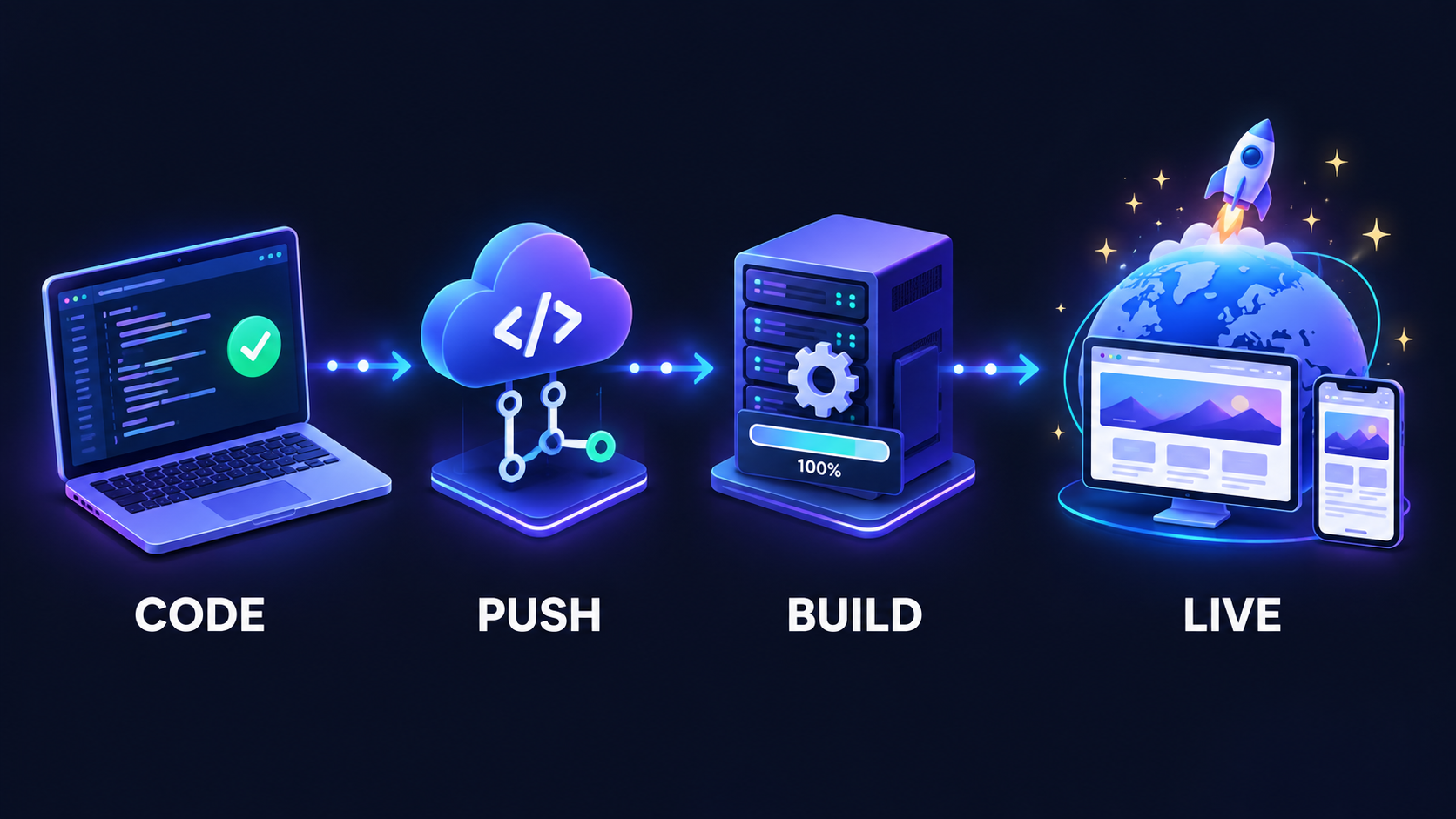
Figure 6: From your laptop to the world. Push, build and go live.
7 Common Mistakes to Avoid
- Starting without a plan. A vague request always produces a generic website.
- Asking for ten changes in one prompt. The agent gets confused and breaks things that were working.
- Publishing AI filler content. Generic text hurts both trust and SEO. Write your own.
- Skipping security checks. Exposed API keys and open databases are the most common problems in AI-built sites.
- Not saving versions. Without checkpoints, one bad prompt can cost you hours.
- Getting locked into one platform. If you can't export your code, you don't fully own your website.
- Letting the AI do all the thinking. The agent writes the code. You still decide what is right.
AI Agents vs Real Skills: What Still Matters
Here is a surprising finding. In a controlled study by METR, experienced developers using AI tools were actually 19% slower on real tasks, even though they believed they had been faster (Second Talent).
The lesson is not that AI doesn't work. It is that AI multiplies the skill you already have. Someone who understands how websites work can guide an agent, spot its mistakes and ship something solid. Someone who doesn't will get stuck the moment the agent gets something wrong, and it will.
The skills that matter most in 2026 are:
- Understanding how websites work: pages, APIs, databases and hosting
- Reading and reviewing code, even if you don't write every line yourself
- Debugging: finding out why something broke
- Product thinking: knowing what users actually need
- Clear communication: because a prompt is just a well-written instruction
This is why it is a great time to learn development. Companies are not looking for people who can only type prompts. They want people who understand what the AI builds, and who can take it from a demo to a real product.
🚀 Want to build real projects, not just prompts?
The Meta Skill Group Internship gives you hands-on experience on real-world projects, guided by experienced developers. Learn how real websites are planned, built, reviewed and shipped, and learn to use AI tools the way professionals do.
Your Pre-Launch Checklist
Before you share your website with the world, make sure every box is ticked:
- Every page, link and button works
- All forms show clear success and error messages
- The site looks right on a real phone, tablet and desktop
- No secret keys or passwords are visible in the frontend code
- Every page has a unique title and meta description
- Every image has descriptive alt text and is compressed
- The PageSpeed Insights score is checked and major issues are fixed
- AI filler text is replaced with your own content
- A custom domain is connected
- The sitemap is submitted to Google Search Console
Final Thoughts
Building a website with AI agents in 2026 is faster and cheaper than ever before. You can go from an idea to a live site in a single weekend.
But the builders who stand out follow the same simple process: plan clearly, choose the right tool, give precise instructions, improve one step at a time, and test everything. The AI does the heavy lifting. Your judgment is what turns it into something people actually want to use.
So pick a small project, write your brief and start building. And if you want to go further and build real-world skills alongside AI, the Meta Skill Group Internship is a great place to start.
❓ FAQs
Comments
Join the conversation
Login to post comments and replies
No comments yet. Be the first!