Drag & Drop File Uploader with Previews & Progress
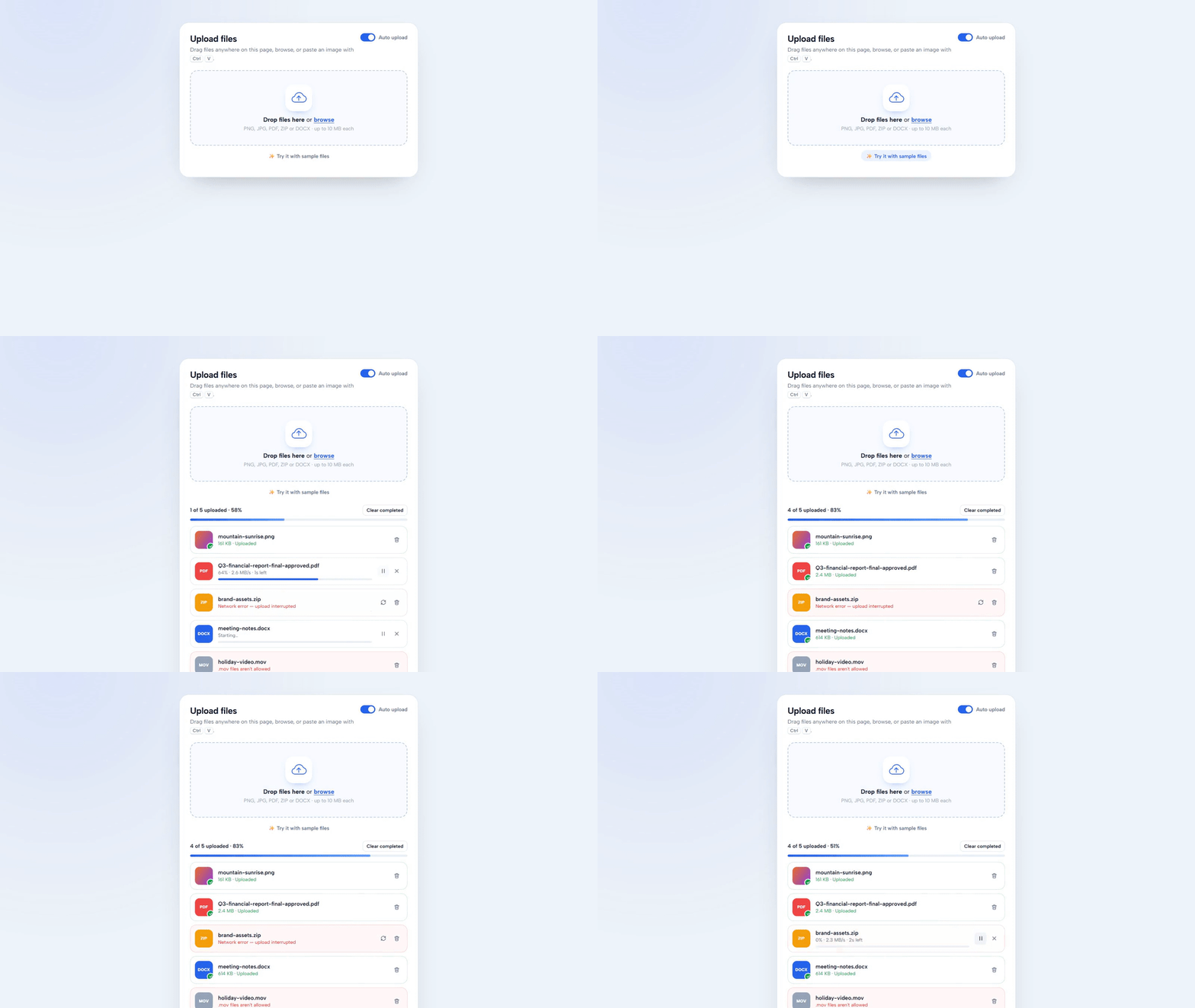
A polished file uploader: drop files on the zone or anywhere on the page (full-window overlay), browse or paste images with Ctrl V. Each file gets a thumbnail or type badge, middle-truncated name, its own progress bar with speed and time left, pause / resume, cancel and retry, plus clear type and size errors. Two uploads run at a time, an overall bar tracks everything and auto-upload can be switched off.
- Published 15 Oct 2026
- 11 views
Overview
Drag & Drop File Uploader with Previews & Progress
Drop, paste or browse — every file gets a preview, live progress, pause/resume and retry. Plain HTML, CSS and JavaScript.
What's Included
- Drop zone + full-window drag overlay, browse, and paste with Ctrl V
- Image thumbnails and coloured type badges
- Per-file progress with speed and time left
- Pause / resume, cancel, retry and remove
- Type and size validation with friendly errors
- Concurrency limit (2 at a time) and overall progress
- Auto-upload toggle with an 'Upload all' button
Dependencies
- Google Fonts — Albert Sans https://fonts.googleapis.com/css2?family=Albert+Sans:wght@400;500;600;700;800&display=swap
Already linked inside the component's files — no extra setup needed.
Desktop Preview
HTML
html1<!doctype html> 2<html lang="en"> 3 <head> 4 <meta charset="UTF-8" /> 5 <meta name="viewport" content="width=device-width, initial-scale=1.0" /> 6 <title>Drag & Drop File Uploader | MetaSkillGroup</title> 7 <link rel="stylesheet" href="style.css" /> 8 </head> 9 <body> 10 <!-- created by metaskillgroup-team --> 11 <main class="page"> 12 <section class="uploader" aria-labelledby="up-title"> 13 <header class="up-head"> 14 <div> 15 <h1 id="up-title">Upload files</h1> 16 <p>Drag files anywhere on this page, browse, or paste an image with <kbd>Ctrl</kbd> <kbd>V</kbd>.</p> 17 </div> 18 <label class="switch"> 19 <input type="checkbox" id="auto" checked /> 20 <span class="track" aria-hidden="true"><i></i></span> 21 Auto upload 22 </label> 23 </header> 24 25 <!-- Drop zone --> 26 <div class="dropzone" id="dropzone" tabindex="0" role="button" aria-describedby="dz-hint"> 27 <div class="dz-icon" aria-hidden="true"> 28 <svg viewBox="0 0 64 48"><path class="cloud" d="M18 40h30a12 12 0 0 0 1.5-23.9A17 17 0 0 0 16.6 19 10.5 10.5 0 0 0 18 40z" /><path class="arrow" d="M32 34V18M25 24l7-7 7 7" /></svg> 29 </div> 30 <p class="dz-title"><b>Drop files here</b> or <span class="link">browse</span></p> 31 <p class="dz-hint" id="dz-hint">PNG, JPG, PDF, ZIP or DOCX · up to 10 MB each</p> 32 <input type="file" id="file-input" multiple hidden /> 33 </div> 34 35 <button type="button" class="samples" id="samples">✨ Try it with sample files</button> 36 37 <!-- Overall progress --> 38 <div class="overall" id="overall" hidden> 39 <div class="ov-row"> 40 <span id="ov-text">0 of 0 uploaded</span> 41 <div class="ov-actions"> 42 <button type="button" id="start-all" hidden>Upload all</button> 43 <button type="button" id="clear-done">Clear completed</button> 44 </div> 45 </div> 46 <div class="ov-bar"><i id="ov-bar"></i></div> 47 </div> 48 49 <ul class="files" id="files" aria-live="polite"></ul> 50 </section> 51 </main> 52 53 <!-- Shown while dragging files over the window --> 54 <div class="drag-overlay" id="drag-overlay" aria-hidden="true"> 55 <div> 56 <span>📂</span> 57 <b>Drop to upload</b> 58 <small>Release anywhere</small> 59 </div> 60 </div> 61 62 <script src="script.js"></script> 63 </body> 64</html>
CSS
css1/* Importing Google Fonts - Albert Sans */ 2@import url("https://fonts.googleapis.com/css2?family=Albert+Sans:wght@400;500;600;700;800&display=swap"); 3 4* { 5 margin: 0; 6 padding: 0; 7 box-sizing: border-box; 8 font-family: "Albert Sans", sans-serif; 9} 10 11:root { 12 --bg: #eef2f9; 13 --card: #ffffff; 14 --text: #121a2c; 15 --muted: #64708a; 16 --faint: #9aa4b8; 17 --border: #dfe5f0; 18 --accent: #2563eb; 19 --accent-soft: #eaf1ff; 20 --good: #16a34a; 21 --bad: #dc2626; 22 --ease: cubic-bezier(0.2, 0.8, 0.2, 1); 23} 24 25body { 26 min-height: 100vh; 27 background: 28 radial-gradient(circle at 10% 0%, rgba(37, 99, 235, 0.1), transparent 40%), 29 var(--bg); 30 color: var(--text); 31} 32 33svg { 34 fill: none; 35 stroke: currentColor; 36 stroke-width: 2; 37 stroke-linecap: round; 38 stroke-linejoin: round; 39} 40 41[hidden] { 42 display: none !important; 43} 44 45kbd { 46 padding: 1px 6px; 47 border: 1px solid var(--border); 48 border-bottom-width: 2px; 49 border-radius: 6px; 50 background: var(--card); 51 font-family: inherit; 52 font-size: 0.75rem; 53 font-weight: 600; 54} 55 56.page { 57 display: grid; 58 place-items: start center; 59 min-height: 100vh; 60 padding: 60px 16px; 61} 62 63.uploader { 64 width: 100%; 65 max-width: 640px; 66 padding: 28px; 67 border: 1px solid var(--border); 68 border-radius: 26px; 69 background: var(--card); 70 box-shadow: 0 30px 70px -40px rgba(18, 26, 44, 0.4); 71} 72 73.up-head { 74 display: flex; 75 justify-content: space-between; 76 align-items: flex-start; 77 gap: 16px; 78 margin-bottom: 20px; 79} 80 81.up-head h1 { 82 font-size: 1.5rem; 83 letter-spacing: -0.02em; 84} 85 86.up-head p { 87 margin-top: 4px; 88 color: var(--muted); 89 font-size: 0.92rem; 90 line-height: 1.55; 91} 92 93/* Toggle switch */ 94.switch { 95 display: flex; 96 align-items: center; 97 gap: 9px; 98 flex-shrink: 0; 99 color: var(--muted); 100 font-size: 0.86rem; 101 font-weight: 600; 102 cursor: pointer; 103} 104 105.switch input { 106 position: absolute; 107 opacity: 0; 108} 109 110.track { 111 position: relative; 112 width: 40px; 113 height: 22px; 114 border-radius: 999px; 115 background: #cfd6e4; 116 transition: background 0.25s; 117} 118 119.track i { 120 position: absolute; 121 top: 3px; 122 left: 3px; 123 width: 16px; 124 height: 16px; 125 border-radius: 50%; 126 background: #fff; 127 box-shadow: 0 1px 3px rgba(0, 0, 0, 0.25); 128 transition: transform 0.25s var(--ease); 129} 130 131.switch input:checked + .track { 132 background: var(--accent); 133} 134 135.switch input:checked + .track i { 136 transform: translateX(18px); 137} 138 139.switch input:focus-visible + .track { 140 outline: 3px solid rgba(37, 99, 235, 0.35); 141 outline-offset: 2px; 142} 143 144/* ---------- Drop zone ---------- */ 145.dropzone { 146 display: grid; 147 justify-items: center; 148 gap: 6px; 149 padding: 36px 20px; 150 border: 2px dashed #c4cfe3; 151 border-radius: 20px; 152 background: #f8faff; 153 text-align: center; 154 cursor: pointer; 155 transition: border-color 0.25s, background 0.25s, transform 0.25s var(--ease); 156} 157 158.dropzone:hover, 159.dropzone:focus-visible { 160 border-color: var(--accent); 161 background: var(--accent-soft); 162 outline: none; 163} 164 165.dropzone.is-over { 166 border-color: var(--accent); 167 background: var(--accent-soft); 168 transform: scale(1.015); 169} 170 171.dz-icon { 172 display: grid; 173 place-items: center; 174 width: 72px; 175 height: 72px; 176 margin-bottom: 6px; 177 border-radius: 22px; 178 background: var(--card); 179 color: var(--accent); 180 box-shadow: 0 10px 24px -14px rgba(37, 99, 235, 0.6); 181} 182 183.dz-icon svg { 184 width: 46px; 185 height: 36px; 186 stroke-width: 2.6; 187} 188 189.dz-icon .arrow { 190 animation: lift 1.8s var(--ease) infinite; 191} 192 193.is-over .dz-icon .arrow { 194 animation-duration: 0.7s; 195} 196 197@keyframes lift { 198 50% { 199 transform: translateY(-4px); 200 } 201} 202 203.dz-title { 204 font-size: 1.02rem; 205} 206 207.dz-title .link { 208 color: var(--accent); 209 font-weight: 700; 210 text-decoration: underline; 211 text-underline-offset: 3px; 212} 213 214.dz-hint { 215 color: var(--faint); 216 font-size: 0.84rem; 217} 218 219.samples { 220 display: block; 221 margin: 12px auto 0; 222 padding: 6px 12px; 223 border: 0; 224 border-radius: 999px; 225 background: none; 226 color: var(--muted); 227 font-size: 0.85rem; 228 font-weight: 600; 229 cursor: pointer; 230} 231 232.samples:hover { 233 background: var(--accent-soft); 234 color: var(--accent); 235} 236 237/* ---------- Overall progress ---------- */ 238.overall { 239 margin-top: 20px; 240} 241 242.ov-row { 243 display: flex; 244 justify-content: space-between; 245 align-items: center; 246 gap: 10px; 247 font-size: 0.88rem; 248 font-weight: 600; 249} 250 251.ov-actions { 252 display: flex; 253 gap: 6px; 254} 255 256.ov-actions button { 257 padding: 6px 10px; 258 border: 1px solid var(--border); 259 border-radius: 9px; 260 background: var(--card); 261 color: var(--text); 262 font-size: 0.8rem; 263 font-weight: 600; 264 cursor: pointer; 265} 266 267#start-all { 268 border-color: var(--accent); 269 background: var(--accent); 270 color: #fff; 271} 272 273.ov-bar { 274 height: 6px; 275 margin-top: 8px; 276 border-radius: 6px; 277 background: #e9eef7; 278 overflow: hidden; 279} 280 281.ov-bar i { 282 display: block; 283 width: 0; 284 height: 100%; 285 border-radius: inherit; 286 background: linear-gradient(90deg, var(--accent), #60a5fa); 287 transition: width 0.3s; 288} 289 290/* ---------- File list ---------- */ 291.files { 292 display: grid; 293 gap: 10px; 294 margin-top: 14px; 295 list-style: none; 296} 297 298.file { 299 display: grid; 300 grid-template-columns: 48px 1fr auto; 301 align-items: center; 302 gap: 14px; 303 padding: 12px 12px 12px 12px; 304 border: 1px solid var(--border); 305 border-radius: 16px; 306 animation: slideIn 0.35s var(--ease); 307 transition: border-color 0.3s, background 0.3s; 308} 309 310@keyframes slideIn { 311 from { 312 opacity: 0; 313 transform: translateY(8px); 314 } 315} 316 317.file.is-removing { 318 animation: slideOut 0.3s var(--ease) forwards; 319} 320 321@keyframes slideOut { 322 to { 323 opacity: 0; 324 transform: translateX(20px); 325 } 326} 327 328.file.error { 329 border-color: #fecaca; 330 background: #fff7f7; 331} 332 333.file.done { 334 border-color: #c9ebd5; 335} 336 337.thumb { 338 position: relative; 339 display: grid; 340 place-items: center; 341 width: 48px; 342 height: 48px; 343 border-radius: 12px; 344 background: var(--c, #e9eef7); 345 color: #fff; 346 font-size: 0.66rem; 347 font-weight: 800; 348 letter-spacing: 0.04em; 349 overflow: hidden; 350} 351 352.thumb img { 353 width: 100%; 354 height: 100%; 355 object-fit: cover; 356} 357 358.thumb .ok { 359 position: absolute; 360 right: -4px; 361 bottom: -4px; 362 display: grid; 363 place-items: center; 364 width: 20px; 365 height: 20px; 366 border: 2px solid var(--card); 367 border-radius: 50%; 368 background: var(--good); 369 animation: pop 0.35s var(--ease); 370} 371 372.thumb .ok svg { 373 width: 11px; 374 height: 11px; 375 stroke-width: 3.5; 376} 377 378@keyframes pop { 379 from { 380 transform: scale(0); 381 } 382} 383 384.info { 385 min-width: 0; 386} 387 388.name { 389 display: flex; 390 font-size: 0.93rem; 391 font-weight: 600; 392} 393 394/* Long names are cut in the middle so the extension stays visible */ 395.name .start { 396 overflow: hidden; 397 text-overflow: ellipsis; 398 white-space: nowrap; 399} 400 401.name .end { 402 flex-shrink: 0; 403 white-space: nowrap; 404} 405 406.status { 407 margin-top: 2px; 408 color: var(--muted); 409 font-size: 0.8rem; 410 font-variant-numeric: tabular-nums; 411} 412 413.error .status { 414 color: var(--bad); 415} 416 417.done .status { 418 color: var(--good); 419} 420 421.bar { 422 height: 5px; 423 margin-top: 8px; 424 border-radius: 5px; 425 background: #e9eef7; 426 overflow: hidden; 427} 428 429.bar i { 430 display: block; 431 width: var(--p, 0%); 432 height: 100%; 433 border-radius: inherit; 434 background: var(--accent); 435 transition: width 0.25s linear; 436} 437 438.paused .bar i { 439 background: #f59e0b; 440} 441 442.done .bar, 443.error .bar, 444.queued .bar { 445 display: none; 446} 447 448.actions { 449 display: flex; 450 gap: 4px; 451} 452 453.act { 454 display: grid; 455 place-items: center; 456 width: 32px; 457 height: 32px; 458 border: 0; 459 border-radius: 9px; 460 background: none; 461 color: var(--muted); 462 cursor: pointer; 463 transition: background 0.2s, color 0.2s; 464} 465 466.act:hover { 467 background: #eef2f9; 468 color: var(--text); 469} 470 471.act.retry:hover { 472 color: var(--accent); 473} 474 475.act.remove:hover { 476 color: var(--bad); 477} 478 479.act svg { 480 width: 17px; 481 height: 17px; 482} 483 484.dropzone:focus-visible, 485.act:focus-visible, 486.samples:focus-visible, 487.ov-actions button:focus-visible { 488 outline: 3px solid rgba(37, 99, 235, 0.35); 489 outline-offset: 2px; 490} 491 492/* ---------- Full-window drag overlay ---------- */ 493.drag-overlay { 494 position: fixed; 495 inset: 12px; 496 z-index: 50; 497 display: grid; 498 place-items: center; 499 border: 3px dashed var(--accent); 500 border-radius: 28px; 501 background: rgba(234, 241, 255, 0.92); 502 backdrop-filter: blur(6px); 503 opacity: 0; 504 visibility: hidden; 505 transition: opacity 0.2s, visibility 0.2s; 506 pointer-events: none; 507} 508 509.drag-overlay.is-on { 510 opacity: 1; 511 visibility: visible; 512} 513 514.drag-overlay div { 515 display: grid; 516 justify-items: center; 517 gap: 6px; 518 color: var(--accent); 519} 520 521.drag-overlay span { 522 font-size: 3.4rem; 523 animation: bounce 0.8s var(--ease) infinite alternate; 524} 525 526@keyframes bounce { 527 to { 528 transform: translateY(-12px); 529 } 530} 531 532.drag-overlay b { 533 font-size: 1.6rem; 534} 535 536.drag-overlay small { 537 color: var(--muted); 538} 539 540/* ---------- Responsive ---------- */ 541@media (max-width: 560px) { 542 .page { 543 padding: 20px 10px; 544 } 545 546 .uploader { 547 padding: 20px 16px; 548 border-radius: 20px; 549 } 550 551 .up-head { 552 flex-direction: column; 553 } 554 555 .file { 556 grid-template-columns: 40px 1fr auto; 557 gap: 10px; 558 } 559 560 .thumb { 561 width: 40px; 562 height: 40px; 563 } 564} 565 566@media (prefers-reduced-motion: reduce) { 567 *, 568 *::before, 569 *::after { 570 animation: none !important; 571 transition: none !important; 572 } 573}
JavaScript
javascript1// ---------- Settings ---------- 2const MAX_SIZE = 10 * 1024 * 1024; // 10 MB 3const ACCEPT = ["png", "jpg", "jpeg", "gif", "webp", "pdf", "zip", "docx", "doc"]; 4const CONCURRENCY = 2; // files uploading at the same time 5const FAIL_RATE = 0.1; // simulated network failures (demo only) 6 7// Colours for non-image file badges 8const TYPE_COLOR = { pdf: "#ef4444", zip: "#f59e0b", docx: "#2563eb", doc: "#2563eb" }; 9 10const $ = (id) => document.getElementById(id); 11const listEl = $("files"); 12const items = []; 13let nextId = 1; 14 15const ICON = { 16 pause: '<path d="M8 5v14M16 5v14"/>', 17 play: '<path d="M7 5l12 7-12 7z"/>', 18 x: '<path d="M6 6l12 12M18 6L6 18"/>', 19 retry: '<path d="M4 12a8 8 0 0 1 14-5.3L20 9M20 4v5h-5M20 12a8 8 0 0 1-14 5.3L4 15M4 20v-5h5"/>', 20 trash: '<path d="M4 7h16M10 11v6M14 11v6M6 7l1 12a2 2 0 0 0 2 2h6a2 2 0 0 0 2-2l1-12M9 7V4h6v3"/>', 21 upload: '<path d="M12 16V4M7 9l5-5 5 5M5 20h14"/>', 22 check: '<path d="M5 12.5l4.5 4.5L19 7.5"/>', 23}; 24const icon = (name) => `<svg viewBox="0 0 24 24" aria-hidden="true">${ICON[name]}</svg>`; 25 26const fmtSize = (b) => (b < 1024 ? `${b} B` : b < 1048576 ? `${(b / 1024).toFixed(0)} KB` : `${(b / 1048576).toFixed(1)} MB`); 27const extOf = (name) => (name.split(".").pop() || "").toLowerCase(); 28const esc = (s) => s.replace(/[&<>"']/g, (c) => ({ "&": "&", "<": "<", ">": ">", '"': """, "'": "'" })[c]); 29 30// ---------- Adding files ---------- 31const addFiles = (files, opts = {}) => { 32 for (const file of files) { 33 const ext = extOf(file.name); 34 const item = { 35 id: nextId++, 36 file, 37 name: file.name, 38 ext, 39 size: file.size, 40 loaded: 0, 41 speed: 0, 42 status: "queued", 43 error: "", 44 // Demo samples fail only where asked; real files get a small random chance 45 failAt: opts.failNames 46 ? opts.failNames.includes(file.name) ? 0.55 : null 47 : Math.random() < FAIL_RATE ? 0.3 + Math.random() * 0.5 : null, 48 preview: file.type.startsWith("image/") ? URL.createObjectURL(file) : null, 49 }; 50 if (!ACCEPT.includes(ext)) { 51 item.status = "error"; 52 item.error = `.${ext} files aren't allowed`; 53 } else if (file.size > MAX_SIZE) { 54 item.status = "error"; 55 item.error = `Too large — ${fmtSize(file.size)} (max ${fmtSize(MAX_SIZE)})`; 56 } 57 items.push(item); 58 listEl.insertAdjacentHTML("beforeend", `<li class="file" data-id="${item.id}"></li>`); 59 paint(item); 60 } 61 updateOverall(); 62 if ($("auto").checked) pump(); 63}; 64 65// ---------- Upload simulation (swap for XMLHttpRequest / fetch with progress) ---------- 66const timers = new Map(); 67 68const pump = () => { 69 const active = items.filter((i) => i.status === "uploading").length; 70 items 71 .filter((i) => i.status === "queued") 72 .slice(0, Math.max(0, CONCURRENCY - active)) 73 .forEach(start); 74}; 75 76const start = (item) => { 77 item.status = "uploading"; 78 paint(item); 79 const TICK = 200; 80 timers.set( 81 item.id, 82 setInterval(() => { 83 // Speed wobbles a little like a real connection 84 item.speed = (0.8 + Math.random() * 1.8) * 1048576; 85 item.loaded = Math.min(item.size, item.loaded + item.speed * (TICK / 1000)); 86 if (item.failAt !== null && item.loaded / item.size >= item.failAt) { 87 stop(item); 88 item.status = "error"; 89 item.error = "Network error — upload interrupted"; 90 item.failAt = null; // a retry will succeed 91 } else if (item.loaded >= item.size) { 92 stop(item); 93 item.status = "done"; 94 } 95 paint(item); 96 updateOverall(); 97 if (item.status !== "uploading") pump(); 98 }, TICK), 99 ); 100}; 101 102const stop = (item) => { 103 clearInterval(timers.get(item.id)); 104 timers.delete(item.id); 105}; 106 107// ---------- Rendering one row ---------- 108const statusText = (i) => { 109 const pct = Math.floor((i.loaded / i.size) * 100); 110 switch (i.status) { 111 case "queued": 112 return $("auto").checked ? "Waiting in queue…" : `${fmtSize(i.size)} · Ready to upload`; 113 case "uploading": { 114 if (!i.speed) return "Starting…"; 115 const left = Math.max(1, Math.ceil((i.size - i.loaded) / i.speed)); 116 return `${pct}% · ${fmtSize(i.speed)}/s · ${left}s left`; 117 } 118 case "paused": 119 return `Paused at ${pct}%`; 120 case "done": 121 return `${fmtSize(i.size)} · Uploaded`; 122 default: 123 return i.error; 124 } 125}; 126 127const actionsFor = (i) => { 128 const btn = (act, label, ic, cls = "") => `<button type="button" class="act ${cls}" data-act="${act}" aria-label="${label} ${esc(i.name)}" title="${label}">${icon(ic)}</button>`; 129 switch (i.status) { 130 case "uploading": 131 return btn("pause", "Pause", "pause") + btn("cancel", "Cancel", "x"); 132 case "paused": 133 return btn("resume", "Resume", "play") + btn("cancel", "Cancel", "x"); 134 case "queued": 135 return ($("auto").checked ? "" : btn("start", "Upload", "upload", "retry")) + btn("remove", "Remove", "trash", "remove"); 136 case "error": 137 return (i.error.startsWith("Network") ? btn("retry", "Retry", "retry", "retry") : "") + btn("remove", "Remove", "trash", "remove"); 138 default: 139 return btn("remove", "Remove", "trash", "remove"); 140 } 141}; 142 143const thumbHTML = (i) => { 144 const inner = i.preview ? `<img src="${i.preview}" alt="" />` : i.ext.toUpperCase().slice(0, 4); 145 const ok = i.status === "done" ? `<span class="ok">${icon("check")}</span>` : ""; 146 return `<span class="thumb" style="--c:${i.preview ? "#e9eef7" : TYPE_COLOR[i.ext] ?? "#94a3b8"}">${inner}${ok}</span>`; 147}; 148 149const paint = (i) => { 150 const li = listEl.querySelector(`[data-id="${i.id}"]`); 151 if (!li) return; 152 const dot = i.name.lastIndexOf("."); 153 const [startPart, endPart] = dot > 0 && i.name.length > 28 ? [i.name.slice(0, dot - 4), i.name.slice(dot - 4)] : [i.name, ""]; 154 li.className = `file ${i.status}`; 155 li.innerHTML = `${thumbHTML(i)} 156 <div class="info"> 157 <div class="name" title="${esc(i.name)}"><span class="start">${esc(startPart)}</span><span class="end">${esc(endPart)}</span></div> 158 <div class="status">${statusText(i)}</div> 159 <div class="bar" role="progressbar" aria-label="${esc(i.name)} upload" aria-valuemin="0" aria-valuemax="100" aria-valuenow="${Math.floor((i.loaded / i.size) * 100)}"><i style="--p:${(i.loaded / i.size) * 100}%"></i></div> 160 </div> 161 <div class="actions">${actionsFor(i)}</div>`; 162}; 163 164const updateOverall = () => { 165 const valid = items.filter((i) => !(i.status === "error" && !i.error.startsWith("Network"))); 166 $("overall").hidden = items.length === 0; 167 const done = valid.filter((i) => i.status === "done").length; 168 const total = valid.reduce((s, i) => s + i.size, 0) || 1; 169 const pct = Math.round((valid.reduce((s, i) => s + i.loaded, 0) / total) * 100); 170 $("ov-text").textContent = `${done} of ${valid.length} uploaded · ${pct}%`; 171 $("ov-bar").style.width = `${pct}%`; 172 $("start-all").hidden = $("auto").checked || !items.some((i) => i.status === "queued"); 173}; 174 175const removeItem = (item) => { 176 stop(item); 177 if (item.preview) URL.revokeObjectURL(item.preview); 178 items.splice(items.indexOf(item), 1); 179 const li = listEl.querySelector(`[data-id="${item.id}"]`); 180 li?.classList.add("is-removing"); 181 setTimeout(() => li?.remove(), 300); 182 updateOverall(); 183 pump(); 184}; 185 186// ---------- Row buttons ---------- 187listEl.addEventListener("click", (e) => { 188 const btn = e.target.closest("[data-act]"); 189 if (!btn) return; 190 const item = items.find((i) => i.id === Number(btn.closest(".file").dataset.id)); 191 const act = btn.dataset.act; 192 if (act === "pause") { 193 stop(item); 194 item.status = "paused"; 195 paint(item); 196 pump(); 197 } 198 if (act === "resume") { 199 item.status = "queued"; 200 paint(item); 201 pump(); 202 // Resume jumps the queue 203 if (item.status === "queued") start(item); 204 } 205 if (act === "start") start(item); 206 if (act === "retry") { 207 item.loaded = 0; 208 item.status = "queued"; 209 item.error = ""; 210 paint(item); 211 pump(); 212 } 213 if (act === "cancel" || act === "remove") removeItem(item); 214 updateOverall(); 215}); 216 217$("start-all").addEventListener("click", () => { 218 items.filter((i) => i.status === "queued").forEach((i) => (i.status = "queued")); 219 const queued = items.filter((i) => i.status === "queued"); 220 queued.slice(0, CONCURRENCY).forEach(start); 221 // the rest start as these finish 222 const wasAuto = $("auto").checked; 223 $("auto").checked = true; 224 pump(); 225 $("auto").checked = wasAuto; 226 updateOverall(); 227}); 228 229$("clear-done").addEventListener("click", () => items.filter((i) => i.status === "done").forEach(removeItem)); 230 231$("auto").addEventListener("change", () => { 232 items.filter((i) => i.status === "queued").forEach(paint); 233 updateOverall(); 234 if ($("auto").checked) pump(); 235}); 236 237// ---------- Ways to add files: browse, drop zone, whole window, paste ---------- 238const input = $("file-input"); 239const zone = $("dropzone"); 240const overlay = $("drag-overlay"); 241 242zone.addEventListener("click", () => input.click()); 243zone.addEventListener("keydown", (e) => { 244 if (e.key === "Enter" || e.key === " ") { 245 e.preventDefault(); 246 input.click(); 247 } 248}); 249input.addEventListener("change", () => { 250 addFiles(input.files); 251 input.value = ""; 252}); 253 254let dragDepth = 0; 255const hasFiles = (e) => [...(e.dataTransfer?.types ?? [])].includes("Files"); 256window.addEventListener("dragenter", (e) => { 257 if (!hasFiles(e)) return; 258 dragDepth++; 259 overlay.classList.add("is-on"); 260 zone.classList.add("is-over"); 261}); 262window.addEventListener("dragleave", () => { 263 dragDepth = Math.max(0, dragDepth - 1); 264 if (!dragDepth) { 265 overlay.classList.remove("is-on"); 266 zone.classList.remove("is-over"); 267 } 268}); 269window.addEventListener("dragover", (e) => hasFiles(e) && e.preventDefault()); 270window.addEventListener("drop", (e) => { 271 if (!hasFiles(e)) return; 272 e.preventDefault(); 273 dragDepth = 0; 274 overlay.classList.remove("is-on"); 275 zone.classList.remove("is-over"); 276 addFiles(e.dataTransfer.files); 277}); 278 279let pasteCount = 0; 280window.addEventListener("paste", (e) => { 281 const files = [...(e.clipboardData?.files ?? [])].map( 282 (f) => new File([f], f.name === "image.png" ? `pasted-image-${++pasteCount}.png` : f.name, { type: f.type }), 283 ); 284 if (files.length) addFiles(files); 285}); 286 287// ---------- Sample files for the demo ---------- 288const makeImage = (name, colors, label) => 289 new Promise((resolve) => { 290 const c = Object.assign(document.createElement("canvas"), { width: 480, height: 320 }); 291 const g = c.getContext("2d"); 292 const grad = g.createLinearGradient(0, 0, 480, 320); 293 grad.addColorStop(0, colors[0]); 294 grad.addColorStop(1, colors[1]); 295 g.fillStyle = grad; 296 g.fillRect(0, 0, 480, 320); 297 g.fillStyle = "rgba(255,255,255,.9)"; 298 g.font = "bold 44px sans-serif"; 299 g.fillText(label, 30, 290); 300 c.toBlob((blob) => resolve(new File([blob], name, { type: "image/png" }))); 301 }); 302const fakeFile = (name, mb, type) => new File([new Uint8Array(Math.round(mb * 1048576))], name, { type }); 303 304$("samples").addEventListener("click", async () => { 305 const files = [ 306 await makeImage("mountain-sunrise.png", ["#f97316", "#7c3aed"], "⛰"), 307 fakeFile("Q3-financial-report-final-approved.pdf", 2.4, "application/pdf"), 308 fakeFile("brand-assets.zip", 3.2, "application/zip"), 309 fakeFile("meeting-notes.docx", 0.6, "application/vnd.openxmlformats-officedocument.wordprocessingml.document"), 310 fakeFile("holiday-video.mov", 24, "video/quicktime"), 311 await makeImage("team-photo.png", ["#06b6d4", "#2563eb"], "👥"), 312 ]; 313 // brand-assets.zip always "fails" once so you can see Retry 314 addFiles(files, { failNames: ["brand-assets.zip"] }); 315});
Built by MetaSkillGroup — copy it, use it, make it yours.
Features
Drop zone + full-window drag overlay, browse, and paste with Ctrl V
Image thumbnails and coloured type badges
Per-file progress with speed and time left
Pause / resume, cancel, retry and remove
Type and size validation with friendly errors
Concurrency limit (2 at a time) and overall progress
Auto-upload toggle with an 'Upload all' button
Built With
HTML5
CSS3
JavaScript
Compatibility
❓ FAQs
The demo simulates progress. To upload for real, replace start() in script.js with an XMLHttpRequest (or fetch with a progress stream) and update item.loaded from its progress events.
Edit ACCEPT (file extensions) and MAX_SIZE at the top of script.js, and update the hint text under the drop zone.
Yes — press Ctrl V (⌘ V on Mac) anywhere on the page and copied images are added as pasted-image-1.png, pasted-image-2.png and so on.

Written by
MetaSkillGroup
Need it built for you?
Built to the same standard as our client work.
If nothing here fits exactly, tell us what you need — our core developers build it. Requirements call first, a written SRS before any code, and a price agreed up front.