Day & Night Dark Mode Toggle with Circular Reveal
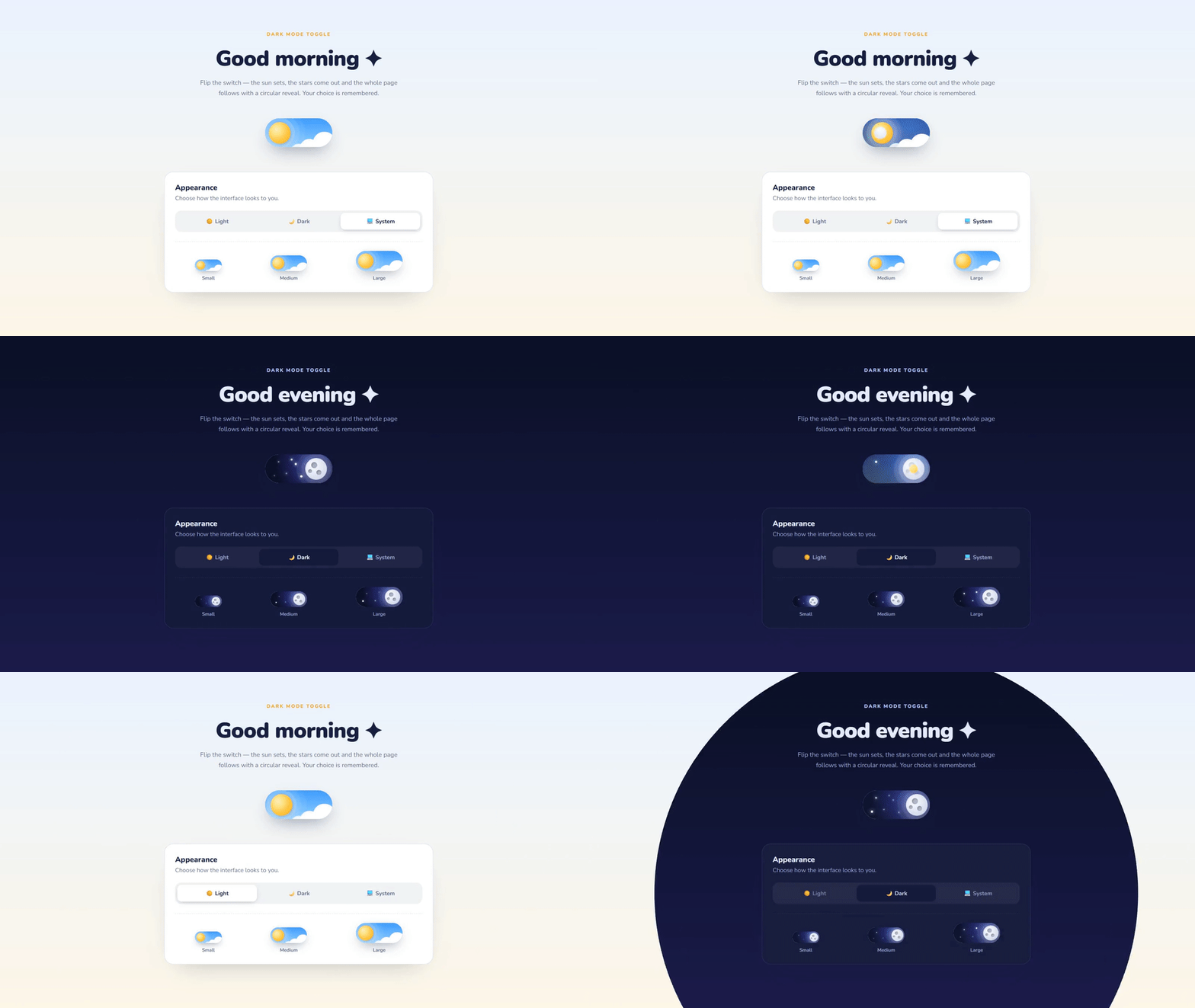
An illustrated theme switch where the sun sets into a cratered moon, clouds drift away and stars twinkle in — and the whole page switches theme with a circular reveal from the toggle (View Transitions API). Includes a Light / Dark / System preference control, small, medium and large sizes, saved choice, no flash on load and live system-theme following.
- Published 15 Oct 2026
- 10 views
Overview
Day & Night Dark Mode Toggle with Circular Reveal
A dark mode toggle worth clicking twice — sun to moon, clouds to stars, and the page follows in a circle.
What's Included
- Sun → moon toggle with clouds, craters and twinkling stars
- Circular page reveal from the toggle (View Transitions API, with fallback)
- Light / Dark / System preference with live OS theme following
- Choice saved in localStorage, applied before first paint (no flash)
- One --s variable scales the toggle to any size
- role="switch" with aria-checked for screen readers
- Theme colors as CSS variables — easy to drop into any site
Dependencies
- Google Fonts — Nunito https://fonts.googleapis.com/css2?family=Nunito:wght@400;600;700;800;900&display=swap
Already linked inside the component's files — no extra setup needed.
Desktop Preview
HTML
html1<!doctype html> 2<html lang="en"> 3 <head> 4 <meta charset="UTF-8" /> 5 <meta name="viewport" content="width=device-width, initial-scale=1.0" /> 6 <title>Day / Night Theme Toggle | MetaSkillGroup</title> 7 <link rel="stylesheet" href="style.css" /> 8 <!-- Set the theme before first paint so there's no flash --> 9 <script> 10 (() => { 11 const saved = localStorage.getItem("theme-preference") || "system"; 12 const dark = saved === "dark" || (saved === "system" && matchMedia("(prefers-color-scheme: dark)").matches); 13 document.documentElement.dataset.theme = dark ? "dark" : "light"; 14 })(); 15 </script> 16 </head> 17 <body> 18 <!-- created by metaskillgroup-team --> 19 <main class="page"> 20 <header class="intro"> 21 <span class="eyebrow">Dark mode toggle</span> 22 <h1>Good <span class="day-word">morning</span><span class="night-word">evening</span> ✦</h1> 23 <p>Flip the switch — the sun sets, the stars come out and the whole page follows with a circular reveal. Your choice is remembered.</p> 24 </header> 25 26 <!-- Big toggle --> 27 <div class="hero-toggle"> 28 <button type="button" class="dn-toggle" role="switch" aria-checked="false" aria-label="Dark mode" style="--s: 2"> 29 <span class="sky" aria-hidden="true"></span> 30 <span class="stars" aria-hidden="true"> 31 <i style="--x: 18%; --y: 22%; --d: 0s"></i> 32 <i style="--x: 30%; --y: 62%; --d: 0.6s"></i> 33 <i style="--x: 44%; --y: 30%; --d: 1.1s"></i> 34 <i style="--x: 12%; --y: 70%; --d: 0.3s"></i> 35 <i style="--x: 52%; --y: 72%; --d: 1.5s"></i> 36 <i style="--x: 38%; --y: 14%; --d: 0.9s"></i> 37 </span> 38 <span class="clouds" aria-hidden="true"> 39 <i></i><i></i><i></i> 40 </span> 41 <span class="knob" aria-hidden="true"> 42 <span class="crater c1"></span> 43 <span class="crater c2"></span> 44 <span class="crater c3"></span> 45 </span> 46 </button> 47 </div> 48 49 <!-- Settings card showing other sizes + a 3-way preference --> 50 <section class="card"> 51 <div class="card-row"> 52 <div> 53 <h2>Appearance</h2> 54 <p>Choose how the interface looks to you.</p> 55 </div> 56 </div> 57 58 <div class="segmented" role="radiogroup" aria-label="Theme preference"> 59 <button type="button" role="radio" data-pref="light">☀️ Light</button> 60 <button type="button" role="radio" data-pref="dark">🌙 Dark</button> 61 <button type="button" role="radio" data-pref="system">💻 System</button> 62 </div> 63 64 <div class="sizes"> 65 <div class="size"> 66 <button type="button" class="dn-toggle" role="switch" aria-checked="false" aria-label="Dark mode (small)" style="--s: 0.8"><span class="sky"></span><span class="stars"><i style="--x: 22%; --y: 30%; --d: 0s"></i><i style="--x: 40%; --y: 65%; --d: 0.7s"></i></span><span class="clouds"><i></i><i></i><i></i></span><span class="knob"><span class="crater c1"></span><span class="crater c2"></span><span class="crater c3"></span></span></button> 67 <small>Small</small> 68 </div> 69 <div class="size"> 70 <button type="button" class="dn-toggle" role="switch" aria-checked="false" aria-label="Dark mode (medium)" style="--s: 1.1"><span class="sky"></span><span class="stars"><i style="--x: 22%; --y: 30%; --d: 0s"></i><i style="--x: 40%; --y: 65%; --d: 0.7s"></i><i style="--x: 14%; --y: 66%; --d: 1.2s"></i></span><span class="clouds"><i></i><i></i><i></i></span><span class="knob"><span class="crater c1"></span><span class="crater c2"></span><span class="crater c3"></span></span></button> 71 <small>Medium</small> 72 </div> 73 <div class="size"> 74 <button type="button" class="dn-toggle" role="switch" aria-checked="false" aria-label="Dark mode (large)" style="--s: 1.4"><span class="sky"></span><span class="stars"><i style="--x: 22%; --y: 30%; --d: 0s"></i><i style="--x: 40%; --y: 65%; --d: 0.7s"></i><i style="--x: 14%; --y: 66%; --d: 1.2s"></i><i style="--x: 48%; --y: 22%; --d: 0.4s"></i></span><span class="clouds"><i></i><i></i><i></i></span><span class="knob"><span class="crater c1"></span><span class="crater c2"></span><span class="crater c3"></span></span></button> 75 <small>Large</small> 76 </div> 77 </div> 78 </section> 79 </main> 80 81 <script src="script.js"></script> 82 </body> 83</html>
CSS
css1/* Importing Google Fonts - Nunito */ 2@import url("https://fonts.googleapis.com/css2?family=Nunito:wght@400;600;700;800;900&display=swap"); 3 4* { 5 margin: 0; 6 padding: 0; 7 box-sizing: border-box; 8 font-family: "Nunito", sans-serif; 9} 10 11/* ---------- Theme tokens ---------- */ 12:root, 13[data-theme="light"] { 14 --bg: #eaf2ff; 15 --bg-2: #fdf7e8; 16 --card: #ffffff; 17 --text: #13213f; 18 --muted: #5f6f8f; 19 --border: #d9e3f5; 20 --accent: #f5a623; 21 color-scheme: light; 22} 23 24[data-theme="dark"] { 25 --bg: #0b1026; 26 --bg-2: #1b1a4a; 27 --card: #141a3a; 28 --text: #e8ecff; 29 --muted: #98a2c9; 30 --border: #262e5c; 31 --accent: #b9c3ff; 32 color-scheme: dark; 33} 34 35body { 36 min-height: 100vh; 37 background: linear-gradient(180deg, var(--bg), var(--bg-2)); 38 color: var(--text); 39 transition: background 0.5s, color 0.5s; 40} 41 42/* The circular reveal is done with the View Transitions API (script.js) */ 43::view-transition-old(root), 44::view-transition-new(root) { 45 animation: none; 46 mix-blend-mode: normal; 47} 48 49.page { 50 display: grid; 51 justify-items: center; 52 max-width: 760px; 53 margin: 0 auto; 54 padding: 80px 20px; 55} 56 57/* ---------- Intro ---------- */ 58.intro { 59 text-align: center; 60} 61 62.eyebrow { 63 color: var(--accent); 64 font-size: 0.82rem; 65 font-weight: 800; 66 letter-spacing: 0.16em; 67 text-transform: uppercase; 68} 69 70.intro h1 { 71 margin: 12px 0; 72 font-size: clamp(2.2rem, 6vw, 3.6rem); 73 font-weight: 900; 74 letter-spacing: -0.02em; 75} 76 77.night-word, 78[data-theme="dark"] .day-word { 79 display: none; 80} 81 82[data-theme="dark"] .night-word { 83 display: inline; 84} 85 86.intro p { 87 max-width: 540px; 88 margin: 0 auto; 89 color: var(--muted); 90 font-size: 1.05rem; 91 line-height: 1.65; 92} 93 94.hero-toggle { 95 margin: 54px 0 60px; 96} 97 98/* ========================================================= 99 The toggle — everything is in `em`, so --s scales it 100 ========================================================= */ 101.dn-toggle { 102 --s: 1; 103 --ease: cubic-bezier(0.6, -0.25, 0.3, 1.3); 104 position: relative; 105 width: 5.6em; 106 height: 2.4em; 107 padding: 0; 108 border: 0; 109 border-radius: 999px; 110 font-size: calc(var(--s) * 16px); 111 cursor: pointer; 112 overflow: hidden; 113 isolation: isolate; 114 box-shadow: 115 inset 0 0.12em 0.35em rgba(0, 0, 0, 0.3), 116 0 0.6em 1.4em -0.5em rgba(19, 33, 63, 0.45); 117 -webkit-tap-highlight-color: transparent; 118} 119 120.dn-toggle:focus-visible { 121 outline: calc(var(--s) * 3px) solid var(--accent); 122 outline-offset: calc(var(--s) * 3px); 123} 124 125/* Day and night skies, cross-faded */ 126.sky, 127.sky::after { 128 position: absolute; 129 inset: 0; 130 background: linear-gradient(180deg, #3d9bff, #8fd0ff); 131} 132 133.sky::after { 134 content: ""; 135 background: radial-gradient(circle at 70% 30%, #2d3592, #0b1026 75%); 136 opacity: 0; 137 transition: opacity 0.6s; 138} 139 140/* Stars (night only) */ 141.stars i { 142 position: absolute; 143 left: var(--x); 144 top: var(--y); 145 width: 0.18em; 146 height: 0.18em; 147 border-radius: 50%; 148 background: #fff; 149 box-shadow: 0 0 0.3em #fff; 150 opacity: 0; 151 transform: scale(0); 152 transition: opacity 0.4s, transform 0.4s; 153} 154 155/* Clouds (day only) */ 156.clouds i { 157 position: absolute; 158 border-radius: 50%; 159 background: #fff; 160 box-shadow: 0 -0.1em 0 rgba(0, 0, 0, 0.04) inset; 161 transition: transform 0.6s var(--ease); 162} 163 164.clouds i:nth-child(1) { 165 right: -0.3em; 166 bottom: -0.6em; 167 width: 1.9em; 168 height: 1.9em; 169} 170 171.clouds i:nth-child(2) { 172 right: 1.1em; 173 bottom: -0.9em; 174 width: 1.6em; 175 height: 1.6em; 176 transition-delay: 0.05s; 177} 178 179.clouds i:nth-child(3) { 180 right: 2.1em; 181 bottom: -1.1em; 182 width: 1.4em; 183 height: 1.4em; 184 opacity: 0.85; 185 transition-delay: 0.1s; 186} 187 188/* Sun → moon */ 189.knob { 190 position: absolute; 191 top: 0.3em; 192 left: 0.3em; 193 width: 1.8em; 194 height: 1.8em; 195 border-radius: 50%; 196 background: radial-gradient(circle at 35% 35%, #fff7b8, #ffc43d 60%, #ffab1f); 197 box-shadow: 198 0 0 0 0.35em rgba(255, 255, 255, 0.2), 199 0 0 0 0.75em rgba(255, 255, 255, 0.1), 200 0 0 0 1.2em rgba(255, 255, 255, 0.06), 201 0.1em 0.15em 0.3em rgba(0, 0, 0, 0.25); 202 transition: transform 0.6s var(--ease), background 0.6s, box-shadow 0.6s; 203} 204 205.crater { 206 position: absolute; 207 border-radius: 50%; 208 background: #a8aec6; 209 box-shadow: inset 0.06em 0.06em 0.1em rgba(0, 0, 0, 0.25); 210 opacity: 0; 211 transition: opacity 0.4s; 212} 213 214.c1 { 215 top: 0.35em; 216 left: 0.5em; 217 width: 0.5em; 218 height: 0.5em; 219} 220 221.c2 { 222 top: 0.95em; 223 left: 0.25em; 224 width: 0.3em; 225 height: 0.3em; 226} 227 228.c3 { 229 top: 1em; 230 left: 0.95em; 231 width: 0.4em; 232 height: 0.4em; 233} 234 235.dn-toggle:hover .knob { 236 transform: translateX(0.15em); 237} 238 239/* ----- Night state ----- */ 240.dn-toggle[aria-checked="true"] .sky::after { 241 opacity: 1; 242} 243 244.dn-toggle[aria-checked="true"] .knob { 245 transform: translateX(3.2em); 246 background: radial-gradient(circle at 35% 35%, #fbfcff, #d9ddee 65%, #c3c8dd); 247 box-shadow: 248 0 0 0 0.35em rgba(255, 255, 255, 0.08), 249 0 0 0 0.75em rgba(255, 255, 255, 0.05), 250 0 0 1.2em rgba(200, 210, 255, 0.5); 251} 252 253.dn-toggle[aria-checked="true"]:hover .knob { 254 transform: translateX(3.05em); 255} 256 257.dn-toggle[aria-checked="true"] .crater { 258 opacity: 1; 259 transition-delay: 0.25s; 260} 261 262.dn-toggle[aria-checked="true"] .clouds i { 263 transform: translateY(2em); 264} 265 266.dn-toggle[aria-checked="true"] .stars i { 267 opacity: 1; 268 transform: scale(1); 269 transition-delay: 0.3s; 270 animation: twinkle 2s var(--d) ease-in-out infinite; 271} 272 273@keyframes twinkle { 274 50% { 275 opacity: 0.3; 276 transform: scale(0.6); 277 } 278} 279 280/* ---------- Settings card ---------- */ 281.card { 282 width: 100%; 283 padding: 28px; 284 border: 1px solid var(--border); 285 border-radius: 24px; 286 background: var(--card); 287 box-shadow: 0 30px 70px -40px rgba(19, 33, 63, 0.35); 288 transition: background 0.5s, border-color 0.5s; 289} 290 291.card h2 { 292 font-size: 1.25rem; 293 font-weight: 800; 294} 295 296.card p { 297 margin-top: 4px; 298 color: var(--muted); 299} 300 301.segmented { 302 display: grid; 303 grid-template-columns: repeat(3, 1fr); 304 gap: 6px; 305 margin: 22px 0 26px; 306 padding: 6px; 307 border-radius: 16px; 308 background: color-mix(in srgb, var(--text) 6%, transparent); 309} 310 311.segmented button { 312 padding: 12px 10px; 313 border: 0; 314 border-radius: 12px; 315 background: none; 316 color: var(--muted); 317 font-size: 0.95rem; 318 font-weight: 700; 319 cursor: pointer; 320 transition: background 0.3s, color 0.3s, box-shadow 0.3s; 321} 322 323.segmented button[aria-checked="true"] { 324 background: var(--card); 325 color: var(--text); 326 box-shadow: 0 4px 14px -6px rgba(19, 33, 63, 0.4); 327} 328 329.segmented button:focus-visible { 330 outline: 3px solid var(--accent); 331 outline-offset: 2px; 332} 333 334.sizes { 335 display: flex; 336 justify-content: space-around; 337 align-items: flex-end; 338 flex-wrap: wrap; 339 gap: 24px; 340 padding-top: 24px; 341 border-top: 1px dashed var(--border); 342} 343 344.size { 345 display: grid; 346 justify-items: center; 347 gap: 10px; 348} 349 350.size small { 351 color: var(--muted); 352 font-size: 0.8rem; 353 font-weight: 700; 354} 355 356/* ---------- Responsive ---------- */ 357@media (max-width: 480px) { 358 .hero-toggle .dn-toggle { 359 --s: 1.5 !important; 360 } 361 362 .segmented button { 363 font-size: 0.85rem; 364 } 365} 366 367@media (prefers-reduced-motion: reduce) { 368 *, 369 *::before, 370 *::after { 371 animation: none !important; 372 transition: none !important; 373 } 374}
JavaScript
javascript1const STORAGE_KEY = "theme-preference"; // "light" | "dark" | "system" 2const root = document.documentElement; 3const toggles = document.querySelectorAll(".dn-toggle"); 4const prefButtons = document.querySelectorAll("[data-pref]"); 5const systemDark = window.matchMedia("(prefers-color-scheme: dark)"); 6const reduceMotion = window.matchMedia("(prefers-reduced-motion: reduce)").matches; 7 8const getPreference = () => { 9 try { 10 return localStorage.getItem(STORAGE_KEY) || "system"; 11 } catch { 12 return "system"; 13 } 14}; 15 16const resolve = (pref) => (pref === "system" ? (systemDark.matches ? "dark" : "light") : pref); 17 18// Paint every control so it matches the current theme + preference 19const syncControls = () => { 20 const dark = root.dataset.theme === "dark"; 21 toggles.forEach((t) => t.setAttribute("aria-checked", dark)); 22 const pref = getPreference(); 23 prefButtons.forEach((b) => b.setAttribute("aria-checked", b.dataset.pref === pref)); 24}; 25 26// Switch theme with a circle that grows from (x, y) 27const applyTheme = (theme, origin) => { 28 if (root.dataset.theme === theme) return syncControls(); 29 30 const swap = () => { 31 root.dataset.theme = theme; 32 syncControls(); 33 }; 34 35 if (!document.startViewTransition || reduceMotion || !origin) { 36 swap(); 37 return; 38 } 39 40 const { x, y } = origin; 41 const radius = Math.hypot(Math.max(x, innerWidth - x), Math.max(y, innerHeight - y)); 42 const transition = document.startViewTransition(swap); 43 transition.ready.then(() => { 44 root.animate( 45 { clipPath: [`circle(0px at ${x}px ${y}px)`, `circle(${radius}px at ${x}px ${y}px)`] }, 46 { duration: 750, easing: "cubic-bezier(0.65, 0, 0.35, 1)", pseudoElement: "::view-transition-new(root)" }, 47 ); 48 }); 49}; 50 51const setPreference = (pref, origin) => { 52 try { 53 localStorage.setItem(STORAGE_KEY, pref); 54 } catch { 55 // Storage can be blocked — the theme still changes for this visit 56 } 57 applyTheme(resolve(pref), origin); 58 syncControls(); 59}; 60 61const centerOf = (el) => { 62 const r = el.getBoundingClientRect(); 63 return { x: r.left + r.width / 2, y: r.top + r.height / 2 }; 64}; 65 66toggles.forEach((toggle) => { 67 toggle.addEventListener("click", () => { 68 const next = root.dataset.theme === "dark" ? "light" : "dark"; 69 // Let the sun / moon animation start, then reveal the page from the knob 70 toggle.setAttribute("aria-checked", next === "dark"); 71 setTimeout(() => setPreference(next, centerOf(toggle.querySelector(".knob"))), 180); 72 }); 73}); 74 75prefButtons.forEach((btn) => { 76 btn.addEventListener("click", () => setPreference(btn.dataset.pref, centerOf(btn))); 77}); 78 79// Follow the OS setting live while the preference is "system" 80systemDark.addEventListener("change", () => { 81 if (getPreference() === "system") applyTheme(resolve("system")); 82}); 83 84syncControls();
Built by MetaSkillGroup — copy it, use it, make it yours.
Features
Sun → moon toggle with clouds, craters and twinkling stars
Circular page reveal from the toggle (View Transitions API, with fallback)
Light / Dark / System preference with live OS theme following
Choice saved in localStorage, applied before first paint (no flash)
One --s variable scales the toggle to any size
role="switch" with aria-checked for screen readers
Theme colors as CSS variables — easy to drop into any site
Built With
HTML5
CSS3
JavaScript
Compatibility
❓ FAQs
Copy the toggle markup, its CSS, the small inline script in <head> (prevents a flash on load) and script.js. Put your colors in the [data-theme="light"] and [data-theme="dark"] blocks.
The theme still switches instantly and the toggle still animates — only the circular page reveal is skipped.
Set the --s variable on the button, e.g. style="--s: 1.5". Everything inside is measured in em, so it scales perfectly.

Written by
MetaSkillGroup
Need it built for you?
Built to the same standard as our client work.
If nothing here fits exactly, tell us what you need — our core developers build it. Requirements call first, a written SRS before any code, and a price agreed up front.