Animated Buttons Pack — 12 Hover & Click Effects
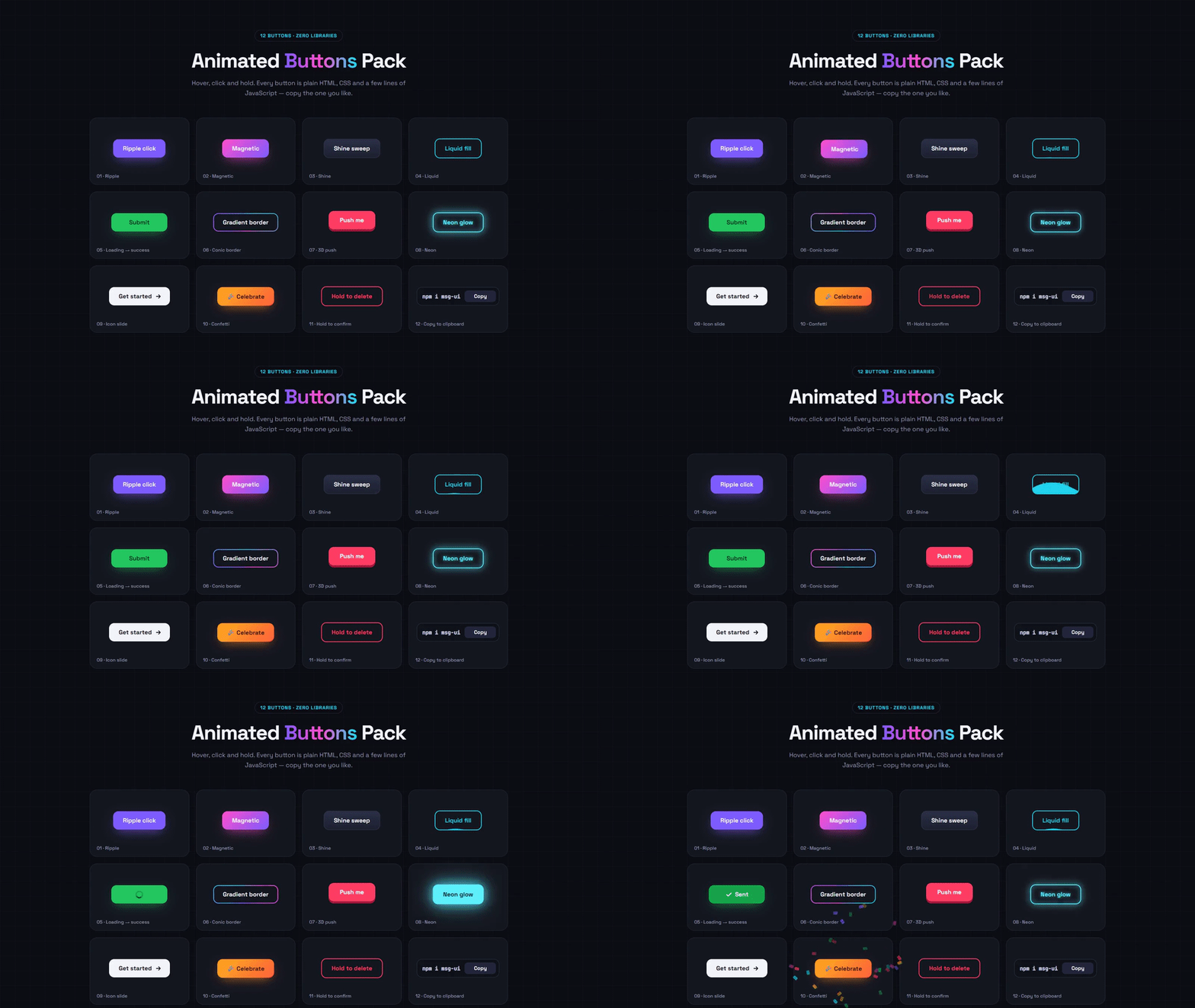
Twelve ready-to-use animated buttons in one pack: ripple, magnetic, shine sweep, liquid fill, loading-to-success, spinning gradient border, 3D push, neon glow, icon slide, confetti burst, hold-to-confirm and copy-to-clipboard. Each one is independent — copy just the HTML, CSS and JavaScript of the button you want.
- Published 15 Oct 2026
- 9 views
Overview
Animated Buttons Pack — 12 Hover & Click Effects
Twelve buttons that feel alive — hover, click and hold each one. Plain HTML, CSS and a few lines of JavaScript.
What's Included
- Ripple from the exact click point
- Magnetic button that follows the cursor
- Shine sweep, liquid fill and neon glow hover effects
- Loading → success state with animated tick
- Spinning conic-gradient border (CSS @property)
- 3D push button with springy press
- Confetti burst, hold-to-confirm and copy-to-clipboard buttons
- Keyboard friendly and respects reduced motion
Dependencies
- Google Fonts — Space Grotesk + JetBrains Mono https://fonts.googleapis.com/css2?family=Space+Grotesk:wght@400;500;600;700&family=JetBrains+Mono:wght@500&display=swap
Already linked inside the component's files — no extra setup needed.
Desktop Preview
HTML
html1<!doctype html> 2<html lang="en"> 3 <head> 4 <meta charset="UTF-8" /> 5 <meta name="viewport" content="width=device-width, initial-scale=1.0" /> 6 <title>Animated Buttons Pack | MetaSkillGroup</title> 7 <link rel="stylesheet" href="style.css" /> 8 </head> 9 <body> 10 <!-- created by metaskillgroup-team --> 11 <main class="wrap"> 12 <header class="intro"> 13 <span class="eyebrow">12 buttons · zero libraries</span> 14 <h1>Animated <span>Buttons</span> Pack</h1> 15 <p>Hover, click and hold. Every button is plain HTML, CSS and a few lines of JavaScript — copy the one you like.</p> 16 </header> 17 18 <div class="grid"> 19 <!-- 1. Ripple --> 20 <div class="tile"> 21 <button type="button" class="btn btn-ripple">Ripple click</button> 22 <span class="tile-name">01 · Ripple</span> 23 </div> 24 25 <!-- 2. Magnetic --> 26 <div class="tile"> 27 <button type="button" class="btn btn-magnetic"><span>Magnetic</span></button> 28 <span class="tile-name">02 · Magnetic</span> 29 </div> 30 31 <!-- 3. Shine sweep --> 32 <div class="tile"> 33 <button type="button" class="btn btn-shine">Shine sweep</button> 34 <span class="tile-name">03 · Shine</span> 35 </div> 36 37 <!-- 4. Liquid fill --> 38 <div class="tile"> 39 <button type="button" class="btn btn-liquid"> 40 <span class="liquid" aria-hidden="true"></span> 41 <span class="text">Liquid fill</span> 42 </button> 43 <span class="tile-name">04 · Liquid</span> 44 </div> 45 46 <!-- 5. Loading → success --> 47 <div class="tile"> 48 <button type="button" class="btn btn-submit"> 49 <span class="state idle">Submit</span> 50 <span class="state loading" aria-hidden="true"><i class="spin"></i></span> 51 <span class="state done" aria-hidden="true"> 52 <svg viewBox="0 0 24 24"><path d="M5 12.5l4.5 4.5L19 7.5" /></svg> Sent 53 </span> 54 </button> 55 <span class="tile-name">05 · Loading → success</span> 56 </div> 57 58 <!-- 6. Spinning gradient border --> 59 <div class="tile"> 60 <button type="button" class="btn btn-border"><span>Gradient border</span></button> 61 <span class="tile-name">06 · Conic border</span> 62 </div> 63 64 <!-- 7. 3D push --> 65 <div class="tile"> 66 <button type="button" class="btn-push"><span class="front">Push me</span></button> 67 <span class="tile-name">07 · 3D push</span> 68 </div> 69 70 <!-- 8. Neon --> 71 <div class="tile"> 72 <button type="button" class="btn btn-neon">Neon glow</button> 73 <span class="tile-name">08 · Neon</span> 74 </div> 75 76 <!-- 9. Icon slide --> 77 <div class="tile"> 78 <button type="button" class="btn btn-arrow"> 79 <span>Get started</span> 80 <svg viewBox="0 0 24 24" aria-hidden="true"><path d="M5 12h14M13 6l6 6-6 6" /></svg> 81 </button> 82 <span class="tile-name">09 · Icon slide</span> 83 </div> 84 85 <!-- 10. Confetti --> 86 <div class="tile"> 87 <button type="button" class="btn btn-confetti">🎉 Celebrate</button> 88 <span class="tile-name">10 · Confetti</span> 89 </div> 90 91 <!-- 11. Hold to confirm --> 92 <div class="tile"> 93 <button type="button" class="btn btn-hold" aria-label="Hold to delete"> 94 <span class="hold-fill" aria-hidden="true"></span> 95 <span class="text">Hold to delete</span> 96 </button> 97 <span class="tile-name">11 · Hold to confirm</span> 98 </div> 99 100 <!-- 12. Copy --> 101 <div class="tile"> 102 <button type="button" class="btn btn-copy" data-copy="npm i msg-ui"> 103 <code>npm i msg-ui</code> 104 <span class="copy-label">Copy</span> 105 </button> 106 <span class="tile-name">12 · Copy to clipboard</span> 107 </div> 108 </div> 109 </main> 110 111 <script src="script.js"></script> 112 </body> 113</html>
CSS
css1/* Importing Google Fonts - Space Grotesk + JetBrains Mono */ 2@import url("https://fonts.googleapis.com/css2?family=Space+Grotesk:wght@400;500;600;700&family=JetBrains+Mono:wght@500&display=swap"); 3 4* { 5 margin: 0; 6 padding: 0; 7 box-sizing: border-box; 8 font-family: "Space Grotesk", sans-serif; 9} 10 11:root { 12 --bg: #0c0d13; 13 --tile: #14161f; 14 --tile-border: #232634; 15 --text: #f2f3f7; 16 --muted: #8a8fa8; 17 --violet: #7c5cff; 18 --cyan: #22d3ee; 19 --pink: #ff4ecd; 20 --green: #22c55e; 21 --red: #ff3d63; 22} 23 24/* Lets the conic border angle animate smoothly */ 25@property --angle { 26 syntax: "<angle>"; 27 initial-value: 0deg; 28 inherits: false; 29} 30 31body { 32 min-height: 100vh; 33 background: 34 linear-gradient(rgba(255, 255, 255, 0.025) 1px, transparent 1px) 0 0 / 40px 40px, 35 linear-gradient(90deg, rgba(255, 255, 255, 0.025) 1px, transparent 1px) 0 0 / 40px 40px, 36 var(--bg); 37 color: var(--text); 38} 39 40.wrap { 41 max-width: 1160px; 42 margin: 0 auto; 43 padding: 80px 20px; 44} 45 46/* ---------- Intro ---------- */ 47.intro { 48 max-width: 640px; 49 margin: 0 auto 52px; 50 text-align: center; 51} 52 53.eyebrow { 54 display: inline-block; 55 padding: 6px 14px; 56 border: 1px solid var(--tile-border); 57 border-radius: 999px; 58 color: var(--cyan); 59 font-size: 0.8rem; 60 font-weight: 600; 61 letter-spacing: 0.08em; 62 text-transform: uppercase; 63} 64 65.intro h1 { 66 margin: 16px 0 12px; 67 font-size: clamp(2.2rem, 5vw, 3.4rem); 68 font-weight: 700; 69 letter-spacing: -0.03em; 70} 71 72.intro h1 span { 73 background: linear-gradient(90deg, var(--violet), var(--pink), var(--cyan)); 74 -webkit-background-clip: text; 75 background-clip: text; 76 color: transparent; 77} 78 79.intro p { 80 color: var(--muted); 81 font-size: 1.05rem; 82 line-height: 1.6; 83} 84 85/* ---------- Grid of tiles ---------- */ 86.grid { 87 display: grid; 88 grid-template-columns: repeat(4, 1fr); 89 gap: 18px; 90} 91 92.tile { 93 position: relative; 94 display: grid; 95 place-items: center; 96 min-height: 180px; 97 padding: 30px 16px 44px; 98 border: 1px solid var(--tile-border); 99 border-radius: 20px; 100 background: var(--tile); 101} 102 103.tile-name { 104 position: absolute; 105 left: 18px; 106 bottom: 14px; 107 color: var(--muted); 108 font-size: 0.78rem; 109 font-weight: 500; 110} 111 112/* ---------- Base button ---------- */ 113.btn { 114 position: relative; 115 display: inline-flex; 116 align-items: center; 117 justify-content: center; 118 gap: 8px; 119 padding: 14px 26px; 120 border: 0; 121 border-radius: 14px; 122 background: #23263a; 123 color: var(--text); 124 font-size: 1rem; 125 font-weight: 600; 126 white-space: nowrap; 127 cursor: pointer; 128 overflow: hidden; 129 isolation: isolate; 130 transition: transform 0.2s, box-shadow 0.3s, background 0.3s, color 0.3s; 131 -webkit-tap-highlight-color: transparent; 132} 133 134.btn:focus-visible, 135.btn-push:focus-visible { 136 outline: 3px solid rgba(34, 211, 238, 0.6); 137 outline-offset: 3px; 138} 139 140/* 01 · Ripple */ 141.btn-ripple { 142 background: var(--violet); 143 box-shadow: 0 10px 30px -10px rgba(124, 92, 255, 0.8); 144} 145 146.ripple { 147 position: absolute; 148 z-index: -1; 149 border-radius: 50%; 150 background: rgba(255, 255, 255, 0.45); 151 transform: scale(0); 152 animation: ripple 0.65s ease-out forwards; 153 pointer-events: none; 154} 155 156@keyframes ripple { 157 to { 158 transform: scale(1); 159 opacity: 0; 160 } 161} 162 163/* 02 · Magnetic (moved by script.js) */ 164.btn-magnetic { 165 background: linear-gradient(135deg, var(--pink), var(--violet)); 166 box-shadow: 0 12px 30px -12px rgba(255, 78, 205, 0.8); 167 transition: transform 0.25s cubic-bezier(0.2, 0.8, 0.2, 1); 168} 169 170.btn-magnetic span { 171 display: inline-block; 172 transition: transform 0.25s cubic-bezier(0.2, 0.8, 0.2, 1); 173} 174 175/* 03 · Shine sweep (on hover + every few seconds) */ 176.btn-shine { 177 border: 1px solid #34384f; 178 background: linear-gradient(180deg, #2b2f46, #1c1f2e); 179} 180 181.btn-shine::after { 182 content: ""; 183 position: absolute; 184 top: 0; 185 left: -75%; 186 width: 50%; 187 height: 100%; 188 background: linear-gradient(100deg, transparent, rgba(255, 255, 255, 0.45), transparent); 189 transform: skewX(-20deg); 190 animation: shine 3.2s ease-in-out infinite; 191} 192 193.btn-shine:hover::after { 194 animation: shine 0.9s ease-in-out; 195} 196 197@keyframes shine { 198 0% { 199 left: -75%; 200 } 201 35%, 202 100% { 203 left: 130%; 204 } 205} 206 207/* 04 · Liquid fill */ 208.btn-liquid { 209 border: 2px solid var(--cyan); 210 background: transparent; 211 color: var(--cyan); 212} 213 214.btn-liquid .liquid { 215 position: absolute; 216 z-index: -1; 217 left: -50%; 218 top: 110%; 219 width: 200%; 220 aspect-ratio: 1; 221 border-radius: 42%; 222 background: var(--cyan); 223 animation: spinWave 5s linear infinite; 224 transition: top 0.8s cubic-bezier(0.3, 0.7, 0.3, 1); 225} 226 227.btn-liquid:hover, 228.btn-liquid:focus-visible { 229 color: #06212a; 230} 231 232.btn-liquid:hover .liquid, 233.btn-liquid:focus-visible .liquid { 234 top: -90%; 235} 236 237@keyframes spinWave { 238 to { 239 transform: rotate(360deg); 240 } 241} 242 243/* 05 · Loading → success */ 244.btn-submit { 245 display: grid; 246 min-width: 150px; 247 background: var(--green); 248 color: #052e12; 249 box-shadow: 0 10px 30px -12px rgba(34, 197, 94, 0.8); 250} 251 252.btn-submit .state { 253 grid-area: 1 / 1; 254 display: inline-flex; 255 align-items: center; 256 justify-content: center; 257 gap: 6px; 258 transition: opacity 0.25s, transform 0.25s; 259} 260 261.btn-submit .loading, 262.btn-submit .done { 263 opacity: 0; 264 transform: translateY(14px); 265} 266 267.btn-submit.is-loading .idle, 268.btn-submit.is-done .idle { 269 opacity: 0; 270 transform: translateY(-14px); 271} 272 273.btn-submit.is-loading .loading, 274.btn-submit.is-done .done { 275 opacity: 1; 276 transform: none; 277} 278 279.btn-submit.is-done { 280 background: #16a34a; 281 color: #fff; 282} 283 284.btn-submit svg { 285 width: 20px; 286 height: 20px; 287 fill: none; 288 stroke: currentColor; 289 stroke-width: 3; 290 stroke-linecap: round; 291 stroke-linejoin: round; 292 stroke-dasharray: 24; 293 stroke-dashoffset: 24; 294} 295 296.btn-submit.is-done svg { 297 animation: draw 0.4s 0.15s ease forwards; 298} 299 300@keyframes draw { 301 to { 302 stroke-dashoffset: 0; 303 } 304} 305 306.spin { 307 width: 20px; 308 height: 20px; 309 border: 3px solid rgba(5, 46, 18, 0.25); 310 border-top-color: #052e12; 311 border-radius: 50%; 312 animation: spinWave 0.7s linear infinite; 313} 314 315/* 06 · Spinning conic-gradient border */ 316.btn-border { 317 padding: 2px; 318 background: conic-gradient(from var(--angle), var(--pink), var(--violet), var(--cyan), var(--pink)); 319 animation: rotateAngle 3s linear infinite; 320} 321 322.btn-border span { 323 display: block; 324 padding: 12px 24px; 325 border-radius: 12px; 326 background: var(--tile); 327 transition: background 0.3s; 328} 329 330.btn-border:hover span { 331 background: rgba(20, 22, 31, 0.6); 332} 333 334@keyframes rotateAngle { 335 to { 336 --angle: 360deg; 337 } 338} 339 340/* 07 · 3D push */ 341.btn-push { 342 padding: 0; 343 border: 0; 344 border-radius: 14px; 345 background: #a3173a; 346 cursor: pointer; 347 -webkit-tap-highlight-color: transparent; 348} 349 350.btn-push .front { 351 display: block; 352 padding: 14px 30px; 353 border-radius: 14px; 354 background: var(--red); 355 color: #fff; 356 font-size: 1rem; 357 font-weight: 700; 358 transform: translateY(-6px); 359 transition: transform 0.25s cubic-bezier(0.3, 0.7, 0.4, 1.5); 360} 361 362.btn-push:hover .front { 363 transform: translateY(-8px); 364} 365 366.btn-push:active .front, 367.btn-push.is-pressed .front { 368 transform: translateY(-2px); 369 transition-duration: 0.05s; 370} 371 372/* 08 · Neon */ 373.btn-neon { 374 border: 2px solid #5ef1ff; 375 background: transparent; 376 color: #5ef1ff; 377 text-shadow: 0 0 8px rgba(94, 241, 255, 0.8); 378 box-shadow: 0 0 12px rgba(94, 241, 255, 0.5), inset 0 0 12px rgba(94, 241, 255, 0.3); 379 animation: neonPulse 2.4s ease-in-out infinite; 380} 381 382.btn-neon:hover { 383 background: #5ef1ff; 384 color: #04161a; 385 text-shadow: none; 386 box-shadow: 0 0 30px rgba(94, 241, 255, 0.9), 0 0 60px rgba(94, 241, 255, 0.5); 387} 388 389@keyframes neonPulse { 390 50% { 391 box-shadow: 0 0 24px rgba(94, 241, 255, 0.75), inset 0 0 18px rgba(94, 241, 255, 0.45); 392 } 393} 394 395/* 09 · Icon slide */ 396.btn-arrow { 397 background: #f2f3f7; 398 color: #0c0d13; 399 padding-right: 22px; 400} 401 402.btn-arrow svg { 403 width: 18px; 404 height: 18px; 405 fill: none; 406 stroke: currentColor; 407 stroke-width: 2.4; 408 stroke-linecap: round; 409 stroke-linejoin: round; 410 transition: transform 0.3s cubic-bezier(0.3, 0.7, 0.3, 1); 411} 412 413.btn-arrow span { 414 transition: transform 0.3s cubic-bezier(0.3, 0.7, 0.3, 1); 415} 416 417.btn-arrow:hover span { 418 transform: translateX(-4px); 419} 420 421.btn-arrow:hover svg { 422 transform: translateX(6px); 423} 424 425/* 10 · Confetti */ 426.btn-confetti { 427 background: linear-gradient(135deg, #ffb020, #ff5e3a); 428 color: #2a0f00; 429 box-shadow: 0 10px 30px -12px rgba(255, 140, 40, 0.9); 430 overflow: visible; 431} 432 433.btn-confetti:active { 434 transform: scale(0.95); 435} 436 437.confetti { 438 position: fixed; 439 z-index: 50; 440 width: 8px; 441 height: 12px; 442 border-radius: 2px; 443 pointer-events: none; 444} 445 446/* 11 · Hold to confirm */ 447.btn-hold { 448 border: 2px solid var(--red); 449 background: transparent; 450 color: var(--red); 451 user-select: none; 452} 453 454.btn-hold .hold-fill { 455 position: absolute; 456 z-index: -1; 457 inset: 0; 458 background: var(--red); 459 transform: scaleX(0); 460 transform-origin: left; 461 transition: transform 0.35s ease; 462} 463 464.btn-hold.is-holding .hold-fill { 465 transform: scaleX(1); 466 transition: transform var(--hold, 1.2s) linear; 467} 468 469.btn-hold.is-holding, 470.btn-hold.is-done { 471 color: #fff; 472} 473 474.btn-hold.is-done .hold-fill { 475 transform: scaleX(1); 476} 477 478.btn-hold.is-done { 479 animation: shake 0.4s; 480} 481 482@keyframes shake { 483 25% { 484 transform: translateX(-4px); 485 } 486 75% { 487 transform: translateX(4px); 488 } 489} 490 491/* 12 · Copy */ 492.btn-copy { 493 gap: 12px; 494 padding: 8px 8px 8px 14px; 495 border: 1px solid #2c3044; 496 background: #0f1118; 497} 498 499.btn-copy code { 500 font-family: "JetBrains Mono", monospace; 501 font-size: 0.88rem; 502 color: #c7cbe0; 503} 504 505.copy-label { 506 min-width: 84px; 507 padding: 7px 12px; 508 border-radius: 9px; 509 background: #23263a; 510 font-size: 0.85rem; 511 transition: background 0.3s, color 0.3s; 512} 513 514.btn-copy.is-copied .copy-label { 515 background: var(--green); 516 color: #052e12; 517} 518 519/* ---------- Responsive ---------- */ 520@media (max-width: 1020px) { 521 .grid { 522 grid-template-columns: repeat(3, 1fr); 523 } 524} 525 526@media (max-width: 760px) { 527 .grid { 528 grid-template-columns: repeat(2, 1fr); 529 } 530} 531 532@media (max-width: 480px) { 533 .grid { 534 grid-template-columns: 1fr; 535 } 536} 537 538@media (prefers-reduced-motion: reduce) { 539 *, 540 *::before, 541 *::after { 542 animation-duration: 0.01ms !important; 543 animation-iteration-count: 1 !important; 544 transition-duration: 0.01ms !important; 545 } 546}
JavaScript
javascript1const reduceMotion = window.matchMedia("(prefers-reduced-motion: reduce)").matches; 2 3// 01 · Ripple — a circle grows from the exact point you clicked 4document.querySelectorAll(".btn-ripple").forEach((btn) => { 5 btn.addEventListener("pointerdown", (e) => { 6 const rect = btn.getBoundingClientRect(); 7 const size = Math.max(rect.width, rect.height) * 2.2; 8 const ripple = document.createElement("span"); 9 ripple.className = "ripple"; 10 ripple.style.width = ripple.style.height = `${size}px`; 11 ripple.style.left = `${e.clientX - rect.left - size / 2}px`; 12 ripple.style.top = `${e.clientY - rect.top - size / 2}px`; 13 btn.appendChild(ripple); 14 ripple.addEventListener("animationend", () => ripple.remove()); 15 }); 16}); 17 18// 02 · Magnetic — the button (and its label, a bit more) follows the cursor 19const MAGNET_STRENGTH = 0.35; 20document.querySelectorAll(".btn-magnetic").forEach((btn) => { 21 const label = btn.querySelector("span"); 22 const area = btn.parentElement; // the whole tile pulls the button 23 24 area.addEventListener("pointermove", (e) => { 25 if (reduceMotion) return; 26 const rect = btn.getBoundingClientRect(); 27 const x = e.clientX - (rect.left + rect.width / 2); 28 const y = e.clientY - (rect.top + rect.height / 2); 29 btn.style.transform = `translate(${x * MAGNET_STRENGTH}px, ${y * MAGNET_STRENGTH}px)`; 30 label.style.transform = `translate(${x * 0.12}px, ${y * 0.12}px)`; 31 }); 32 33 area.addEventListener("pointerleave", () => { 34 btn.style.transform = ""; 35 label.style.transform = ""; 36 }); 37}); 38 39// 05 · Loading → success (replace the timeout with your real request) 40document.querySelectorAll(".btn-submit").forEach((btn) => { 41 btn.addEventListener("click", () => { 42 if (btn.classList.contains("is-loading") || btn.classList.contains("is-done")) return; 43 btn.classList.add("is-loading"); 44 btn.setAttribute("aria-busy", "true"); 45 46 setTimeout(() => { 47 btn.classList.replace("is-loading", "is-done"); 48 btn.removeAttribute("aria-busy"); 49 setTimeout(() => btn.classList.remove("is-done"), 2000); 50 }, 1400); 51 }); 52}); 53 54// 07 · 3D push — keyboard users get the same press feel 55document.querySelectorAll(".btn-push").forEach((btn) => { 56 btn.addEventListener("keydown", (e) => { 57 if (e.key === " " || e.key === "Enter") btn.classList.add("is-pressed"); 58 }); 59 btn.addEventListener("keyup", () => btn.classList.remove("is-pressed")); 60}); 61 62// 10 · Confetti burst from the button 63const CONFETTI_COLORS = ["#ff4ecd", "#7c5cff", "#22d3ee", "#ffb020", "#22c55e", "#ff3d63"]; 64document.querySelectorAll(".btn-confetti").forEach((btn) => { 65 btn.addEventListener("click", () => { 66 if (reduceMotion) return; 67 const rect = btn.getBoundingClientRect(); 68 const cx = rect.left + rect.width / 2; 69 const cy = rect.top + rect.height / 2; 70 71 for (let i = 0; i < 36; i++) { 72 const piece = document.createElement("span"); 73 piece.className = "confetti"; 74 piece.style.left = `${cx}px`; 75 piece.style.top = `${cy}px`; 76 piece.style.background = CONFETTI_COLORS[i % CONFETTI_COLORS.length]; 77 document.body.appendChild(piece); 78 79 const angle = Math.random() * Math.PI * 2; 80 const distance = 70 + Math.random() * 110; 81 const dx = Math.cos(angle) * distance; 82 const dy = Math.sin(angle) * distance - 60; 83 const spin = (Math.random() - 0.5) * 720; 84 85 piece 86 .animate( 87 [ 88 { transform: "translate(-50%, -50%) rotate(0)", opacity: 1 }, 89 { transform: `translate(${dx}px, ${dy}px) rotate(${spin}deg)`, opacity: 1, offset: 0.7 }, 90 { transform: `translate(${dx}px, ${dy + 80}px) rotate(${spin * 1.4}deg)`, opacity: 0 }, 91 ], 92 { duration: 1100 + Math.random() * 500, easing: "cubic-bezier(0.2, 0.7, 0.3, 1)" }, 93 ) 94 .finished.then(() => piece.remove()); 95 } 96 }); 97}); 98 99// 11 · Hold to confirm — fill completes only if you keep holding 100const HOLD_MS = 1200; 101document.querySelectorAll(".btn-hold").forEach((btn) => { 102 const text = btn.querySelector(".text"); 103 const original = text.textContent; 104 let timer; 105 btn.style.setProperty("--hold", `${HOLD_MS}ms`); 106 107 const start = () => { 108 if (btn.classList.contains("is-done")) return; 109 btn.classList.add("is-holding"); 110 timer = setTimeout(() => { 111 btn.classList.replace("is-holding", "is-done"); 112 text.textContent = "Deleted ✓"; 113 setTimeout(() => { 114 btn.classList.remove("is-done"); 115 text.textContent = original; 116 }, 1800); 117 }, HOLD_MS); 118 }; 119 120 const cancel = () => { 121 clearTimeout(timer); 122 btn.classList.remove("is-holding"); 123 }; 124 125 btn.addEventListener("pointerdown", start); 126 ["pointerup", "pointerleave", "pointercancel"].forEach((ev) => btn.addEventListener(ev, cancel)); 127 btn.addEventListener("keydown", (e) => { 128 if ((e.key === " " || e.key === "Enter") && !e.repeat) { 129 e.preventDefault(); 130 start(); 131 } 132 }); 133 btn.addEventListener("keyup", cancel); 134}); 135 136// 12 · Copy to clipboard 137document.querySelectorAll(".btn-copy").forEach((btn) => { 138 const label = btn.querySelector(".copy-label"); 139 btn.addEventListener("click", async () => { 140 try { 141 await navigator.clipboard.writeText(btn.dataset.copy); 142 } catch { 143 // Clipboard can be blocked (e.g. file:// pages) — the feedback still shows 144 } 145 btn.classList.add("is-copied"); 146 label.textContent = "Copied ✓"; 147 setTimeout(() => { 148 btn.classList.remove("is-copied"); 149 label.textContent = "Copy"; 150 }, 1600); 151 }); 152});
Built by MetaSkillGroup — copy it, use it, make it yours.
Features
Ripple from the exact click point
Magnetic button that follows the cursor
Shine sweep, liquid fill and neon glow hover effects
Loading → success state with animated tick
Spinning conic-gradient border (CSS @property)
3D push button with springy press
Confetti burst, hold-to-confirm and copy-to-clipboard buttons
Keyboard friendly and respects reduced motion
Built With
HTML5
CSS3
JavaScript
Compatibility
❓ FAQs
Yes. Every button has its own CSS block (marked 01–12 in style.css) and, if it needs one, its own small section in script.js. Copy only those parts plus the base .btn styles.
In script.js, replace the setTimeout in the 'Loading → success' section with your fetch call and add the is-done class when it resolves.
Yes. All click effects use pointer events, so they work with touch. Hover-only effects simply show their resting state on touch screens.

Written by
MetaSkillGroup
Need it built for you?
Built to the same standard as our client work.
If nothing here fits exactly, tell us what you need — our core developers build it. Requirements call first, a written SRS before any code, and a price agreed up front.