UI Component
✨ NewMedia
3D Coverflow Carousel with Autoplay & Swipe
A cinematic 3D coverflow carousel for featured content — infinite looping, drag and swipe, keyboard arrows, trackpad scroll, autoplay with a progress ring, dots, reflections and a details panel that updates with the active slide. The page glow picks up each slide's colour. Pure HTML, CSS and vanilla JavaScript.
September 26, 20263 views
- Carousel & Slider
- carousel
- slider
- coverflow
- 3d
- swipe
- autoplay
- gallery
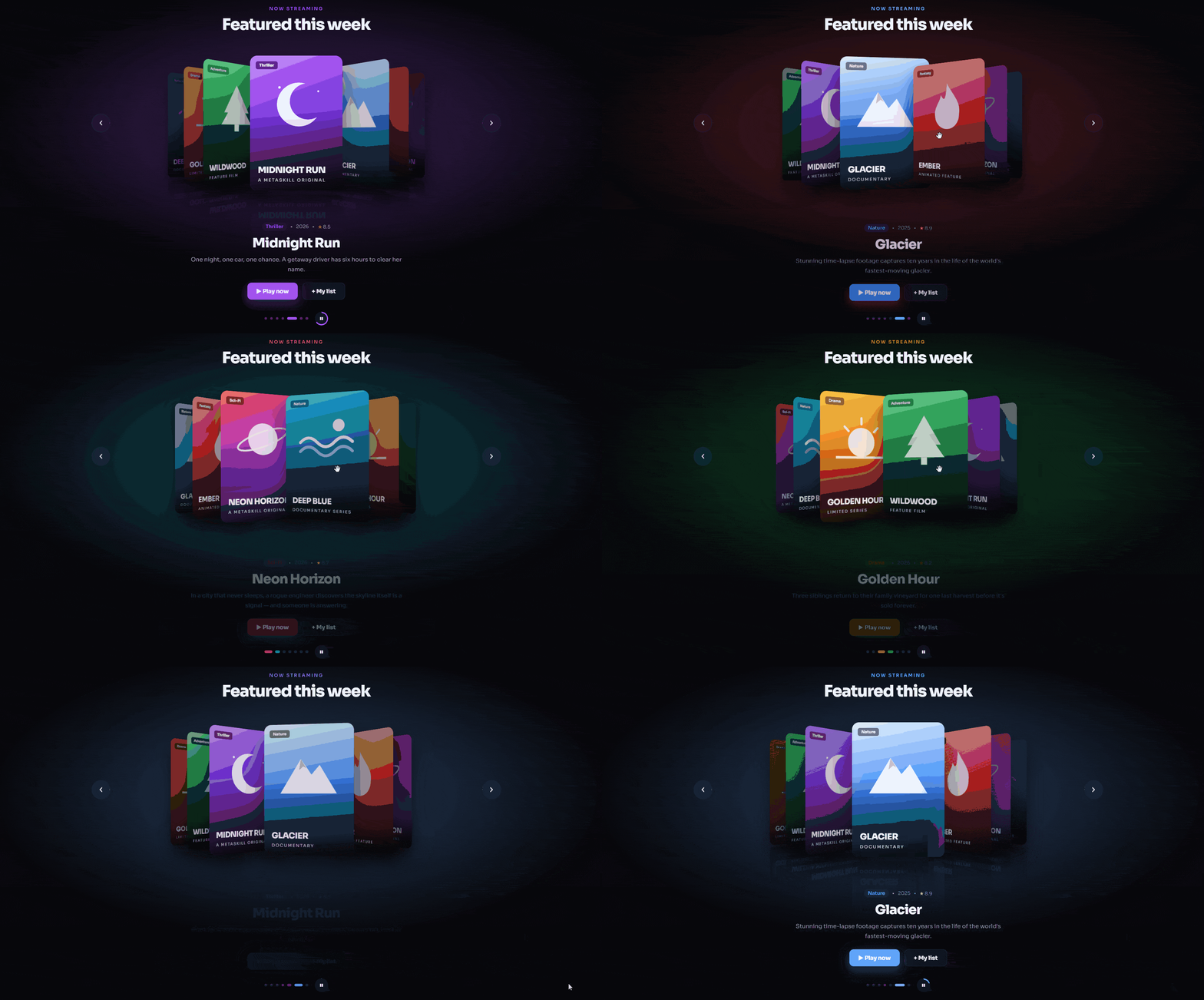
Features Included
3D coverflow layout with depth, rotation and reflections
Infinite loop in both directions
Drag (mouse), swipe (touch), arrow keys and horizontal trackpad scroll
Autoplay with a progress ring, pauses on hover
Details panel (genre, year, rating, description) with a smooth change animation
Ambient background colour that follows the active slide
Slides are generated from a simple JavaScript array
3D Coverflow Carousel with Autoplay & Swipe
A streaming-app style 3D coverflow carousel — swipe, drag or let it autoplay while the whole page glows in the active slide's colour. HTML, CSS and vanilla JavaScript.
What's Included
- 3D coverflow layout with depth, rotation and reflections
- Infinite loop in both directions
- Drag (mouse), swipe (touch), arrow keys and horizontal trackpad scroll
- Autoplay with a progress ring, pauses on hover
- Details panel (genre, year, rating, description) with a smooth change animation
- Ambient background colour that follows the active slide
- Slides are generated from a simple JavaScript array
Dependencies
- Google Fonts — Sora https://fonts.googleapis.com/css2?family=Sora:wght@400;500;600;700;800&display=swap
Already linked inside the component's files — no extra setup needed.
Desktop Preview
HTML
html1<!doctype html> 2<html lang="en"> 3 <head> 4 <meta charset="UTF-8" /> 5 <meta name="viewport" content="width=device-width, initial-scale=1.0" /> 6 <title>3D Coverflow Carousel | MetaSkillGroup</title> 7 <link rel="stylesheet" href="style.css" /> 8 </head> 9 <body> 10 <!-- created by metaskillgroup-team --> 11 <div class="ambient" aria-hidden="true"></div> 12 13 <main class="coverflow-section"> 14 <header class="cf-head"> 15 <span class="cf-eyebrow">Now streaming</span> 16 <h1>Featured this week</h1> 17 </header> 18 19 <div class="coverflow" tabindex="0" aria-roledescription="carousel" aria-label="Featured titles"> 20 <div class="stage"> 21 <!-- Slides are created from script.js --> 22 </div> 23 24 <button class="arrow prev" aria-label="Previous slide"> 25 <svg viewBox="0 0 24 24" width="22" height="22"><path d="M15 6l-6 6 6 6" fill="none" stroke="currentColor" stroke-width="2.4" stroke-linecap="round" stroke-linejoin="round"/></svg> 26 </button> 27 <button class="arrow next" aria-label="Next slide"> 28 <svg viewBox="0 0 24 24" width="22" height="22"><path d="M9 6l6 6-6 6" fill="none" stroke="currentColor" stroke-width="2.4" stroke-linecap="round" stroke-linejoin="round"/></svg> 29 </button> 30 </div> 31 32 <!-- Active slide details --> 33 <div class="details" aria-live="polite"> 34 <div class="meta"> 35 <span class="tag genre"></span> 36 <span class="dot">•</span> 37 <span class="year"></span> 38 <span class="dot">•</span> 39 <span class="rating"></span> 40 </div> 41 <h2 class="title"></h2> 42 <p class="desc"></p> 43 <div class="detail-actions"> 44 <a href="#" class="btn btn-play">▶ Play now</a> 45 <button class="btn btn-list">+ My list</button> 46 </div> 47 </div> 48 49 <div class="controls"> 50 <div class="dots" role="tablist"></div> 51 <button class="autoplay" aria-label="Pause autoplay"> 52 <span class="progress-ring"></span> 53 <span class="icon-pause">❚❚</span> 54 <span class="icon-play">▶</span> 55 </button> 56 </div> 57 </main> 58 59 <script src="script.js"></script> 60 </body> 61</html>
CSS
css1/* Importing Google Fonts - Sora */ 2@import url("https://fonts.googleapis.com/css2?family=Sora:wght@400;500;600;700;800&display=swap"); 3 4* { 5 margin: 0; 6 padding: 0; 7 box-sizing: border-box; 8 font-family: "Sora", sans-serif; 9} 10 11:root { 12 --bg: #07070b; 13 --text: #f6f6fb; 14 --muted: #9a9ab0; 15 --accent: #ff4d6d; 16 --tint: #ff4d6d; 17 --card-w: 260px; 18 --card-h: 380px; 19} 20 21body { 22 min-height: 100vh; 23 background: var(--bg); 24 color: var(--text); 25 overflow-x: hidden; 26} 27 28a { 29 color: inherit; 30 text-decoration: none; 31} 32 33button { 34 font: inherit; 35 color: inherit; 36 border: none; 37 background: none; 38 cursor: pointer; 39} 40 41/* Background glow picks up the active slide colour */ 42.ambient { 43 position: fixed; 44 inset: 0; 45 z-index: -1; 46 background: radial-gradient(ellipse 60% 50% at 50% 35%, color-mix(in srgb, var(--tint) 35%, transparent), transparent 70%); 47 transition: background 0.8s ease; 48} 49 50.coverflow-section { 51 max-width: 1200px; 52 margin: 0 auto; 53 padding: 56px 16px 60px; 54} 55 56.cf-head { 57 text-align: center; 58} 59 60.cf-eyebrow { 61 font-size: 0.8rem; 62 font-weight: 600; 63 letter-spacing: 0.2em; 64 text-transform: uppercase; 65 color: var(--tint); 66 transition: color 0.6s ease; 67} 68 69.cf-head h1 { 70 margin-top: 8px; 71 font-size: clamp(1.8rem, 4.5vw, 2.8rem); 72 font-weight: 800; 73 letter-spacing: -0.03em; 74} 75 76/* ---------- Coverflow stage ---------- */ 77.coverflow { 78 position: relative; 79 height: calc(var(--card-h) + 120px); 80 margin-top: 30px; 81 overflow-x: clip; 82 outline: none; 83 user-select: none; 84 touch-action: pan-y; 85} 86 87.stage { 88 position: absolute; 89 inset: 0; 90 perspective: 1200px; 91 cursor: grab; 92} 93 94.stage.dragging { 95 cursor: grabbing; 96} 97 98.slide { 99 position: absolute; 100 top: 30px; 101 left: 50%; 102 width: var(--card-w); 103 height: var(--card-h); 104 margin-left: calc(var(--card-w) / -2); 105 border-radius: 20px; 106 overflow: hidden; 107 transform-style: preserve-3d; 108 transition: 109 transform 0.7s cubic-bezier(0.22, 1, 0.36, 1), 110 opacity 0.7s ease, 111 filter 0.7s ease; 112 box-shadow: 0 30px 60px rgba(0, 0, 0, 0.6); 113 -webkit-box-reflect: below 10px linear-gradient(transparent 65%, rgba(0, 0, 0, 0.25)); 114} 115 116.stage.dragging .slide { 117 transition: none; 118} 119 120/* Poster artwork built with gradients + SVG */ 121.poster { 122 position: relative; 123 width: 100%; 124 height: 100%; 125 display: flex; 126 flex-direction: column; 127 justify-content: flex-end; 128 padding: 22px; 129 background: var(--art); 130} 131 132.poster::before { 133 content: ""; 134 position: absolute; 135 inset: 0; 136 background: linear-gradient(transparent 40%, rgba(0, 0, 0, 0.75)); 137} 138 139.poster svg { 140 position: absolute; 141 top: 12%; 142 left: 50%; 143 width: 70%; 144 transform: translateX(-50%); 145 opacity: 0.9; 146} 147 148.poster-title { 149 position: relative; 150 font-size: 1.5rem; 151 font-weight: 800; 152 line-height: 1.1; 153 letter-spacing: -0.02em; 154 text-transform: uppercase; 155} 156 157.poster-sub { 158 position: relative; 159 margin-top: 6px; 160 font-size: 0.75rem; 161 letter-spacing: 0.2em; 162 text-transform: uppercase; 163 opacity: 0.8; 164} 165 166.poster-badge { 167 position: absolute; 168 top: 16px; 169 left: 16px; 170 padding: 4px 10px; 171 border-radius: 6px; 172 font-size: 0.7rem; 173 font-weight: 700; 174 background: rgba(0, 0, 0, 0.45); 175 backdrop-filter: blur(6px); 176} 177 178/* Shine sweep on the active slide */ 179.slide.active .poster::after { 180 content: ""; 181 position: absolute; 182 inset: 0; 183 background: linear-gradient(115deg, transparent 30%, rgba(255, 255, 255, 0.25) 45%, transparent 60%); 184 transform: translateX(-100%); 185 animation: shine 1.2s 0.4s ease forwards; 186} 187 188@keyframes shine { 189 to { 190 transform: translateX(100%); 191 } 192} 193 194/* ---------- Arrows ---------- */ 195.arrow { 196 position: absolute; 197 top: calc(30px + var(--card-h) / 2); 198 z-index: 50; 199 display: grid; 200 place-items: center; 201 width: 52px; 202 height: 52px; 203 border-radius: 50%; 204 transform: translateY(-50%); 205 background: rgba(255, 255, 255, 0.08); 206 border: 1px solid rgba(255, 255, 255, 0.12); 207 backdrop-filter: blur(10px); 208 transition: 209 background 0.2s ease, 210 transform 0.2s ease; 211} 212 213.arrow:hover { 214 background: rgba(255, 255, 255, 0.18); 215 transform: translateY(-50%) scale(1.08); 216} 217 218.arrow.prev { 219 left: 8px; 220} 221 222.arrow.next { 223 right: 8px; 224} 225 226/* ---------- Details ---------- */ 227.details { 228 max-width: 620px; 229 margin: 0 auto; 230 text-align: center; 231} 232 233.details > * { 234 transition: 235 opacity 0.35s ease, 236 transform 0.45s cubic-bezier(0.22, 1, 0.36, 1); 237} 238 239.details.changing > * { 240 opacity: 0; 241 transform: translateY(10px); 242} 243 244.meta { 245 display: flex; 246 justify-content: center; 247 align-items: center; 248 gap: 10px; 249 font-size: 0.85rem; 250 color: var(--muted); 251} 252 253.tag { 254 padding: 3px 10px; 255 border-radius: 99px; 256 font-weight: 600; 257 color: var(--tint); 258 background: color-mix(in srgb, var(--tint) 16%, transparent); 259 transition: 260 color 0.6s ease, 261 background 0.6s ease; 262} 263 264.rating::before { 265 content: "★ "; 266 color: #fbbf24; 267} 268 269.title { 270 margin: 12px 0 10px; 271 font-size: clamp(1.6rem, 4vw, 2.3rem); 272 font-weight: 800; 273 letter-spacing: -0.03em; 274} 275 276.desc { 277 color: var(--muted); 278 line-height: 1.7; 279} 280 281.detail-actions { 282 display: flex; 283 justify-content: center; 284 gap: 12px; 285 margin-top: 24px; 286} 287 288.btn { 289 padding: 13px 26px; 290 border-radius: 12px; 291 font-weight: 700; 292 transition: 293 transform 0.2s ease, 294 background 0.2s ease; 295} 296 297.btn:hover { 298 transform: translateY(-2px); 299} 300 301.btn-play { 302 color: #fff; 303 background: var(--tint); 304 box-shadow: 0 10px 30px color-mix(in srgb, var(--tint) 45%, transparent); 305 transition: 306 background 0.6s ease, 307 transform 0.2s ease; 308} 309 310.btn-list { 311 background: rgba(255, 255, 255, 0.08); 312 border: 1px solid rgba(255, 255, 255, 0.12); 313} 314 315.btn-list.added { 316 color: #22c55e; 317} 318 319/* ---------- Dots + autoplay ---------- */ 320.controls { 321 display: flex; 322 justify-content: center; 323 align-items: center; 324 gap: 18px; 325 margin-top: 34px; 326} 327 328.dots { 329 display: flex; 330 gap: 8px; 331} 332 333.dots button { 334 width: 8px; 335 height: 8px; 336 border-radius: 99px; 337 background: rgba(255, 255, 255, 0.25); 338 transition: 339 width 0.35s ease, 340 background 0.35s ease; 341} 342 343.dots button.active { 344 width: 28px; 345 background: var(--tint); 346} 347 348.autoplay { 349 position: relative; 350 display: grid; 351 place-items: center; 352 width: 38px; 353 height: 38px; 354 border-radius: 50%; 355 font-size: 0.7rem; 356 background: rgba(255, 255, 255, 0.08); 357} 358 359/* Ring that fills up until the next auto slide */ 360.progress-ring { 361 position: absolute; 362 inset: 0; 363 border-radius: 50%; 364 background: conic-gradient(var(--tint) calc(var(--p, 0) * 1turn), transparent 0); 365 mask: radial-gradient(circle, transparent 15px, #000 16px); 366 -webkit-mask: radial-gradient(circle, transparent 15px, #000 16px); 367} 368 369.icon-play, 370.autoplay.paused .icon-pause { 371 display: none; 372} 373 374.autoplay.paused .icon-play { 375 display: inline; 376} 377 378/* ---------- Responsive ---------- */ 379@media (max-width: 640px) { 380 :root { 381 --card-w: 200px; 382 --card-h: 290px; 383 } 384 385 .arrow { 386 width: 42px; 387 height: 42px; 388 } 389 390 .poster-title { 391 font-size: 1.2rem; 392 } 393} 394 395@media (prefers-reduced-motion: reduce) { 396 .slide, 397 .details > * { 398 transition-duration: 0.01ms !important; 399 } 400 401 .slide.active .poster::after { 402 animation: none; 403 } 404}
JavaScript
javascript1// Edit this list to change the slides 2const slides = [ 3 { title: "Neon Horizon", sub: "A MetaSkill Original", genre: "Sci-Fi", year: 2026, rating: 8.7, color: "#ff4d6d", art: "linear-gradient(160deg, #ff4d6d, #7b2ff7 70%, #120824)", icon: "planet", desc: "In a city that never sleeps, a rogue engineer discovers the skyline itself is a signal — and someone is answering." }, 4 { title: "Deep Blue", sub: "Documentary series", genre: "Nature", year: 2025, rating: 9.1, color: "#22d3ee", art: "linear-gradient(170deg, #22d3ee, #0e4d92 60%, #03111f)", icon: "wave", desc: "Journey 11,000 metres below the surface to meet the creatures that have never seen sunlight." }, 5 { title: "Golden Hour", sub: "Limited series", genre: "Drama", year: 2026, rating: 8.2, color: "#f59e0b", art: "linear-gradient(165deg, #fcd34d, #f97316 55%, #3b1204)", icon: "sun", desc: "Three siblings return to their family vineyard for one last harvest before it's sold forever." }, 6 { title: "Wildwood", sub: "Feature film", genre: "Adventure", year: 2024, rating: 7.9, color: "#22c55e", art: "linear-gradient(170deg, #86efac, #15803d 55%, #04160b)", icon: "tree", desc: "A group of teenagers follow an old map into a forest that rearranges itself every night." }, 7 { title: "Midnight Run", sub: "A MetaSkill Original", genre: "Thriller", year: 2026, rating: 8.5, color: "#a855f7", art: "linear-gradient(160deg, #c084fc, #6d28d9 55%, #12051f)", icon: "moon", desc: "One night, one car, one chance. A getaway driver has six hours to clear her name." }, 8 { title: "Glacier", sub: "Documentary", genre: "Nature", year: 2025, rating: 8.9, color: "#60a5fa", art: "linear-gradient(170deg, #e0f2fe, #3b82f6 55%, #071a3a)", icon: "peak", desc: "Stunning time-lapse footage captures ten years in the life of the world's fastest-moving glacier." }, 9 { title: "Ember", sub: "Animated feature", genre: "Fantasy", year: 2026, rating: 8.4, color: "#ef4444", art: "linear-gradient(165deg, #fca5a5, #dc2626 55%, #2a0606)", icon: "flame", desc: "The last dragon's flame is fading, and only a clumsy apprentice knows how to relight it." }, 10]; 11 12// Simple SVG artwork for each poster 13const icons = { 14 planet: '<svg viewBox="0 0 100 100"><circle cx="50" cy="50" r="26" fill="rgba(255,255,255,.9)"/><ellipse cx="50" cy="50" rx="46" ry="12" fill="none" stroke="rgba(255,255,255,.8)" stroke-width="3" transform="rotate(-20 50 50)"/></svg>', 15 wave: '<svg viewBox="0 0 100 100"><path d="M5 55 Q20 40 35 55 T65 55 T95 55" fill="none" stroke="#fff" stroke-width="5" stroke-linecap="round"/><path d="M5 70 Q20 55 35 70 T65 70 T95 70" fill="none" stroke="rgba(255,255,255,.6)" stroke-width="5" stroke-linecap="round"/><circle cx="72" cy="28" r="10" fill="#fff"/></svg>', 16 sun: '<svg viewBox="0 0 100 100"><circle cx="50" cy="55" r="24" fill="#fff"/><path d="M5 80 H95" stroke="#fff" stroke-width="4"/><path d="M50 15v10M20 30l7 7M80 30l-7 7" stroke="#fff" stroke-width="4" stroke-linecap="round"/></svg>', 17 tree: '<svg viewBox="0 0 100 100"><path d="M50 12 L78 60 H22 Z" fill="rgba(255,255,255,.9)"/><path d="M50 32 L84 80 H16 Z" fill="#fff"/><rect x="45" y="80" width="10" height="12" fill="#fff"/></svg>', 18 moon: '<svg viewBox="0 0 100 100"><path d="M64 18 A34 34 0 1 0 82 70 A28 28 0 1 1 64 18Z" fill="#fff"/><circle cx="24" cy="24" r="2" fill="#fff"/><circle cx="84" cy="30" r="1.5" fill="#fff"/></svg>', 19 peak: '<svg viewBox="0 0 100 100"><path d="M5 85 L38 30 L55 55 L68 40 L95 85 Z" fill="#fff"/><path d="M38 30 L47 45 L42 42 L35 48 Z" fill="rgba(0,0,0,.2)"/></svg>', 20 flame: '<svg viewBox="0 0 100 100"><path d="M50 10 C62 32 78 42 74 64 A24 24 0 0 1 26 64 C24 50 36 42 38 30 C44 40 48 42 50 10Z" fill="#fff"/><path d="M50 48 C56 58 62 62 60 72 A10 10 0 0 1 40 72 C40 64 46 60 50 48Z" fill="rgba(255,255,255,.5)"/></svg>', 21}; 22 23const AUTOPLAY_MS = 5000; 24 25const root = document.documentElement; 26const coverflow = document.querySelector(".coverflow"); 27const stage = document.querySelector(".stage"); 28const dotsBox = document.querySelector(".dots"); 29const details = document.querySelector(".details"); 30const autoplayBtn = document.querySelector(".autoplay"); 31const listBtn = document.querySelector(".btn-list"); 32 33let current = 0; 34let dragOffset = 0; // fractional slide offset while dragging 35let paused = false; 36let elapsed = 0; 37let lastTick = performance.now(); 38 39// ---------- Build slides + dots ---------- 40const slideEls = slides.map((s, i) => { 41 const el = document.createElement("div"); 42 el.className = "slide"; 43 el.setAttribute("role", "group"); 44 el.setAttribute("aria-label", `${i + 1} of ${slides.length}: ${s.title}`); 45 el.innerHTML = ` 46 <div class="poster" style="--art: ${s.art}"> 47 <span class="poster-badge">${s.genre}</span> 48 ${icons[s.icon]} 49 <span class="poster-title">${s.title}</span> 50 <span class="poster-sub">${s.sub}</span> 51 </div>`; 52 stage.appendChild(el); 53 54 const dot = document.createElement("button"); 55 dot.setAttribute("aria-label", `Go to ${s.title}`); 56 dot.addEventListener("click", () => goTo(i)); 57 dotsBox.appendChild(dot); 58 59 return el; 60}); 61 62const dots = [...dotsBox.children]; 63 64// ---------- Layout ---------- 65// Position every slide relative to the active one (plus any drag offset) 66const layout = () => { 67 const spacing = window.innerWidth < 640 ? 110 : 170; 68 const n = slides.length; 69 70 slideEls.forEach((el, i) => { 71 // Shortest distance around the loop, so the carousel wraps infinitely 72 let offset = i - current + dragOffset; 73 if (offset > n / 2) offset -= n; 74 if (offset < -n / 2) offset += n; 75 76 const abs = Math.abs(offset); 77 const sign = Math.sign(offset); 78 const rotate = Math.max(-1, Math.min(1, offset)) * -50; 79 const x = sign * (Math.min(abs, 1) * spacing * 1.1 + Math.max(abs - 1, 0) * spacing * 0.55); 80 const z = -Math.min(abs, 3) * 140; 81 82 el.style.transform = `translateX(${x}px) translateZ(${z}px) rotateY(${rotate}deg)`; 83 el.style.zIndex = String(100 - Math.round(abs * 10)); 84 el.style.opacity = abs > 3.2 ? "0" : "1"; 85 el.style.filter = `brightness(${1 - Math.min(abs, 3) * 0.2})`; 86 el.classList.toggle("active", Math.round(offset) === 0 && dragOffset === 0); 87 }); 88}; 89 90// ---------- Details panel ---------- 91const updateDetails = () => { 92 const s = slides[current]; 93 details.classList.add("changing"); 94 setTimeout(() => { 95 details.querySelector(".genre").textContent = s.genre; 96 details.querySelector(".year").textContent = s.year; 97 details.querySelector(".rating").textContent = s.rating; 98 details.querySelector(".title").textContent = s.title; 99 details.querySelector(".desc").textContent = s.desc; 100 listBtn.classList.remove("added"); 101 listBtn.textContent = "+ My list"; 102 details.classList.remove("changing"); 103 }, 250); 104 root.style.setProperty("--tint", s.color); 105 dots.forEach((d, i) => { 106 d.classList.toggle("active", i === current); 107 d.setAttribute("aria-selected", String(i === current)); 108 }); 109}; 110 111function goTo(index) { 112 current = (index + slides.length) % slides.length; 113 dragOffset = 0; 114 elapsed = 0; 115 layout(); 116 updateDetails(); 117} 118 119document.querySelector(".prev").addEventListener("click", () => goTo(current - 1)); 120document.querySelector(".next").addEventListener("click", () => goTo(current + 1)); 121 122coverflow.addEventListener("keydown", (e) => { 123 if (e.key === "ArrowLeft") goTo(current - 1); 124 if (e.key === "ArrowRight") goTo(current + 1); 125}); 126 127listBtn.addEventListener("click", () => { 128 const added = listBtn.classList.toggle("added"); 129 listBtn.textContent = added ? "✓ Added" : "+ My list"; 130}); 131 132// ---------- Drag / swipe ---------- 133let startX = 0; 134let dragging = false; 135let moved = false; 136 137stage.addEventListener("pointerdown", (e) => { 138 dragging = true; 139 moved = false; 140 startX = e.clientX; 141 stage.setPointerCapture(e.pointerId); 142}); 143 144stage.addEventListener("pointermove", (e) => { 145 if (!dragging) return; 146 const dx = e.clientX - startX; 147 if (Math.abs(dx) > 5) { 148 moved = true; 149 stage.classList.add("dragging"); 150 } 151 const spacing = window.innerWidth < 640 ? 110 : 170; 152 dragOffset = dx / (spacing * 1.2); 153 layout(); 154}); 155 156const endDrag = (e) => { 157 if (!dragging) return; 158 dragging = false; 159 stage.classList.remove("dragging"); 160 161 if (moved) { 162 // Snap to the nearest slide 163 const steps = Math.round(-dragOffset); 164 goTo(current + steps); 165 return; 166 } 167 168 // A tap without movement: jump to the slide under the pointer 169 dragOffset = 0; 170 const hit = document.elementFromPoint(e.clientX, e.clientY)?.closest(".slide"); 171 if (hit) goTo(slideEls.indexOf(hit)); 172 else layout(); 173}; 174 175stage.addEventListener("pointerup", endDrag); 176stage.addEventListener("pointercancel", endDrag); 177 178// Mouse wheel / trackpad horizontal scroll 179let wheelLock = false; 180coverflow.addEventListener( 181 "wheel", 182 (e) => { 183 const delta = Math.abs(e.deltaX) > Math.abs(e.deltaY) ? e.deltaX : 0; 184 if (!delta || wheelLock) return; 185 e.preventDefault(); 186 wheelLock = true; 187 goTo(current + (delta > 0 ? 1 : -1)); 188 setTimeout(() => (wheelLock = false), 450); 189 }, 190 { passive: false }, 191); 192 193// ---------- Autoplay ---------- 194const setPaused = (value) => { 195 paused = value; 196 autoplayBtn.classList.toggle("paused", paused); 197 autoplayBtn.setAttribute("aria-label", paused ? "Start autoplay" : "Pause autoplay"); 198}; 199 200autoplayBtn.addEventListener("click", () => setPaused(!paused)); 201 202let hovering = false; 203coverflow.addEventListener("mouseenter", () => (hovering = true)); 204coverflow.addEventListener("mouseleave", () => (hovering = false)); 205 206const tick = (now) => { 207 const dt = now - lastTick; 208 lastTick = now; 209 if (!paused && !hovering && !dragging && !document.hidden) { 210 elapsed += dt; 211 if (elapsed >= AUTOPLAY_MS) goTo(current + 1); 212 } 213 autoplayBtn.style.setProperty("--p", Math.min(elapsed / AUTOPLAY_MS, 1)); 214 requestAnimationFrame(tick); 215}; 216 217if (window.matchMedia("(prefers-reduced-motion: reduce)").matches) setPaused(true); 218 219window.addEventListener("resize", layout); 220goTo(0); 221requestAnimationFrame(tick);
Built by Meta Skill Group — copy it, use it, make it yours.
Built With
🌐
HTML5
🎨
CSS3
⚡
JavaScript
Compatibility
Browsers
ChromeOperaBraveFirefoxSafariArcVivaldiEdge
Devices
SmartwatchTVTabletDesktopMobile
Frameworks
Vanilla JSHTML/CSS
Found this useful?

Written by
MetaSkillGroup
September 26, 2026